
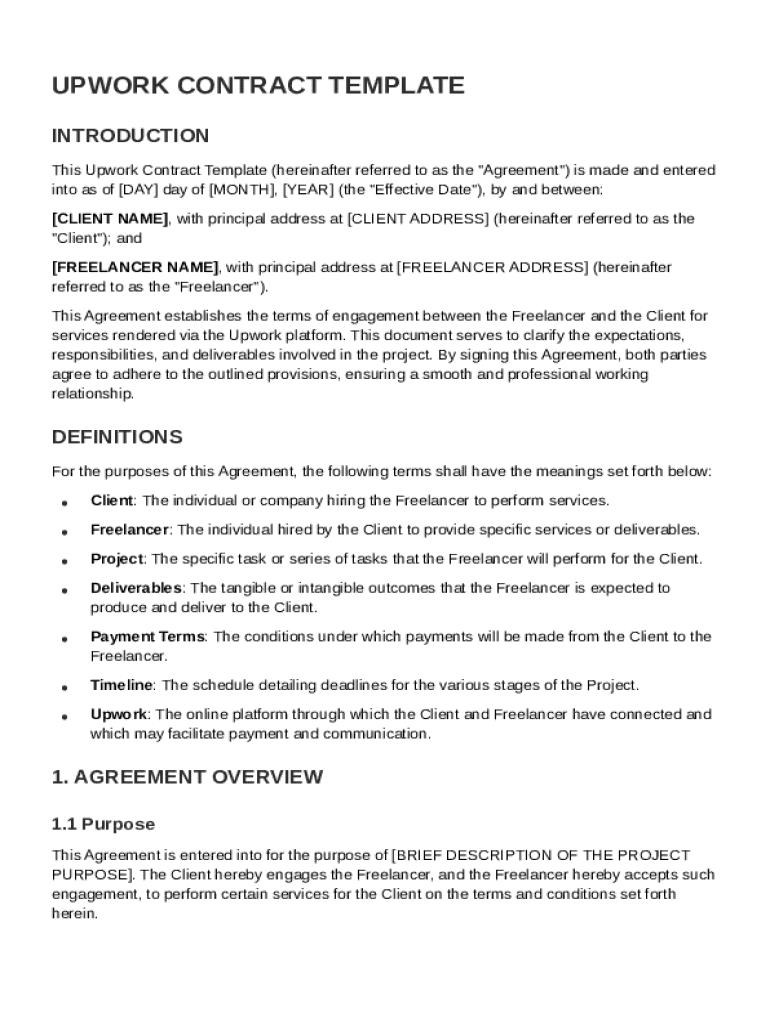







Understanding the Upwork Contract Template
The Upwork Contract Template is a standardized agreement used to formalize the relationship between freelancers and clients on the Upwork platform. This template outlines the responsibilities and expectations for both parties, ensuring a clear understanding before work begins. The contract includes detailed sections on the scope of work, payment terms, communication methods, and confidentiality obligations. This structure helps protect both clients and freelancers, facilitating a smooth collaboration experience on Upwork.
Key Elements of the Upwork Contract Template
The Upwork Contract Template includes several key sections that are essential to establishing a comprehensive agreement:
- Scope of Work: This section details the tasks and deliverables expected from the freelancer, outlining each project's specific requirements.
- Payment Terms: It specifies how and when payments will be made, including hourly rates or fixed project fees and any milestone-based payments.
- Communication Methods: Defines preferred communication channels and frequency, ensuring both parties remain aligned throughout the project.
- Confidentiality Obligations: Protects sensitive information shared between the client and freelancer, stressing the importance of data privacy.
- Termination Conditions: Outlines the circumstances under which the contract can be terminated by either party, providing a framework for resolving disputes or ending collaborations amicably.
How to Use the Upwork Contract Template
Utilizing the Upwork Contract Template involves several steps that ensure both parties enter a mutually agreeable partnership:
- Review the Template: Clients and freelancers should carefully read the template to understand each section's implications and requirements.
- Customize the Agreement: Tailor the template to fit the specific needs of the project by adjusting the scope of work, compensation details, and other variable elements.
- Negotiate Terms: Discuss any changes or additional clauses that may need to be included to accommodate unique project demands or preferences.
This iterative process ensures the contract accurately reflects the collaboration's expected outputs and conditions.
Examples of Using the Upwork Contract Template
Consider a scenario where a digital marketing consultant is hired by a small business to manage an online campaign. The Upwork Contract Template would outline the specific tasks, such as social media management, email marketing, and analytics reporting. Payment terms might include milestones for each campaign phase, with clear clauses on performance reviews and adjustments.
Alternatively, a graphic designer engaged to create a brand logo might use the template to define deliverables like initial concepts, revisions, and final design files. Payment could be tied to the completion of each stage, ensuring the client pays only when satisfied with the work progression.
Important Terms Related to the Upwork Contract Template
Understanding specific terms within the Upwork Contract Template is crucial for both clients and freelancers:
- Deliverables: Defined outcomes or products the freelancer is expected to produce.
- Milestones: Pre-agreed points in the project timeline tied to specific deliverables, often used to trigger payments.
- Non-Disclosure Agreement (NDA): A clause protecting confidential information exchanged during the project.
- Intellectual Property Rights: Determines the ownership of creative work produced during the collaboration.
Legal Use of the Upwork Contract Template
The Upwork Contract Template is crafted to comply with U.S. legal standards, ensuring enforceability in a court of law. It reflects best practices for professional service agreements, including compliance with relevant regulations like the ESIGN Act for electronic signatures. This legal foundation provides reassurance for both parties, reducing the risk of disputes arising from unclear contract terms.
Potential Users of the Upwork Contract Template
The Upwork Contract Template is designed for diverse users:
- Freelancers: Individuals providing professional services, such as writing, programming, or design, benefit from a clear contract that outlines their obligations and rights.
- Clients: Businesses ranging from startups to large enterprises find value in using standardized templates to manage freelancer relationships efficiently and effectively.
Business Types Benefitting Most from the Upwork Contract Template
Different business types can leverage the Upwork Contract Template for optimized freelance collaborations:
- Technology Startups: These companies often require specialized skills on a project basis, making them frequent users of freelancing services.
- Creative Agencies: Regularly hiring freelancers for writing and design allows these agencies to use the template as a consistent framework for project agreements.
Software Compatibility and Integration
DocHub enhances the use of the Upwork Contract Template by offering seamless integration with various cloud storage services and the Google Workspace ecosystem. Users can import and edit templates directly within their preferred environments:
- Google Drive and Gmail: Access, edit, and store the contract template without switching platforms, streamlining the workflow.
- Mobile and Desktop Access: Edit and manage documents conveniently from any device without needing special software installations.
Real-World Scenarios and Variations
Consider a consulting firm needing to rapidly onboard multiple freelancers for a short-term project. By using the Upwork Contract Template, they can quickly customize agreements for each freelancer, ensuring consistency while accommodating unique project needs. Similarly, a creative agency working with remote illustrators can use the template to clarify project phases and payment schedules, enabling efficient project management.
Managing Changes and Disputes in the Upwork Contract Template
The template allows for the clear management of changes and disputes through predefined clauses:
- Amendment Procedures: Details how changes to the contract should be documented and agreed upon by both parties.
- Dispute Resolution: Defines the steps for addressing disagreements, such as mediation or arbitration, to minimize conflict and maintain professional relationships.
This structured approach facilitates smooth modifications and conflict resolution, ensuring both parties feel heard and respected.
Exploring Variations and Alternatives
While the Upwork Contract Template is robust, circumstances may require exploring variations or alternative agreements, such as:
- Consultancy Contracts: Tailored for advisory roles, focusing more on strategic inputs rather than deliverable-based projects.
- Licensing Agreements: Useful for projects involving intellectual property rights, where usage rights need explicit definition.
These alternatives ensure that each business relationship is governed by terms that best suit its unique scope and objectives.




