
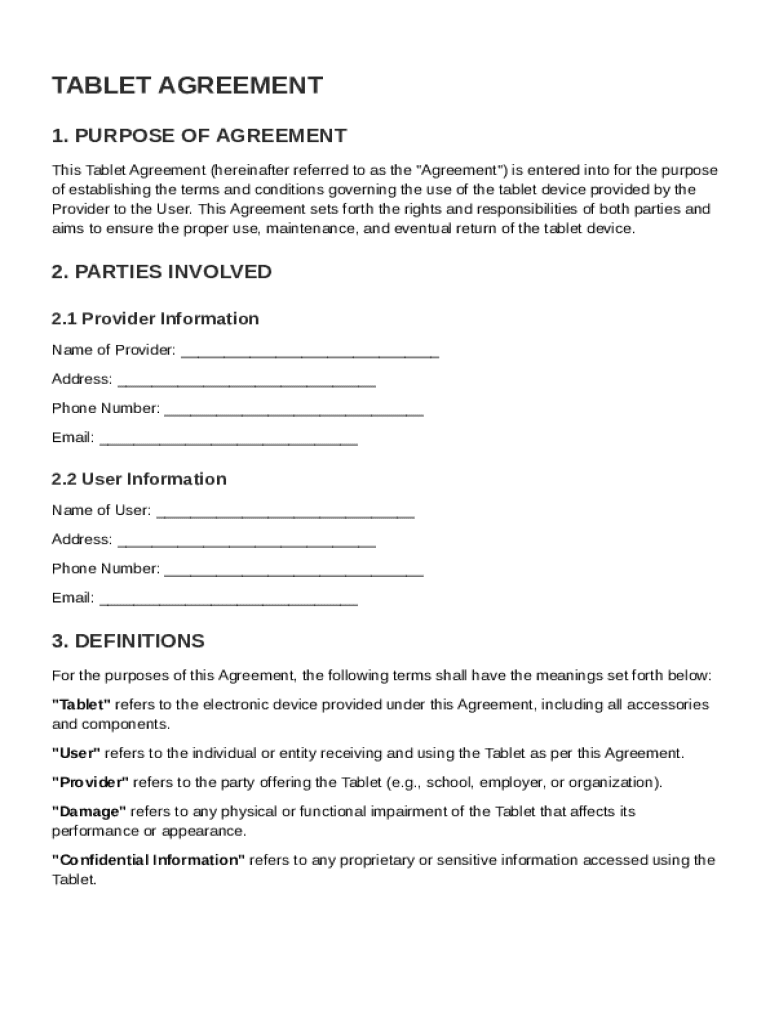







Definition and Purpose of the Tablet Agreement Template
The Tablet Agreement Template serves as a comprehensive document that outlines the terms and conditions surrounding the use of a tablet device. This contract is primarily between a provider, often an organization or educational institution, and a user, such as an employee or student. The agreement stipulates the responsibilities of both parties, specifying authorized and prohibited uses of the tablet, ownership rights, and obligations regarding its care and maintenance. By establishing clear guidelines, this agreement helps prevent misuse and ensures that both parties are aware of their rights and obligations, reducing the risk of disputes.
Key Elements of the Tablet Agreement Template
This agreement is structured to cover multiple critical elements, each designed to address different aspects of the tablet's provision and use. Key components typically include:
- Ownership and Usage Rights: Clarifies whether the tablet is owned by the provider and outlines the conditions under which the user can operate the device.
- Authorized Uses: Specifies activities that are approved, aligning usage with the provider’s objectives.
- Prohibited Uses: Lists activities that are not allowed, ensuring the tablet is used responsibly and ethically.
- Maintenance Responsibilities: Outlines the user’s obligation to keep the device in good condition.
- Liability for Damages: Defines financial responsibility in case of loss, theft, or damage to the device.
- Return Procedures: Details the process for returning the tablet, ensuring it is done efficiently and without disputes.
Steps to Complete the Tablet Agreement Template
Filling out the Tablet Agreement Template involves several methodical steps to ensure accuracy and completeness:
- Identify the Parties Involved: Clearly state the names and contact information of both the provider and the user.
- Detail Usage Terms: Specify approved and prohibited uses, ensuring that both parties have a mutual understanding.
- Define Responsibilities: Outline maintenance duties and responsibilities regarding the device’s condition.
- Clarify Financial Liabilities: Describe scenarios where the user might be financially liable for damaged or lost devices.
- Provide Contact Information for Dispute Resolution: Include details on who to contact in case disputes arise related to the tablet’s use or return.
Legal Use of the Tablet Agreement Template
This template is drafted in compliance with applicable legal standards, aiming to minimize disputes and provide clear legal recourse if issues arise. It incorporates several legal provisions, such as:
- Termination Clauses: Outlines conditions under which either party can terminate the agreement.
- Governing Law: Establishes the legal jurisdiction that will oversee any disputes.
- Dispute Resolution: Details the processes for resolving disagreements, which may include mediation or arbitration.
- Amendments: States how changes to the agreement can be made, requiring both parties to consent to modifications.
Important Terms Related to the Tablet Agreement Template
Understanding key terms is essential for interpreting the agreement correctly. Some crucial terms include:
- Provider: The entity offering the tablet for use, responsible for defining terms and conditions.
- User: The individual who receives and uses the tablet under a specified agreement.
- Liability: The user’s legal and financial responsibility regarding the device.
- Maintenance Obligations: Specific tasks the user must perform to ensure the tablet’s proper functioning.
- Authorized Usage: Permitted activities outlined in the agreement, typically aligned with organizational goals.
Examples of Using the Tablet Agreement Template
Organizations can benefit from drafting detailed tablet agreements tailored to their specific needs. For instance:
- Educational Institutions: Schools can use the template to set guidelines for students using tablets for learning, ensuring devices are used for educational purposes alone.
- Businesses: Companies offering tablets to employees can specify business-related activities as authorized uses, enhancing productivity while safeguarding company data.
- Healthcare Providers: Medical offices utilizing tablets for patient data can incorporate stringent privacy clauses, ensuring compliance with regulations like HIPAA.
State-Specific Rules for the Tablet Agreement Template
While the core elements of the Tablet Agreement Template are broadly applicable, certain state-specific regulations might require adjustments. Differences often manifest in:
- Consumer Protection Laws: These can dictate additional disclosures or terms to protect user rights.
- Privacy Regulations: States with stricter data protection laws may require more comprehensive clauses regarding data handling and confidentiality.
- Dispute Resolution Mandates: Varying laws across states may necessitate different procedures for handling disputes, such as the requirement for arbitration before litigation.
Digital vs. Paper Version of the Tablet Agreement Template
The Tablet Agreement Template can be adapted for both digital and paper formats, offering flexibility for providers and users.
- Digital Version: Benefits include ease of distribution, electronic signing capabilities, and quick access through multiple devices. This format is suitable for organizations with remote or highly mobile users.
- Paper Version: Provides a traditional approach for businesses or institutions preferring hard copies. It ensures documentation continuity, especially in environments with limited technology adoption.
Who Typically Uses the Tablet Agreement Template
The Tablet Agreement Template is widely used across various sectors, each having unique requirements and benefits:
- Corporate Entities: Use the document to manage company-owned tablets assigned to employees.
- Educational Institutions: Employ the template to guide students in the appropriate use of school-provided devices.
- Healthcare Organizations: Implement agreements to regulate the use of tablets handling sensitive patient data.

Variations and Alternatives to the Tablet Agreement Template
Organizations might explore alternative forms or variations of the Tablet Agreement Template to better suit specific operational needs:
- Custom Agreements: Tailored contracts that incorporate bespoke terms unique to a particular organization's operations or regulatory environment.
- Standardized Templates: Pre-populated versions with common terms are useful for organizations with recurring needs for such agreements.
- Industry-Specific Variations: Modify certain clauses to address specific industry regulations or practices, such as confidentiality clauses in healthcare scenarios.




