Type text, add images, blackout confidential details, add comments, highlights and more.
02. Sign it in a few clicks
Draw your signature, type it, upload its image, or use your mobile device as a signature pad.
03. Share your form with others
Send resale certificate example via email, link, or fax. You can also download it, export it or print it out.
How to use or fill out NY Resale Certificate with our platform
Ease of Setup
DocHub User Ratings on G2
Ease of Use
DocHub User Ratings on G2
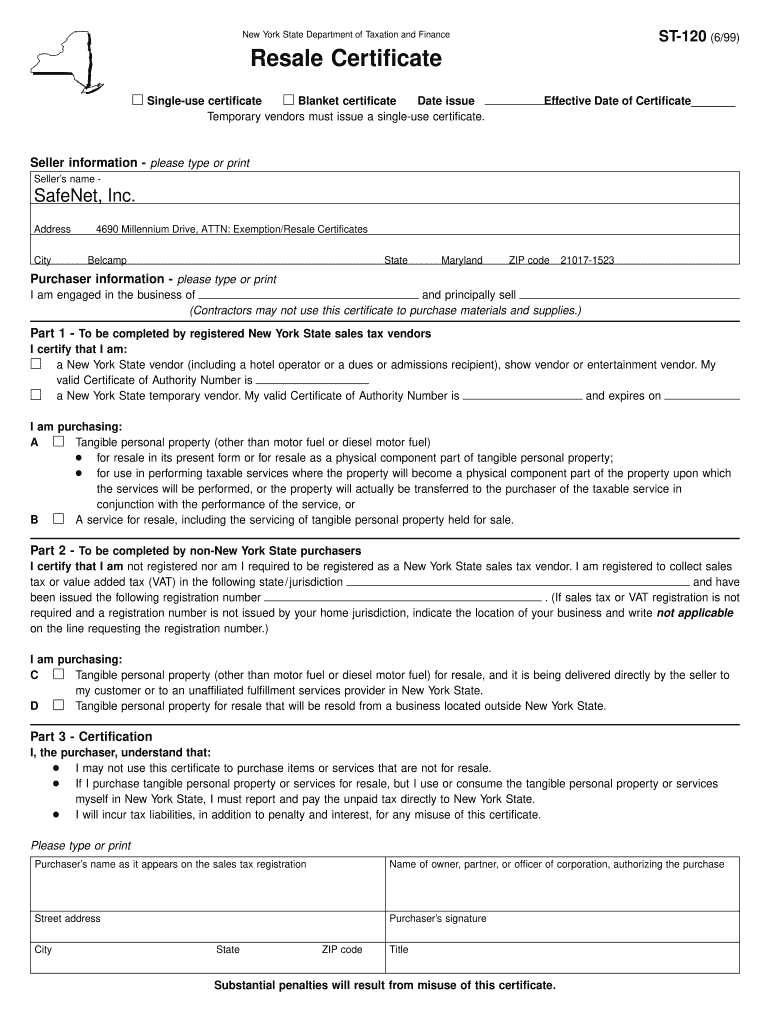
Click ‘Get Form’ to open the NY Resale Certificate in the editor.
Begin by selecting whether this is a Single-use or Blanket certificate. Enter the date of issue and effective date of the certificate.
Fill in the seller information, including the seller’s name, address, city, state, and ZIP code.
Provide purchaser information by stating your business type and what you principally sell. Ensure that you check the appropriate box for New York State vendors or non-New York State purchasers.
Complete Part 1 or Part 2 based on your vendor status. Include your valid Certificate of Authority number if applicable.
In Part 3, certify your understanding of the limitations of this certificate by signing and providing your title along with your printed name and address.
Start using our platform today to fill out your NY Resale Certificate for free!
Form ST-120 Resale Certificate Revised 1/26 - Tax.NY.gov
Form ST‑120, Resale Certificate, is a sales tax exemption certificate. This certificate is only for use by a purchaser who: is registered as a New York StateRead more
To the seller. As a New York State registered vendor, you may accept an exemption certificate in lieu of collecting tax and be protected from liability for theRead more
Aug 13, 2015 Further clarification regarding the scope of this certificate and the applicability of. AS9100C / ISO 9001:2008 requirements may be obtained byRead more
Cookie consent notice
This site uses cookies to enhance site navigation and personalize your experience.
By using this site you agree to our use of cookies as described in our Privacy Notice.
You can modify your selections by visiting our Cookie and Advertising Notice.