






Definition and Meaning of the Irrigation Contract Template
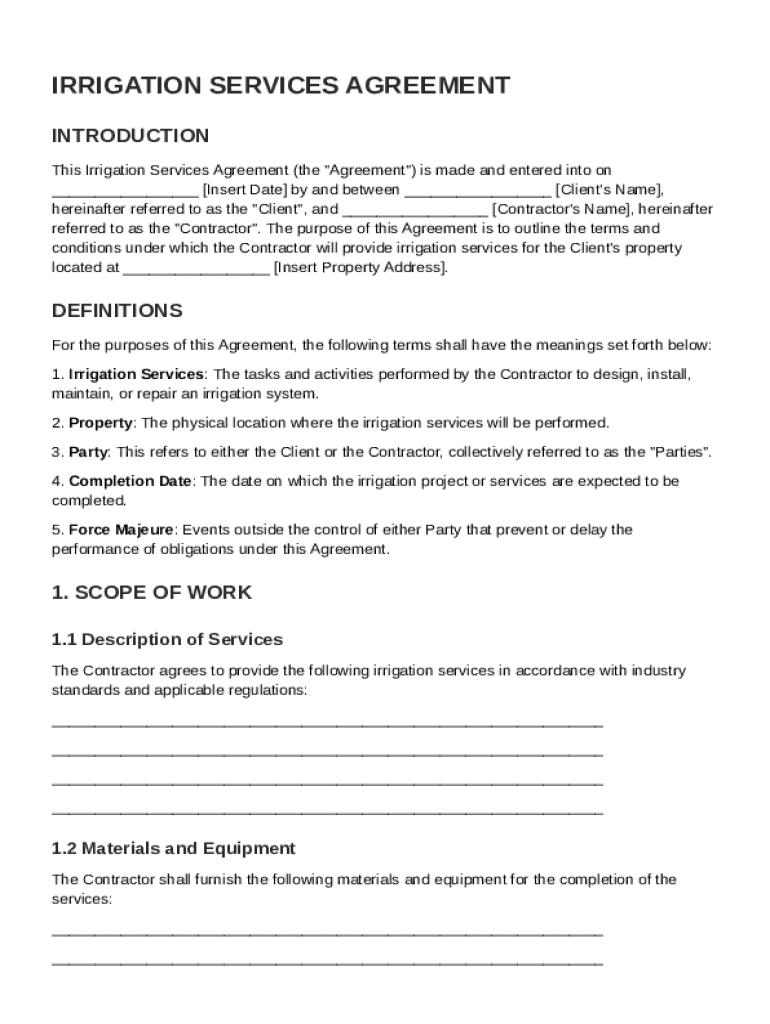
The Irrigation Contract Template serves as a comprehensive document outlining the terms and conditions for providing irrigation services between a contractor and a client. This essential template ensures that both parties have a clear understanding of their responsibilities and obligations. The template typically includes sections such as the scope of work, payment terms, warranties, and indemnification clauses. By offering a detailed structure, it ensures clarity and minimizes potential disputes regarding the execution of irrigation services. Each section is meticulously crafted to cover various aspects of the agreement, facilitating smoother communications and collaborations between contractors and clients.
Key Elements of the Irrigation Contract Template
Understanding the key elements of the Irrigation Contract Template is crucial for its effective use. These elements include:
- Scope of Work: Clearly defines the specific tasks and services to be performed by the contractor, ensuring all parties are aligned.
- Payment Terms: Outlines the agreed-upon payment schedule, including any deposits, milestones, and final payments.
- Responsibilities: Details each party's roles and responsibilities, reducing misunderstandings and ensuring accountability.
- Warranties and Indemnification: Specifies any guarantees made by the contractor and outlines the indemnification obligations.
- Termination Clause: Provides the conditions under which the contract can be terminated by either party, protecting both from breach of contract.
These elements ensure a well-rounded and enforceable agreement, which can adapt to various scenarios that may arise during the course of the project.
How to Use the Irrigation Contract Template
Utilizing the Irrigation Contract Template effectively requires a comprehensive understanding of its sections and purpose. Here are steps to ensure proper use:
- Review the Template: Thoroughly understand all the included sections and how they apply to your specific agreement.
- Customize the Document: Adjust relevant sections to suit your specific needs, such as inserting the property details and defining scope specifics.
- Communicate with Other Party: Discuss and agree on all listed terms with the other party to address any concerns or adjustments.
- Finalize and Sign: Once both parties have agreed on the terms, finalize the document and proceed with signatures to make it legally binding.
- Maintain Copies: Ensure that each party retains a signed copy for their records.
By following these steps, parties can ensure the document is used effectively and legally.
Steps to Complete the Irrigation Contract Template
Completing the Irrigation Contract Template involves methodical execution to ensure accuracy and completeness. Follow this detailed process:
- Read Each Section Carefully: Digest each clause to understand its implications fully.
- Fill Out Client and Contractor Information: Ensure all personal and contact details are accurate and up-to-date.
- Specify the Scope of Work: Clearly articulate the tasks, timelines, and expectations for the project.
- Detail the Payment Arrangement: Include amounts, due dates, and methods of payment.
- Define Responsibilities: Outline each party's roles clearly, mitigating potential conflicts.
- Review Legal Terms: Confirm the understanding of legal clauses such as indemnity, warranties, and dispute resolution.
- Sign and Date the Document: Secure the signatures of both participating parties along with a date to solidify agreement.
This completion guide offers a structured approach to filling out the template, ensuring precision and legal compliance.
Who Typically Uses the Irrigation Contract Template
The Irrigation Contract Template is mainly used by:
- Contractors and Landscaping Companies: To formalize agreements with clients regarding irrigation services.
- Property Managers and Homeowners: Seeking to engage professional services for maintaining and installing irrigation systems.
- Agricultural Enterprises: Engaging specialists to enhance irrigation efficiency and effectiveness on farmland.
- Commercial Real Estate Managers: Who need consistent irrigation services for large properties or complexes.
These users benefit from the template by streamlining service agreements and aligning expectations between service providers and recipients.


State-Specific Rules for the Irrigation Contract Template
Irrigation contracts may vary based on state-specific laws and regulations. Key considerations include:
- Licensing Requirements: Some states require contractors to hold specific licenses to perform irrigation work.
- Environmental Regulations: States may enforce rules on water usage, which should be incorporated into the contract.
- Consumer Protection Laws: Ensure that the contract complies with applicable state consumer rights and protections.
- Local Building Codes: Consider any local ordinances or codes that might impact the contractual agreements.
Understanding these state-specific rules is vital to ensuring that the contract is enforceable and compliant within a particular jurisdiction.
Legal Use of the Irrigation Contract Template
The legal integrity of the Irrigation Contract Template is foundational to its utility. When tailored for specific agreements, it serves as a legally binding document upon signature. Legal usage includes:
- Compliance with State Laws: Adapting the contract to comply with state and federal regulations.
- Adhering to Contractual Obligations: Ensuring that all outlined responsibilities and terms are realistic and achievable.
- Protecting Rights: Establishing clear protective measures for both parties, such as termination rights and dispute resolution mechanisms.
Legal counsel may be advisable to ensure full compliance and to address any potential ambiguities present in the template.
Variations or Alternatives to the Irrigation Contract Template
While the Irrigation Contract Template serves broad uses, there are alternative forms and variations available:
- Field-Specific Contracts: Tailored templates specific to agriculture, residential, or commercial landscapes.
- Service Level Agreements (SLAs): Focus on performance metrics and service continuity for ongoing contracts.
- Memorandums of Understanding (MOUs): Use when projects involve collaboration between multiple parties or when formal contracts are in development.
Choosing an appropriate version or alternative depends on the specific needs and context of the service agreement.
Business Types That Benefit Most from the Irrigation Contract Template
Several business models benefit significantly from using the Irrigation Contract Template:
- Independent Contractors: Offer tailored irrigation solutions without complex administrative overhead.
- Landscaping Firms: Deliver comprehensive service packages that include irrigation as a core component.
- Construction Companies: Integrate irrigation services into larger residential or commercial development projects.
- Farm Operations: Utilize these agreements to standardize water delivery systems necessary for crop production.
Leveraging the appropriate contract boosts efficiency and client satisfaction across these business types.