
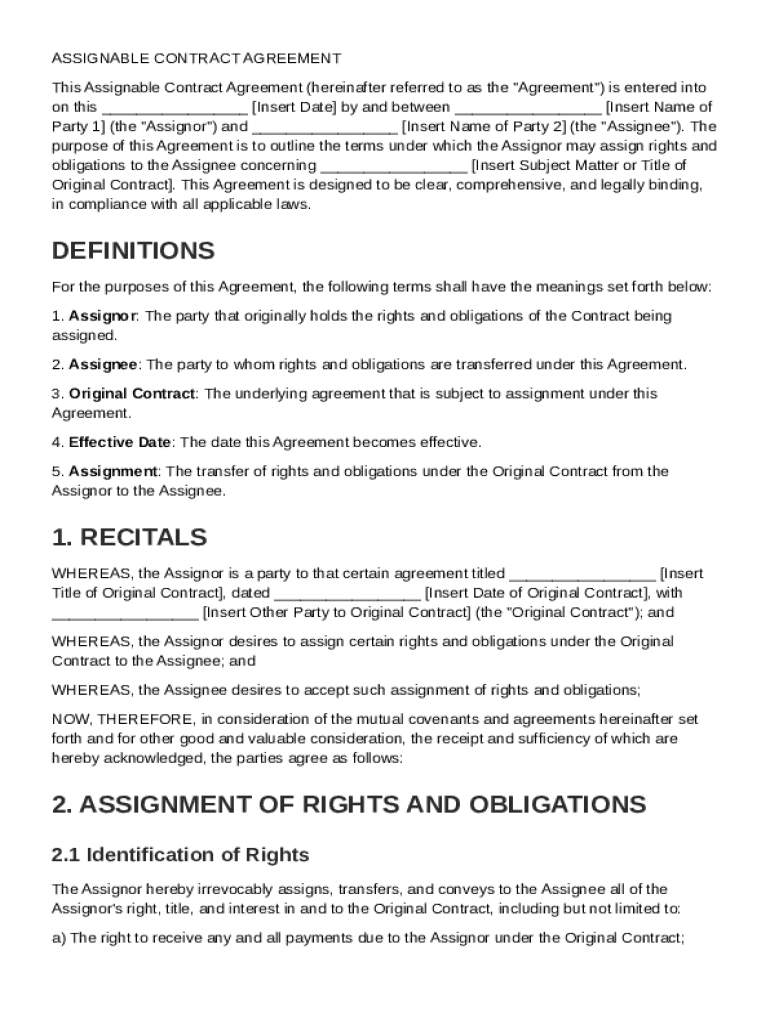







Definition and Meaning of an Assignable Contract Template
An Assignable Contract Template is a structured document designed to facilitate the transfer of rights and obligations from one party, known as the assignor, to another party, known as the assignee. It provides a comprehensive framework for ensuring that both parties agree to the transfer and are aware of their respective rights and responsibilities. The template typically includes essential components such as the names of the involved parties, a description of the original agreement, details on the rights and obligations being transferred, and any conditions or limitations of the assignment. By clearly outlining these elements, the template ensures a smooth and legally binding transfer process that aligns with applicable laws.
Key Elements of the Assignable Contract Template
Several critical components are inherent in an assignable contract, ensuring that it is legally binding and comprehensive:
- Parties Involved: Clearly identified assignor and assignee.
- Assignment Details: Description of rights and obligations being transferred.
- Acceptance of Assignment: Agreement from the assignee to accept the assignment.
- Representations and Warranties: Statements from both parties about their authority to enter the agreement.
- Indemnification Clauses: Protections against potential losses arising from the assignment.
- Governing Law: Jurisdiction under which the contract will be interpreted.
- Dispute Resolution: Procedures for resolving any disagreements.
Steps to Complete the Assignable Contract Template
Filling out an assignable contract template involves several detailed steps to ensure accuracy and completeness:
- Identify Parties: Enter the full legal names of both the assignor and assignee.
- Describe Original Contract: Provide specifics of the original agreement, including the date and parties involved.
- Detail Assigned Rights: Clearly outline which aspects of the original contract are being transferred.
- Specify Conditions: Include any terms or conditions that apply to the assignment.
- Outline Acceptance: Require the assignee’s formal agreement to the terms.
- Review Representations and Warranties: Ensure both parties acknowledge their capacity to execute the assignment.
- Sign and Date: Both parties must sign and date the document for it to be legally binding.
Legal Use of the Assignable Contract Template
Assignable contracts are often used in various legal scenarios, ensuring clarity and compliance with applicable laws. Here's how legality comes into play:
- Ensuring Compliance: The template should align with local, state, and federal laws regarding contract assignments.
- Conditions for Valid Use: Only certain contracts are assignable, and the template should accommodate restrictions or require necessary permissions.
- Binding Agreement: Properly completed templates represent legally enforceable agreements between both parties.
Examples of Using the Assignable Contract Template
Assignable contracts see usage across numerous scenarios and industries, facilitating smooth transitions of obligations:
- Real Estate Transactions: When original buyers wish to transfer their purchase rights.
- Business Agreements: In transferring rights under service contracts or supplier agreements.
- Employment Contracts: Sometimes used to transfer employee obligations to a new employer in mergers.
Who Typically Uses the Assignable Contract Template
The template is a valuable tool for various professionals and entities:
- Real Estate Agents: Commonly used to handle assignments of purchase contracts.
- Corporate Attorneys: Utilize the template for mergers or personnel transfers.
- Business Owners: Employ the document when reassigning vendor or supplier agreements.


State-Specific Rules for the Assignable Contract Template
While the foundational elements of an assignable contract remain consistent, specific aspects may vary by state:
- Variations in Consumer Protection Laws: Each state may have different regulations impacting how contracts can be assigned.
- Differences in Regulatory Compliance: Contract assignment needs to adhere to specific state regulations, which may affect the enforceability.
- Real Estate Transactions: Certain states might require additional disclosures when assigning property contracts.
Important Terms Related to the Assignable Contract Template
Understanding the terminology is crucial for the effective use of assignable contracts:
- Assignor: The party that transfers rights or obligations.
- Assignee: The recipient of those rights or obligations.
- Assignment: The act of transferring rights or obligations from one party to another.
- Novation: A related concept where a new contract replaces an old one, and all three parties must agree.
Business Types that Benefit Most from the Assignable Contract Template
Certain entities find assignable contracts particularly advantageous:
- LLCs and Corporations: These entities frequently deal with contract rights that may be reassigned.
- Real Estate Investment Firms: Often use assignable contracts to facilitate property sales or acquisitions.
- Service Providers: Companies that contract work to third parties benefit from the flexibility of assignments.
Software Compatibility for the Assignable Contract Template
In today's digital age, software compatibility is key for managing assignable contracts:
- DocHub Integration: Compatible with multiple file types beyond PDFs, such as DOC, PPT, XLS, and TXT.
- Cloud Connectivity: Direct importing from services like Google Drive, Dropbox, and OneDrive for flexible document management.
- Electronic Signature Support: Integration with signature platforms ensures that the signed documents remain legally binding.
Versions or Alternatives to the Assignable Contract Template
Various alternatives may exist for assignable contract templates, providing options to cater to different needs:
- Standard Assignment Contract: General form that can be easily modified to fit specific requirements.
- Customized Legal Templates: Developed specifically by legal professionals to address unique circumstances.
- Online Template Tools: Platforms offering user-friendly interfaces to create customized contracts based on preset legal standards.




