Type text, add images, blackout confidential details, add comments, highlights and more.
02. Sign it in a few clicks
Draw your signature, type it, upload its image, or use your mobile device as a signature pad.
03. Share your form with others
Send nrl1 form 2021 via email, link, or fax. You can also download it, export it or print it out.
How to use or fill out nrl1 form 2021 with DocHub
Ease of Setup
DocHub User Ratings on G2
Ease of Use
DocHub User Ratings on G2
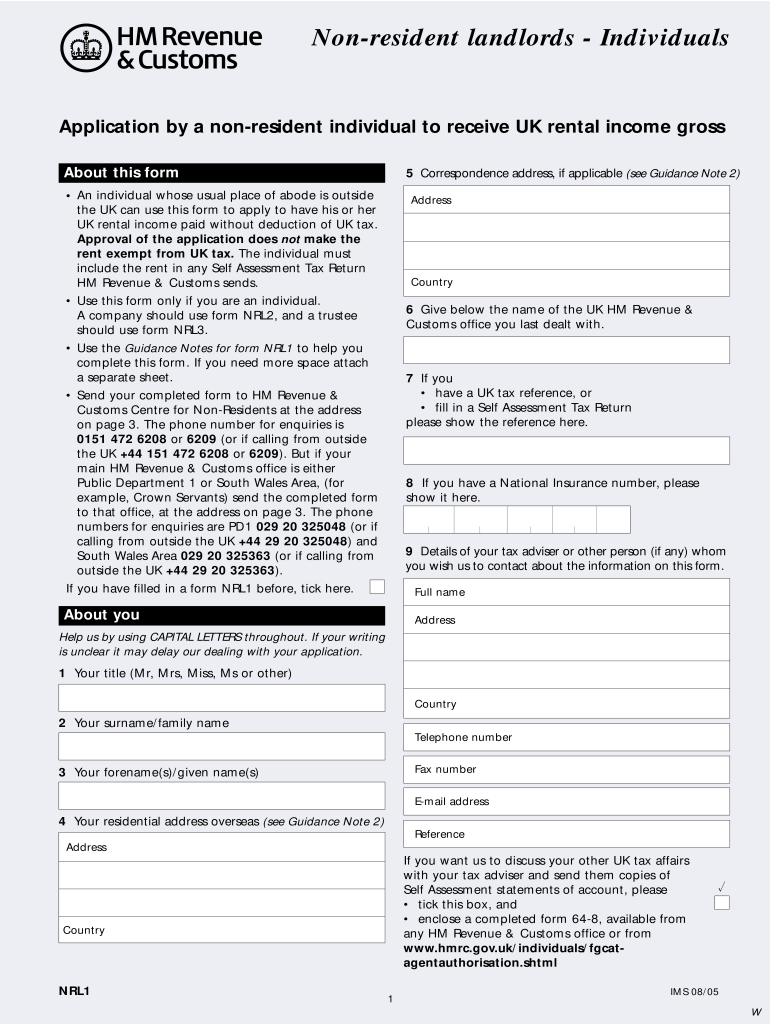
Click ‘Get Form’ to open the nrl1 form 2021 in our editor.
Begin by filling in your personal details in the 'About You' section. Use capital letters for clarity, including your title, surname, forename(s), and residential address overseas.
Provide your UK tax reference number and National Insurance number if applicable. This information is crucial for processing your application.
In the 'Details of Your Tax Adviser' section, include the contact information of any tax adviser you wish HM Revenue & Customs to communicate with regarding this form.
Complete the sections regarding your UK rental income, including expected amounts before and after deductions. Ensure all figures are accurate to avoid delays.
Review the declaration at the end of the form. Confirm that all statements are true and sign where indicated before submitting.
Start using our platform today to fill out your nrl1 form 2021 easily and for free!
Printable nrl1 form 2021Nrl1 form 2021 pdf downloadNrl1 form 2021 pdfNrl1 form 2021 templateNRL1 form downloadNRL1 form pdf free downloadNrl1 form 2021 downloadNrl1 form 2021 online
Security and compliance
At DocHub, your data security is our priority. We follow HIPAA, SOC2, GDPR, and other standards, so you can work on your documents with confidence.
ISU program aims to support healthy aging through walking
Jan 27, 2022 The researchers ongoing virtual format and the re-launch of their in-person programming this month aims to support healthy aging across Iowa. Read more
Identification of Nrl1 Domains Responsible for Interactions
by B Mikolaskova 2021 Cited by 8 We found that while the Nrl1-TAP co-purified with spliceosome proteins, its truncated forms had a DocHubly reduced ability to bind to spliceosome proteins.Read more
Cookie consent notice
This site uses cookies to enhance site navigation and personalize your experience.
By using this site you agree to our use of cookies as described in our Privacy Notice.
You can modify your selections by visiting our Cookie and Advertising Notice.