High school field trip permission slip 2026

Get Form
field trip permission slip template google docs Preview on Page 1

Here's how it works

01. Edit your field trip permission slip template google docs online
Type text, add images, blackout confidential details, add comments, highlights and more.

02. Sign it in a few clicks
Draw your signature, type it, upload its image, or use your mobile device as a signature pad.

03. Share your form with others
Send permission slip template google docs via email, link, or fax. You can also download it, export it or print it out.

How to use or fill out high school field trip permission slip with our platform

Form edit decoration
9.5
Ease of Setup
DocHub User Ratings on G2
9.0
Ease of Use
DocHub User Ratings on G2
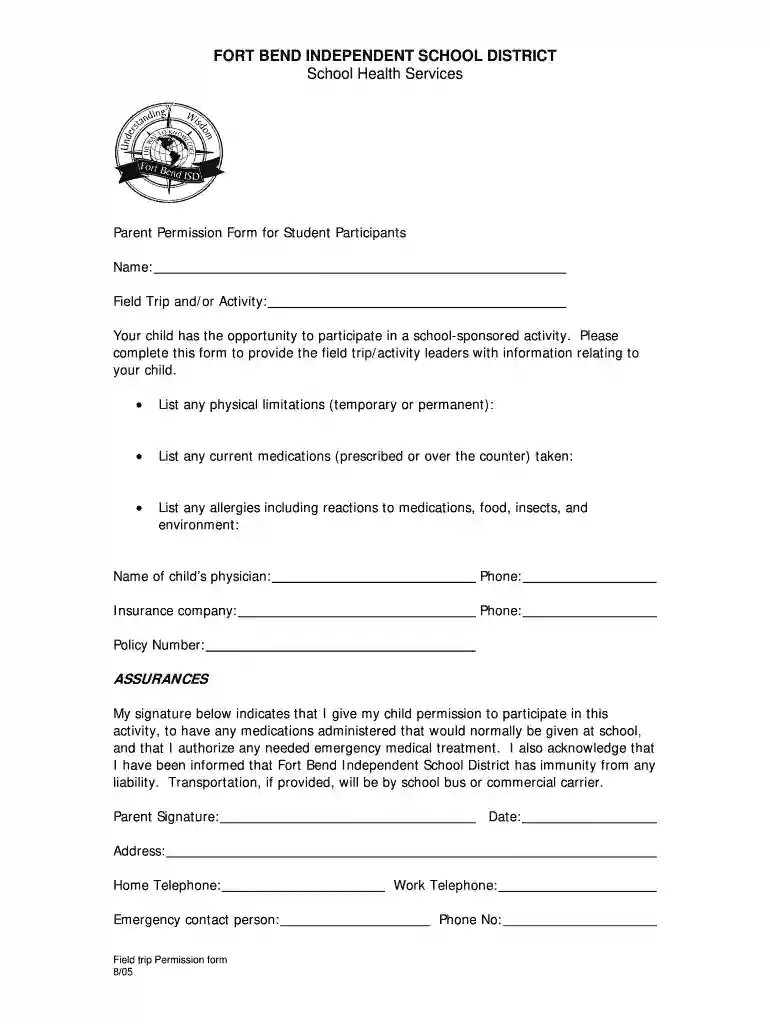
  1. Click ‘Get Form’ to open the high school field trip permission slip in the editor.
  2. Begin by entering your child's name in the designated field at the top of the form. This ensures that all information is accurately linked to your child.
  3. Next, specify the field trip or activity your child will be participating in. This helps the activity leaders prepare accordingly.
  4. In the section for physical limitations, list any relevant details about your child's health that may affect their participation. This could include temporary or permanent conditions.
  5. Provide information on any current medications your child is taking, whether prescribed or over-the-counter, to ensure their safety during the trip.
  6. List any allergies your child has, including reactions to medications, food, insects, and environmental factors. This is crucial for emergency preparedness.
  7. Fill in the name and phone number of your child's physician for reference in case of emergencies.
  8. Enter insurance company details along with the policy number to facilitate medical treatment if necessary.
  9. Sign and date the form at the bottom to give permission for your child’s participation and acknowledge understanding of liability waivers.
  10. Finally, provide your contact information including home and work telephone numbers as well as an emergency contact person.

Start using our platform today to easily complete and submit your child's field trip permission slip online for free!

See more high school field trip permission slip versions

We've got more versions of the high school field trip permission slip form. Select the right high school field trip permission slip version from the list and start editing it straight away!
Versions Form popularity Fillable & printable
2005 4 Satisfied (41 Votes)
be ready to get more

Complete this form in 5 minutes or less

Get form

Got questions?

We have answers to the most popular questions from our customers. If you can't find an answer to your question, please contact us.
Contact us
Parents need to understand why it is beneficial for their childs learning. 3. Provide all necessary information Include all relevant details about the field trip, such as date, time, location, means of transportation, cost, what the students should bring, and who the accompanying teachers or chaperones will be.
Here is an example of this line: I, (parent or guardians name), give permission for my child, (childs name), to attend the field trip to (location of field trip) with (organization or adults name who is leading the trip). 4. Include space for medical details. 5. Add an emergency contact option.
Parental Consent to Go on a School Trip This is to inform you that I have given my consent for my son to participate in the school trip. I am also sending the money (Rs. 5000/-) for the trip with him. Kindly provide the itinerary and the safety precautions that would be followed throughout the journey.
A consent form or permission slip template usually includes: The student name. What activity the child will be participating in. The start time, end time, and date of the activity. An emergency contact number. Release of legal liability, if applicable. Space for a parent signature.

Security and compliance

At DocHub, your data security is our priority. We follow HIPAA, SOC2, GDPR, and other standards, so you can work on your documents with confidence.

Learn more
ccpa2
pci-dss
gdpr-compliance
hipaa
soc-compliance
be ready to get more

Complete this form in 5 minutes or less

Get form