






Definition and Meaning
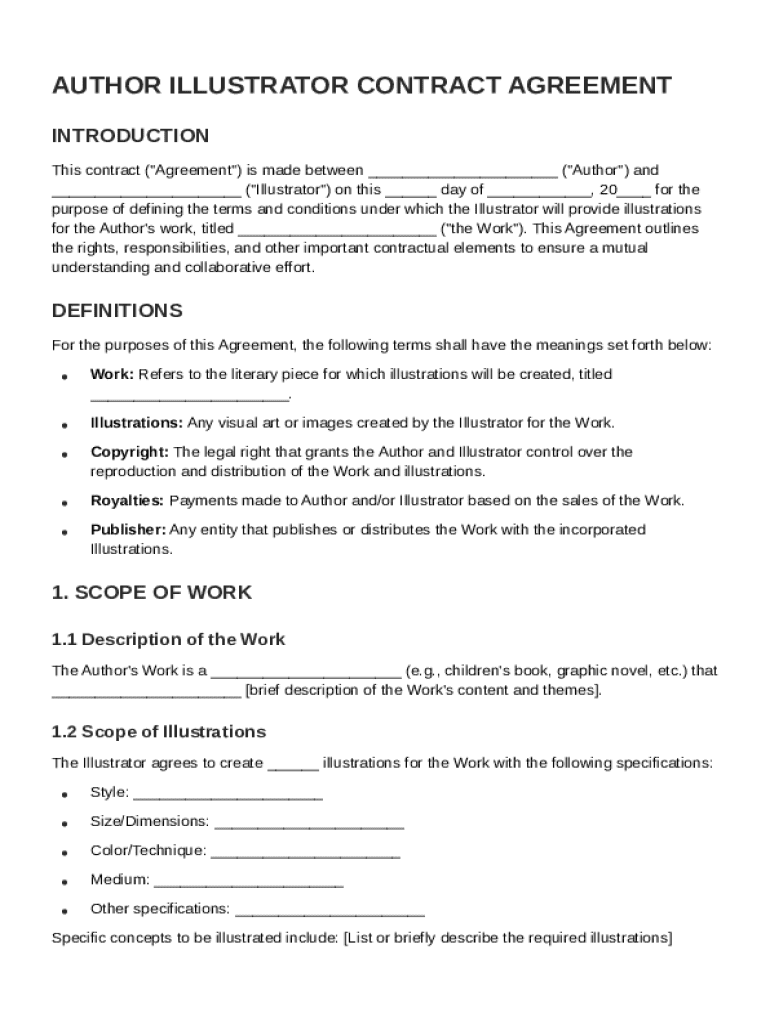
The Author Illustrator Contract Template serves as a formal agreement outlining the terms and conditions between an author and an illustrator. This document defines the scope of work, payment terms, rights to the illustrations, revision processes, and confidentiality obligations. By establishing these elements, the contract ensures clarity and mutual understanding, protecting the interests of both parties involved in the creative process.
Role Clarity and Responsibilities
- Author's Role: The author provides the manuscript, direction, and feedback necessary for the illustrator to complete the work.
- Illustrator's Role: The illustrator is responsible for creating the artwork in accordance with the agreed specifications, styles, and deadlines.
- Joint Responsibilities: Both parties are expected to communicate effectively, adhere to outlined timelines, and respect each other's creative input and ownership rights.
Usefulness of the Contract
This template is essential for avoiding misunderstandings and ensuring a smooth collaboration. It clearly delineates roles, responsibilities, and expectations, mitigating potential conflicts and protecting the artistic and financial interests of both the author and the illustrator.
Key Elements of the Author Illustrator Contract Template
A comprehensive contract includes various critical components to address every aspect of the collaboration.
Scope of Work
The agreement must explicitly define the scope of work, detailing the type and number of illustrations required. This may include specifics about style, color schemes, and formats, ensuring both parties have a clear understanding of the project requirements.
Compensation and Payment Terms
- Fee Structure: Outlines the payment amount, whether it's a flat fee, hourly rate, or royalties.
- Payment Schedule: Details when and how payments will be made, such as upfront deposits, milestones, and final payment.
- Additional Expenses: Specifies any reimbursements for costs incurred by the illustrator, such as materials or travel.
Rights and Ownership
Clarifies who retains the rights to the artwork upon completion. This section is crucial for understanding the usage rights of the illustrations, whether for publication, reproduction, or promotional purposes. Typically, the illustrator grants limited rights to the author, ensuring proper acknowledgment of their work.
Steps to Complete the Author Illustrator Contract Template
Filling out the contract template involves several precise steps to ensure nothing is overlooked.
Drafting and Customization
- Gather Necessary Information: Include names, contact information, and relevant details about both parties.
- Specify Work Requirements: Clearly outline the scope of work, including the number and type of illustrations.
- Define Payment Structure: Agree on compensation, including any contingencies for revisions or extra work.
Legal Review
Prior to finalization, it's advisable for both parties to review the contract with legal counsel. This ensures the agreement complies with applicable laws and covers all potential legal issues that may arise.
Finalization and Signing
- Exchange and Review: Both parties should carefully review the completed contract for accuracy.
- Sign and Distribute: Obtain signatures from both the author and the illustrator. Each party should retain a copy for their records.
Legal Use of the Author Illustrator Contract Template
This contract serves as a legally binding agreement that protects the rights and responsibilities of both parties involved in a creative project.
Governing Law and Jurisdiction
The contract should specify which state’s laws will govern the agreement. This is important for resolving disputes and ensures that the contract adheres to local regulations.
Termination Conditions
Outlines the circumstances under which the agreement can be terminated, such as failure to meet deadlines or unsatisfactory work. This section should also detail any penalties or procedures for contract dissolution.
Important Terms Related to the Author Illustrator Contract Template
Understanding key terms can enhance the efficacy of the contract.
Confidentiality
The contract may include clauses that prevent either party from disclosing proprietary or sensitive information related to the project.
Non-Compete and Exclusivity
These terms prohibit the illustrator from working with competitors on similar projects, safeguarding the author's market interests and uniqueness of the work.
Who Typically Uses the Author Illustrator Contract Template
This contract is widely used across the publishing and creative industries.


Common Users
- Authors: Individuals or publishers who need illustrations for books or other publications.
- Illustrators: Freelance or contracted artists providing creative services.
- Agencies and Studios: Organizations managing creative projects on behalf of multiple clients.

Benefits for Creative Professionals
Using a standardized contract template helps streamline negotiations, ensures fair compensation, and facilitates professional relationships through clear communication.
Examples of Using the Author Illustrator Contract Template
Exploring real-world scenarios can illustrate the versatility and necessity of this contract.
Case Study: Children's Book Collaboration
In a project for a children's book, the author and illustrator use the contract to agree on a series of ten illustrations. The document specifies deadlines, character designs, and payment in two installments. Both parties rely on the contract to resolve creative differences and ensure timely project completion.
Scenario: Marketing Campaign
An illustrator is hired to create graphics for a marketing campaign. The contract details the deliverables' style and format, allowing both parties to remain aligned on campaign goals and usage rights throughout the project.
State-Specific Rules for the Author Illustrator Contract Template
Legal requirements can vary by state, affecting the enforcement of the contract's provisions.
Importance of State Compliance
Differences in contract law and intellectual property rights may necessitate specific clauses to ensure the contract's validity. For example, some states may have unique regulations regarding work-for-hire agreements or freelance contractor status.
Recommended Actions
Both parties should research and incorporate applicable state laws into the contract. Consulting a legal professional can help in tailoring the agreement to meet state-specific requirements.