Type text, add images, blackout confidential details, add comments, highlights and more.
02. Sign it in a few clicks
Draw your signature, type it, upload its image, or use your mobile device as a signature pad.
03. Share your form with others
Send 72 form via email, link, or fax. You can also download it, export it or print it out.
How to use or fill out Form 72 - US Court of Appeals - DC Circuit - cadc uscourts with our platform
Ease of Setup
DocHub User Ratings on G2
Ease of Use
DocHub User Ratings on G2
Click ‘Get Form’ to open it in the editor.
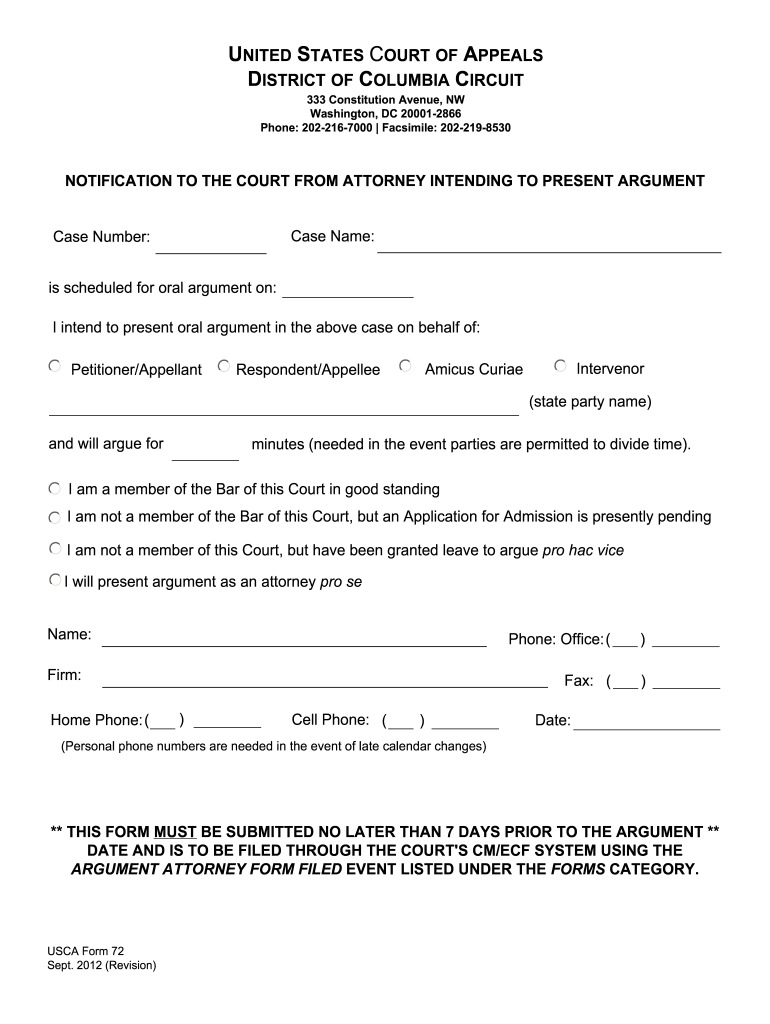
Begin by entering the 'Case Name' and 'Case Number' at the top of the form. Ensure these details are accurate as they are crucial for identification.
Indicate the scheduled date for oral argument by filling in the corresponding field. This helps the court manage its calendar effectively.
Select your role in the case by checking one of the options: Petitioner/Appellant, Intervenor, Amicus Curiae, or Respondent/Appellee. Be sure to state the party name clearly.
Specify how many minutes you will need for your argument. This is important if time division is permitted among parties.
Complete your personal information including your name, phone numbers, and firm details. This ensures that you can be contacted for any last-minute changes.
Finally, review all entries for accuracy before submitting. Remember, this form must be submitted no later than 7 days prior to the argument date through the court's CM/ECF system.
Start using our platform today to fill out Form 72 easily and efficiently!
Fill out Form 72 - US Court of Appeals - DC Circuit - cadc uscourts online It's free
See more Form 72 - US Court of Appeals - DC Circuit - cadc uscourts versions
We've got more versions of the Form 72 - US Court of Appeals - DC Circuit - cadc uscourts form. Select the right Form 72 - US Court of Appeals - DC Circuit - cadc uscourts version from the list and start editing it straight away!
D.C. Circuit Court of AppealsU.S. court of appeals DC Circuit Attorney lookupD.C. Circuit court of appeals RulesD.C. Circuit RulesD.C. Circuit brief checklistCourt of appeals for Federal CircuitD.C. Circuit Court of Appeals judgesDc Circuit handbook of Practice and Internal Procedures
Security and compliance
At DocHub, your data security is our priority. We follow HIPAA, SOC2, GDPR, and other standards, so you can work on your documents with confidence.
united states court of appeals for the district of columbia circuit
The D.C. Circuit as a Conseil DEtat
by A Hammond 2024 Cited by 8 The current composition of the D.C. Circuit and the Supreme Court, the fractious state of national politics, and the formalist turn in administrative lawRead more
THIS FORM IS FOR INTERNAL COURT PURPOSES ONLY AND WILL REMAIN. CONFIDENTIAL TO 46(g) - Supervisors must file their own Form 72 and attend the argument.Read more
Cookie consent notice
This site uses cookies to enhance site navigation and personalize your experience.
By using this site you agree to our use of cookies as described in our Privacy Notice.
You can modify your selections by visiting our Cookie and Advertising Notice.