






Definition & Meaning
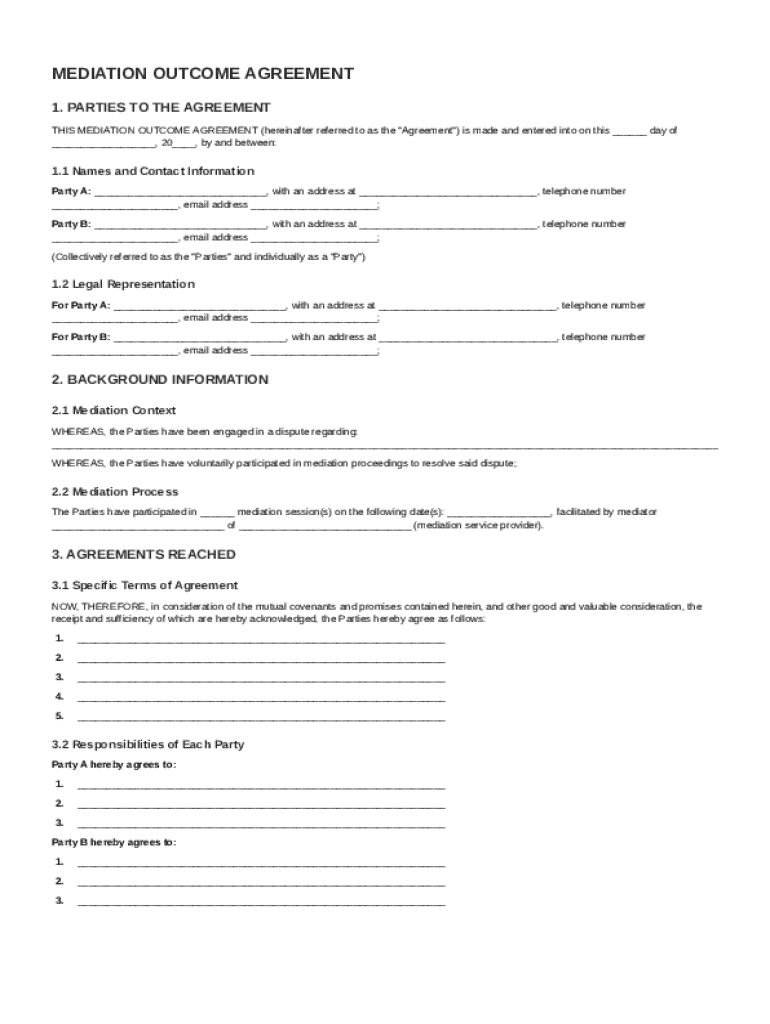
A Mediation Outcome Agreement Template is a structured document used to outline the terms and conditions agreed upon by two parties as a result of mediation. This agreement is typically formulated to resolve disputes efficiently by clearly defining what both parties have consented to during the mediation process. Mediation Outcome Agreements are crucial because they serve as legally binding documents, providing a framework for ensuring that the parties adhere to their commitments.
Mediation Outcome Agreements often include elements such as the identities of the involved parties, the background of the dispute, the specific terms agreed upon, and the responsibilities of each party. The importance of this document lies in its ability to bring clarity and prevent future disputes by encapsulating every detail of the mediation in a formalized manner.
Key Elements of the Mediation Outcome Agreement Template
To create a comprehensive Mediation Outcome Agreement, it is essential to include several key elements. These elements ensure that the agreement is detailed, clear, and enforceable:
- Parties Involved: Clearly define which parties are involved in the agreement, including organizations or individuals whose interests are represented.
- Background and Context: Provide a detailed background of the dispute and the mediation process. This is particularly important for setting the agreement's context and ensuring both parties have a mutual understanding of the issues at hand.
- Terms of Agreement: Outlines specific terms that have been agreed upon during mediation. Each term should be explicit to avoid any ambiguity.
- Responsibilities and Obligations: Detail the responsibilities each party has as per the agreement. This includes any actions they need to carry out post-agreement.
- Implementation Timeline: A well-defined timeline indicating when each obligation should be fulfilled and the entire agreement's duration.
- Dispute Resolution Procedures: Provide guidelines on how future disputes that arise in connection with the mediation outcome are to be handled.
- Miscellaneous Provisions: Include legal terms such as binding effect, governing law, and conditions of amendments if needed.
How to Use the Mediation Outcome Agreement Template
Using a Mediation Outcome Agreement Template involves several critical steps:
- Preparation: Assemble all the necessary information relevant to the dispute and issues to be resolved. This often requires thorough documentation and consultation with the involved parties.
- Drafting: Employ the template to draft the agreement. Ensure that each section of the template is filled accurately, reflecting the decisions made during mediation.
- Review: Have both parties review the draft for accuracy and completeness. It is essential that all involved parties agree with the documented outcome.
- Signing: After making any necessary revisions, all parties should sign the agreement. Signing demonstrates that both parties consent to the terms and conditions outlined.
- Implementation: Execute the agreement according to the established timeline and ensure both parties fulfill their responsibilities.
Examples of Using the Mediation Outcome Agreement Template
There are varied scenarios where a Mediation Outcome Agreement Template would be beneficial:
- Workplace Conflicts: For disputes between employees or management and staff, an agreement can outline resolutions and expectations.
- Business Partnerships: When disagreements arise between business partners, a mediation outcome agreement can solidify terms for future collaboration.
- Family Disputes: In family law cases, such as custody agreements or property partitions, these templates serve to clearly define every party's rights and responsibilities.
By using the template, parties can ensure all critical factors of their resolutions are captured adequately and legally binding.
Legal Use of the Mediation Outcome Agreement Template
The Mediation Outcome Agreement Template is drafted to adhere to legal standards, ensuring that the settled agreements are enforceable in a court of law if necessary. The agreement must be comprehensive and should reflect mutual consent without coercion, ensuring that both parties understand and accept the terms.
In the United States, mediation agreements must comply with state-specific laws but generally require clear, concise language, the voluntary participation of all parties, and legal capacity to agree. Legal counsel or a mediator experienced in such agreements can help navigate these requirements to ensure compliance.
Important Terms Related to the Mediation Outcome Agreement Template
Understanding the terminology included in a Mediation Outcome Agreement is necessary to ensure clarity and effectiveness:
- Mediator: An independent party who facilitates the mediation process, helping parties reach a voluntary agreement.
- Binding Agreement: A legally enforceable agreement that obligates parties to act or refrain from acting according to its terms.
- Arbitration: A method of dispute resolution involving an arbitrator who makes a binding decision.
By including a glossary or explanation of essential terms, parties can better navigate and understand the template, ensuring every provision is understood with clarity.
State-by-State Differences
Mediation agreements might differ based on specific state regulations in the United States. Key differences may pertain to:
- Mediation Requirements: Some states mandate mediation for certain dispute types before cases proceed to court.
- Enforcement Laws: Details surrounding how mediation agreements are enforced can vary, with some states offering specific guidance on court procedures.
- Legal Framework: Variations in state laws may affect the wording and necessary inclusions in the agreement.
Understanding these differences is crucial for anyone drafting or entering a mediation agreement, ensuring compliance with regional laws and practices.
Digital vs. Paper Version
With the advancement of digital platforms, such as DocHub, mediation agreements can now be efficiently managed and signed electronically, offering numerous advantages over traditional paper versions:
- Efficiency: Digital agreements can be easily distributed, edited, and signed, streamlining the entire process.
- Security: Using electronic platforms with encryption ensures data protection, unlike paper documents that can be lost or damaged.
- Accessibility: Digital formats can be accessed and modified from anywhere with internet access, affording greater flexibility.
Employing a digital version of the agreement is particularly beneficial for remote participants or when a high degree of organization and security is required.
Software Compatibility
Platforms like DocHub enhance the ease of working with mediation agreements through compatibility with numerous software tools:
- Import Capability: Documents can be imported from various sources including cloud services like Google Drive and Dropbox.
- Interactive Editing: Users can make real-time changes and update fields before finalizing the agreement.
- E-signature Integration: Legal electronic signatures can be added seamlessly, making it simple to finalize and authenticate documents.
By leveraging these tools, users can enhance productivity and ensure that their agreements are both comprehensive and securely documented.