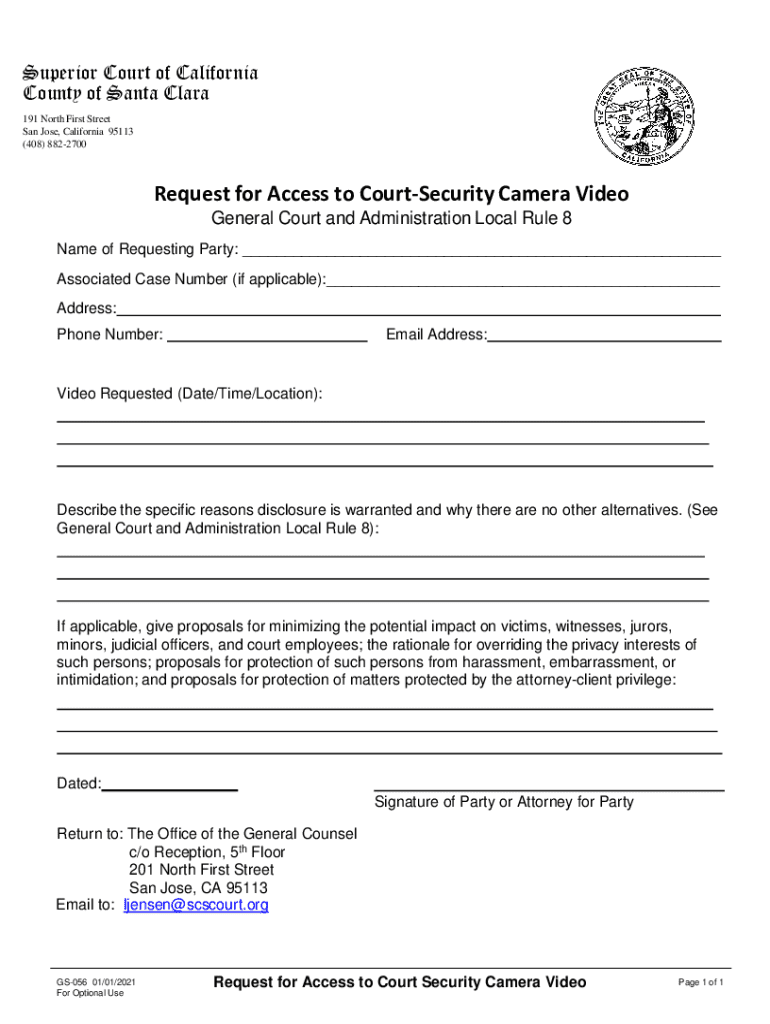







Definition and Meaning of the Request for Access to Court-Security Camera Video
A Request for Access to Court-Security Camera Video is a formal application used to obtain footage from security cameras within court premises. This type of request is predominantly utilized by legal professionals, law enforcement agencies, or individuals involved in a legal case to gather evidence or clarify events related to court proceedings. The footage accessed through this request can prove integral in supporting the facts of a case, providing detailed visual information that written testimonies might not fully capture.
Purpose and Context
- Used by legal professionals for evidence gathering.
- Helps in understanding the sequence of events during court incidents.
- Supports transparency and accuracy within legal processes.
Importance of Security Camera Footage
Security camera footage serves as an objective witness that can corroborate or challenge verbal testimonies. In the legal system, such video evidence can significantly impact the outcome of a case, ensuring fairness and thorough investigation into claims or counterclaims.
How to Use the Request for Access to Court-Security Camera Video
Accessing court-security camera footage requires understanding the protocols and procedures involved. It begins with identifying the specific event or timeframe for which video access is needed and proceeds through correctly filling out the necessary form.
Step-by-Step Process:
- Identify Need: Determine the specific incident or evidence requirement for which camera footage is necessary.
- Form Completion: Accurately fill out the form, including personal details, case information, and reasons for the request.
- Submit Application: Follow prescribed guidelines to submit the completed request form to the relevant court authority.
Considerations:
- Only authorized individuals or parties may request footage.
- Specific details must be provided to justify the request.
- Requests should align with privacy laws and court protocols.
Steps to Complete the Request Form
Completing the Request for Access to Court-Security Camera Video involves detailed attention to the information required to ensure compliance with legal and procedural norms.
Critical Sections to Fill Out:
- Personal Information: Fill in your name, address, and contact details accurately.
- Case Information: Provide the case number, date of the incident, and any relevant parties involved.
- Purpose of Request: Clearly articulate the reasons for requesting access to the footage, emphasizing its relevance to the case.
- Minimization Proposal: Suggest how the request will minimize impact on individuals, preserving privacy where possible.
Submitting the Request:
- Ensure all sections are completed before submission.
- Attach any necessary documentation to support your request.
- Follow submission guidelines as outlined by the court, which may include methods such as mail, online, or in-person submission.
Legal Use of the Request for Access to Court-Security Camera Video
The legal use of this form is bound by specific regulations and ethical standards aimed at protecting individual privacy while allowing necessary access for justice purposes.
Legal and Ethical Guidelines:
- Requests should be used solely for legal proceedings or case clarifications.
- Compliance with privacy and data protection laws is mandatory.
- Disclosure of obtained footage is restricted to authorized legal proceedings.
Key Elements of the Request Form
A thorough understanding of the key elements ensures that the Request for Access to Court-Security Camera Video is filled out effectively.
Essential Components:
- Requester Identity: Proof of identification to authenticate the request.
- Case Specifics: Clear link between the footage and the case details.
- Impact Considerations: Evaluation of potential impacts on subjects captured in the footage.
State-Specific Rules for the Request
While the general process for accessing court-security camera video remains consistent, nuances exist depending on state regulations and court-specific protocols.
Differences Across States:
- Jurisdiction-specific rules may dictate who can request footage.
- Different states might have variation in the forms of documentation required.
- Variations in processing times and approval criteria may exist.
Who Typically Uses the Request Form
While the primary users of this form are within specific demographics, understanding who typically accesses these requests can inform the process.


Common Users:
- Legal Professionals: Lawyers and paralegals gathering evidence for court cases.
- Law Enforcement Agencies: Police and investigation teams requiring footage for case analysis.
- individuals: Parties involved in litigation who require evidence to support their claims.

Contextual Use:
- Frequently used in cases involving public disturbances, security incidents, or disputes within court premises.
Examples of Using the Request for Access to Court-Security Camera Video
Practical examples of how the request form can be used may illustrate its necessity and function within legal proceedings.
Real-World Scenarios:
- Case Evidence: A lawyer requests footage of an incident in the courthouse lobby to verify witness testimonies.
- Security Breaches: Law enforcement agencies request access to camera footage following a breach of security within court premises.
- Public Incidents: Footage is requested by parties involved to evaluate an altercation that took place outside the courtroom.