




01. Edit your form online
Type text, add images, blackout confidential details, add comments, highlights and more.

Type text, add images, blackout confidential details, add comments, highlights and more.

Draw your signature, type it, upload its image, or use your mobile device as a signature pad.

Send it via email, link, or fax. You can also download it, export it or print it out.
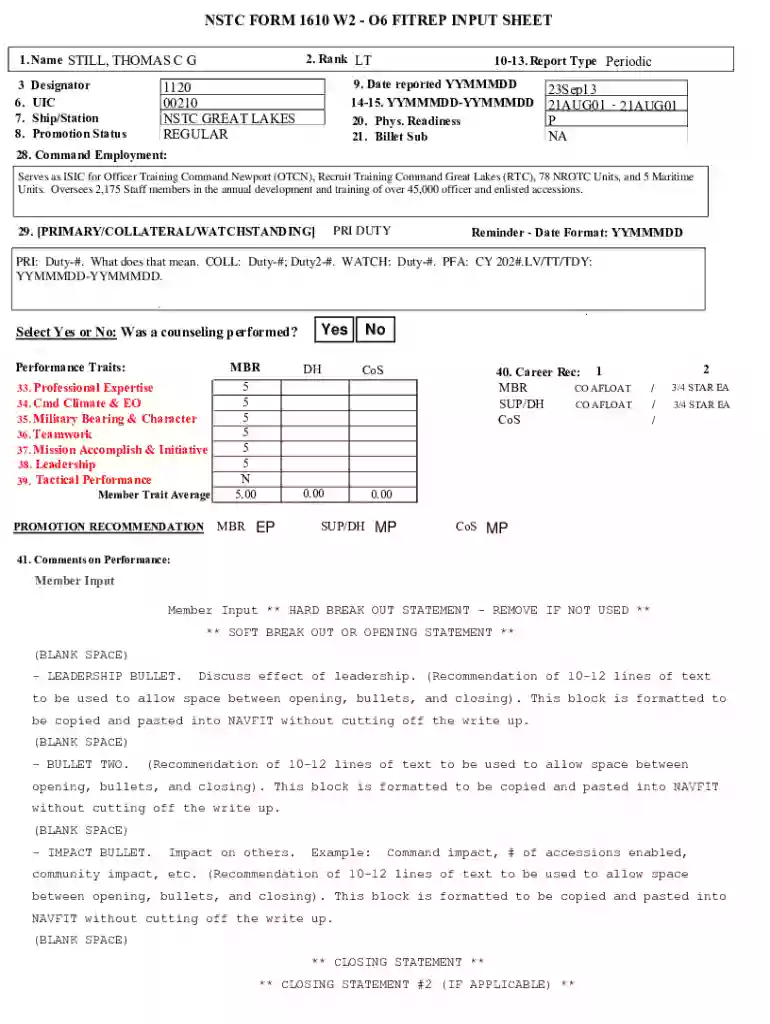
The NSTC Form 1610 W2 - O6 FITREP Input Sheet is a performance evaluation document used by the United States Navy for officers, specifically focusing on those at the O6 rank, such as Captains. It plays a crucial role in assessing the performance, leadership qualities, and potential for promotion of officers, offering a structured way to gather input from different levels within the command chain. This form helps in systematically reviewing the achievements and areas of improvement of an officer during a particular reporting period, ensuring that decisions related to promotions and postings are informed by comprehensive data.
Using the NSTC Form 1610 W2 - O6 FITREP Input Sheet involves several steps to ensure accurate and objective evaluation:
Understanding the Sections: Familiarize yourself with the various sections of the form, which may include command employment, performance traits, and promotion recommendations. This understanding forms the basis for accurate completion.
Gathering Information: Collect necessary data on the officer's performance. Input from the officer, supervisors, and command staff is crucial to provide a well-rounded evaluation.
Filling Out the Form: Carefully input the collected data into the appropriate sections. Ensure that all performance traits are covered, highlighting both strengths and areas for improvement.
Review and Verification: Once completed, the form should be reviewed by all relevant parties to verify accuracy and provide additional inputs if required.
Submission: After all necessary revisions, submit the form as per the designated protocol which could vary by command or location.
Completing the form requires attention to detail to ensure that all aspects of an officer's performance are accurately captured:
Initiation by Supervisor: The process typically begins with a supervisor who initiates the review, documenting observations and assessments.
Officer Self-Assessment: Officers are encouraged to provide a self-evaluation that reflects on their own performance, contributions, and areas they wish to develop further.
Command Input: The form must include inputs from various command levels, providing a holistic view of the officer's performance and leadership.
Performance Traits Evaluation: Each trait listed on the form should be thoroughly evaluated and scored based on observable performance during the review period.
Drafting Recommendations: Based on the evaluation, recommendations for further training, promotion, or other career development actions are drafted.
Final Review: The completed form undergoes a final review to ensure completeness and accuracy before being submitted to higher authority.
Understanding specific terminology used in the form can assist in accurate completion:
Several key elements define the structure and purpose of the form:
Practical application examples of the form include:
The form can be submitted through various channels depending on the command’s protocol:
Both digital and paper versions of the form have their distinct characteristics:
We've got more versions of the Nstc Form 1610 W2 - O6 Fitrep Input Sheet form. Select the right Nstc Form 1610 W2 - O6 Fitrep Input Sheet version from the list and start editing it straight away!
| Versions | Form popularity | Fillable & printable |
|---|---|---|
| 2021 | 4.6 Satisfied (52 Votes) |
At DocHub, your data security is our priority. We follow HIPAA, SOC2, GDPR, and other standards, so you can work on your documents with confidence.


