




01. Edit your form online
Type text, add images, blackout confidential details, add comments, highlights and more.

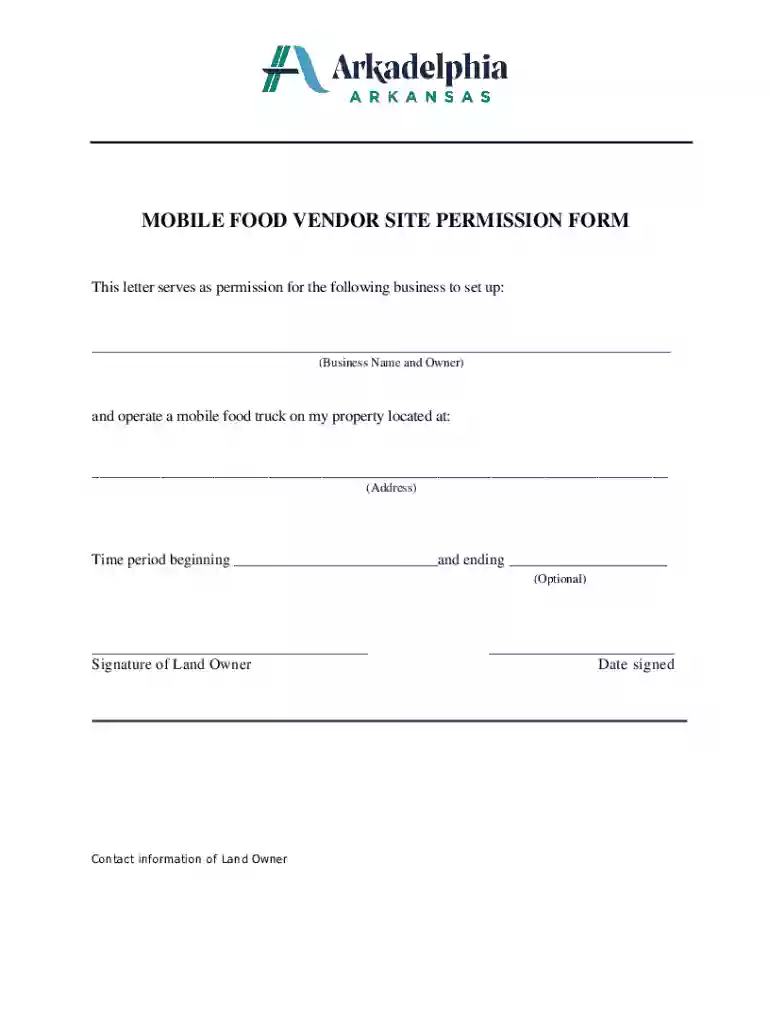
Type text, add images, blackout confidential details, add comments, highlights and more.

Draw your signature, type it, upload its image, or use your mobile device as a signature pad.

Send it via email, link, or fax. You can also download it, export it or print it out.
The Mobile Food Vendor Site Permission Form is a formal document utilized by mobile food vendors to obtain consent from a property owner to operate on their premises. This form is essential to ensure that the vendor has the legal right to conduct business in a specified location, adhering to local regulations and zoning laws. The form typically includes details such as the vendor's business name, operating schedule, the specific area granted for use, and the signature of the landowner granting permission.
To effectively use the Mobile Food Vendor Site Permission Form, vendors should follow these steps:
Fill Out the Vendor Information: Provide the mobile food business name, business address, and contact information.
Specify Operating Details: Clearly outline the dates and times when the vendor intends to operate.
Secure Landowner Consent: Ensure that the property owner fills out their section, including providing their name, contact information, and signature.
Submit the Form: Depending on local regulations, you may need to submit this form to a local government office for validation or to keep it available for inspection during operations.
Keep a Copy Handy: Retain a copy for your records and be prepared to present it during inspections or when requested by the property owner.
The Mobile Food Vendor Site Permission Form comprises several vital components:
The form is necessary for several reasons:
The form is primarily used by:


The form’s legal use involves:
Each U.S. state may have distinct regulations:
Exploring state-specific rules is essential to ensure comprehensive compliance.
We've got more versions of the MOBILE FOOD VENDOR SITE PERMISSION FORM form. Select the right MOBILE FOOD VENDOR SITE PERMISSION FORM version from the list and start editing it straight away!
At DocHub, your data security is our priority. We follow HIPAA, SOC2, GDPR, and other standards, so you can work on your documents with confidence.





Compare Zenput vs Smart Food Safe across HACCP and preventive controls management, Mobile plant-floor inspections, pricing signals, risk, and normalized.
All food trucks are required to complete a Request for a Use Permit for Concessions. proof of Commercial General Liability, Proof of inspections and permits
Application Fees: $50.00. Fill out the Application for Mobile Food Vending License and required additional forms. c.gov or call 212-436-0441.


