




01. Edit your form online
Type text, add images, blackout confidential details, add comments, highlights and more.

Type text, add images, blackout confidential details, add comments, highlights and more.

Draw your signature, type it, upload its image, or use your mobile device as a signature pad.

Send it via email, link, or fax. You can also download it, export it or print it out.
Forms online refer to digital versions of traditional paper forms that can be completed, submitted, and processed over the internet. These online forms are designed to streamline various application processes, allowing users to fill out necessary information electronically. This method enhances efficiency by reducing the time and resources needed to manage paper forms. Users can access these forms on various devices, ensuring greater accessibility and convenience. Digital forms are particularly useful for tasks such as tax filing, license applications, and service requests, with options to save, edit, or submit forms directly online.
Using forms online involves several key steps to ensure accurate completion and submission:
Accessing the Form: Locate the relevant form on a website by navigating to the appropriate section or using a search function. Many organizations offer a specific section for downloadable or fillable forms.
Filling Out the Form: Enter the required information in designated fields. Most forms will guide you through the process with labeled fields for text input, checkboxes, and dropdown menus.
Saving Progress: Some platforms allow you to save your progress, enabling you to return and complete the form later. Look for a "Save" button or option to ensure your data is preserved.
Reviewing Information: Before submission, review all entered information for accuracy and completeness. Errors or omissions may result in processing delays or rejections.
Submitting the Form: Upon completion, submit the form through the platform's submission feature. Ensure you receive confirmation of receipt or submission success.
Tracking Submission: Some platforms provide tracking features that allow you to monitor the status of your form post-submission, which is ideal for applications or processes subject to review.
Obtaining forms online typically involves downloading or accessing them through specific platforms or websites. Here's how you can access them:
Official Websites: Visit the official website of the organization or agency offering the form. Look for sections labeled "Forms," "Downloads," or "Resources."
Search Engines: Use search engines and enter keywords related to the form you seek. Include terms such as "download," "fillable," or the specific purpose of the form to narrow results.
Customer Support: For assistance, contact customer support of the relevant organization. They can provide direct links or instructions for accessing required forms.
Online Repositories: Some forms may be available in online repositories or document management platforms like DocHub, which facilitate easy downloading and filling.
Completing an online form requires a systematic approach to ensure thoroughness:
Collect Necessary Documents: Gather all necessary documents and information beforehand, including identification, financial data, or prior records.
Read Instructions Carefully: Review any provided instructions or guidelines associated with the form. Understanding the requirements aids in filling out the form correctly.
Enter Information: Input your information accurately within the specified fields. Use the format requested (e.g., date format, capitalization).
Upload Attachments: If attachments are required, ensure they are in the correct file format and size. Common formats include PDF, DOCX, or JPEG.
Use Spell Check: Leverage built-in spell-checking tools to correct errors in real-time, where available.
Finalize and Submit: After ensuring all data is correct, proceed with submission. Confirm submission by checking for a notification or email confirmation.
Opting to complete forms online offers several advantages over traditional paper methods:
Time Efficiency: Reduces the time spent on manual filling and mailing, processing information faster.
Cost Effectiveness: Minimizes costs associated with printing, mailing, and storing physical documents.
Environmental Benefits: Less paper usage aligns with eco-friendly practices and reduces waste.
Convenience and Accessibility: Allows users to fill out forms anytime, anywhere, using various internet-enabled devices.
Forms online cater to a wide array of users, including:
Individuals: For personal applications such as renewals, registrations, and service requests.
Businesses: Companies utilize online forms for employee management, data gathering, and client onboarding processes.
Government Agencies: Collects information securely and efficiently through digital means for services like tax filing and benefits application.
Educational Institutions: Use online forms for applications, enrollments, and surveys.
Understanding key terms associated with online forms enhances user experience:
Fillable Fields: Areas in a form where the user inputs information, such as text boxes, checkboxes, and drop-down lists.
Digital Signature: A secure method for signing a document electronically, often legally binding under laws such as the ESIGN Act.
Two-Factor Authentication: A security process in which the user provides two different authentication factors to verify themselves.
Encryption: The process of encoding information to prevent unauthorized access, ensuring data security.
The legal use of forms online involves compliance with regulations such as:
ESIGN Act: Governs the use of electronic records and signatures, ensuring they hold the same legal status as handwritten signatures.
GDPR Compliance: For users and organizations operating within the EU, ensuring that personal data collected online adheres to privacy standards.
Data Protection Laws: In the U.S., ensure that online forms comply with relevant state and federal privacy laws to protect user information.
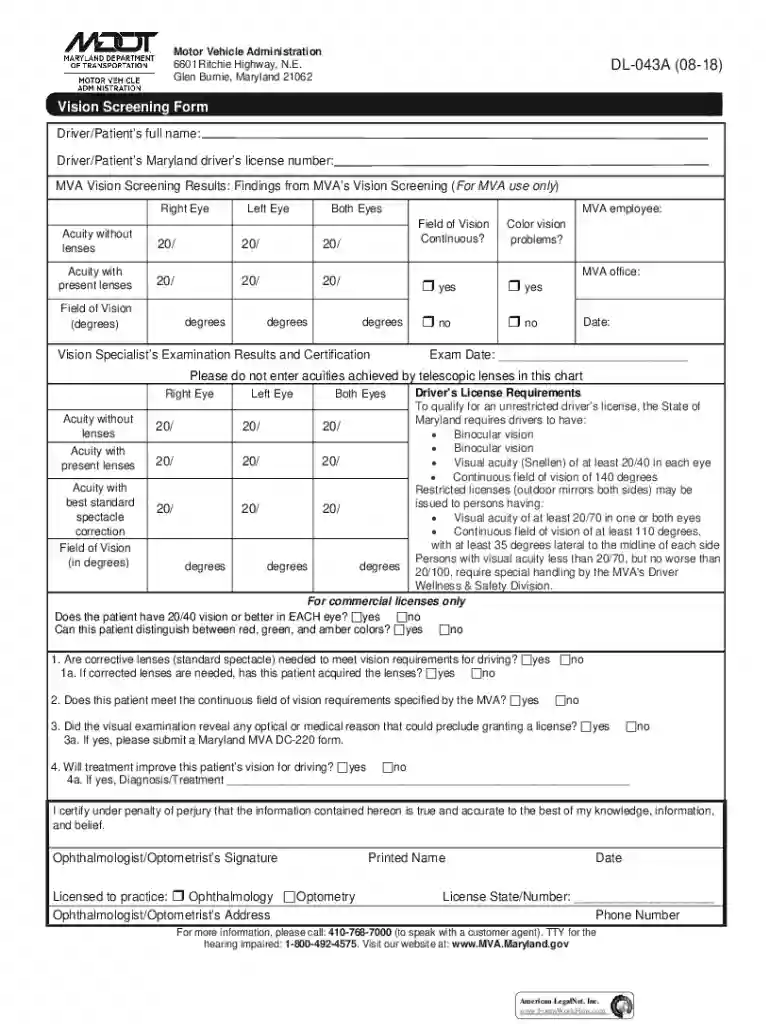
We've got more versions of the Maryland MVA Vision Screening Form form. Select the right Maryland MVA Vision Screening Form version from the list and start editing it straight away!
At DocHub, your data security is our priority. We follow HIPAA, SOC2, GDPR, and other standards, so you can work on your documents with confidence.




If your eye doctor is not an authorized MVA vision certification provider, bring your drivers license renewal form or the MVA vision form - PDF - 94.06 KB toRead more
The Value Proposition Canvas is a tool for understanding customers true needs and designing corresponding solutions. By identifying consumer pain points andRead more
MVA vision screening chart. Maryland driver vision test. Page 16 Accessibility is a major strength of Maryland Mva Eye Exam Chart in digital form.


