01. Edit your form online
Type text, add images, blackout confidential details, add comments, highlights and more.

Type text, add images, blackout confidential details, add comments, highlights and more.

Draw your signature, type it, upload its image, or use your mobile device as a signature pad.

Send it via email, link, or fax. You can also download it, export it or print it out.
In the digital age, a "form online" refers to a digital document that can be accessed, completed, and submitted over the internet. This innovation has transformed paperwork management, allowing users to interact with forms without needing physical copies or in-person submissions. Online forms can serve various functions, including applications, surveys, and legal documents. The platform, such as DocHub, offers tools to create, fill, and e-sign these forms, streamlining document workflows and enhancing user efficiency.
Utilizing an online form through DocHub is straightforward and can be broken down into a series of steps. First, you access the form via DocHub's interface, either by uploading a document from your device or importing directly from cloud storage services like Google Drive or Dropbox. Once the form is open, users can take advantage of DocHub's tools to fill in required fields, add text, or include digital signatures. Real-time collaboration features allow multiple users to work on a form simultaneously, making it simple for teams to finalize documents efficiently.
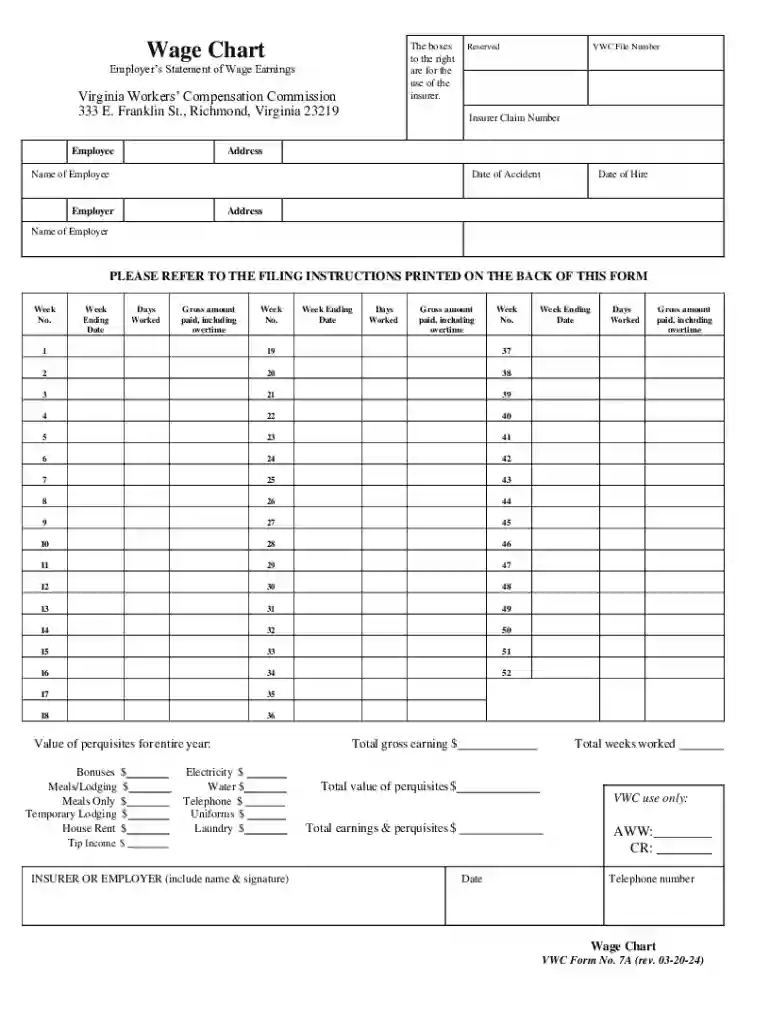
For example, suppose you need to complete a Wage Chart form for the Virginia Workers' Compensation Commission. You would follow these steps, inputting employee earnings into the form's designated fields before electronically signing and submitting it.
An online form typically includes several crucial components to ensure it fulfills its intended purpose effectively. These elements can vary based on the document's purpose but generally include:
In the Wage Chart form, essential elements include sections where employers can report gross weekly earnings and areas for signatures, ensuring that the form serves both documentation and compliance purposes.
Online forms are utilized by a broad spectrum of users due to their versatility. Individuals, small businesses, and large corporations alike benefit from the convenience and efficiency of managing documents online.

Legal validity is a significant aspect of online forms, especially those requiring signatures. Platforms like DocHub adhere to regulations, offering legally binding electronic signatures that comply with the ESIGN Act.
Understanding specific terminology is crucial for effectively navigating online forms. Key terms include:
DocHub's platform is designed for compatibility with various software suites, enhancing user convenience and ensuring users can work efficiently within their existing ecosystems.
In conclusion, understanding how to effectively manage forms online using DocHub can significantly enhance productivity and streamline the document workflow process for both individuals and businesses. It simplifies the traditionally cumbersome process of managing physical documents, offering a modern, efficient alternative.
We've got more versions of the Virginia Wage Chart Form 7A form. Select the right Virginia Wage Chart Form 7A version from the list and start editing it straight away!
At DocHub, your data security is our priority. We follow HIPAA, SOC2, GDPR, and other standards, so you can work on your documents with confidence.