01. Edit your form online
Type text, add images, blackout confidential details, add comments, highlights and more.

Type text, add images, blackout confidential details, add comments, highlights and more.

Draw your signature, type it, upload its image, or use your mobile device as a signature pad.

Send it via email, link, or fax. You can also download it, export it or print it out.
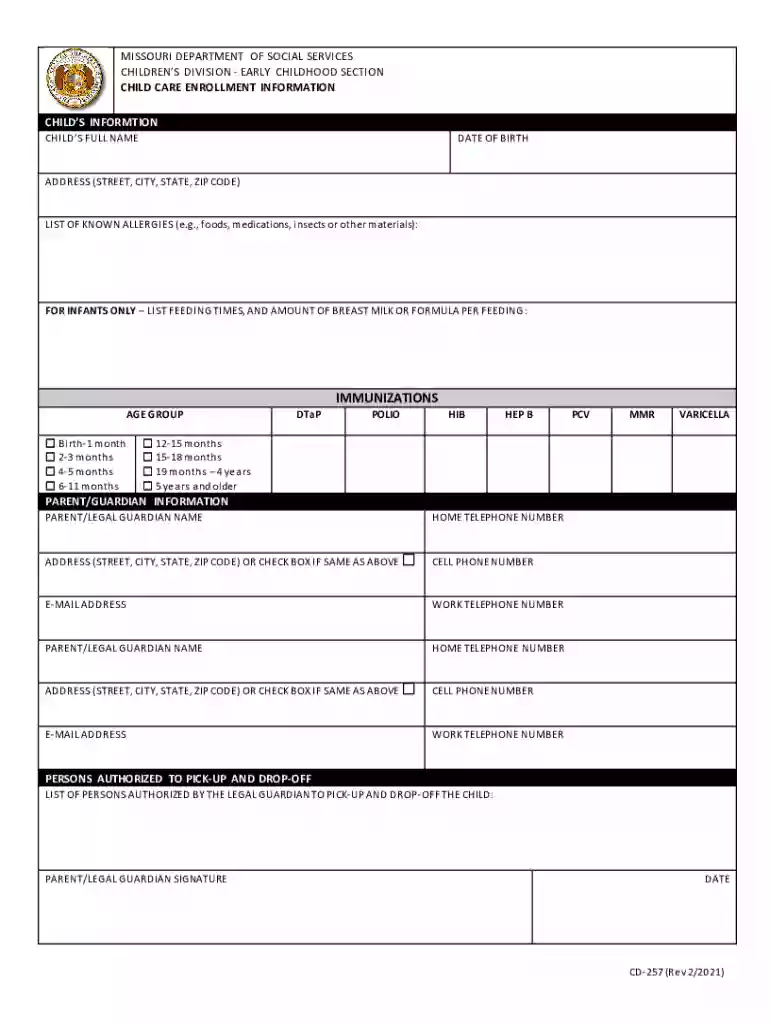
The "IMMUNIZATIONS - Missouri Department of Social Services" form is a documentation tool designed to record immunization data required for children under specific care arrangements within Missouri. This form is essential for verifying a child's immunization status, which ensures compliance with state health regulations for child welfare and safety. It serves to authenticate that children have received vaccinations corresponding to their age group as mandated by the Missouri Department of Health.
Utilizing the immunization form requires that caregivers or parents meticulously fill in required details about the child’s medical history regarding vaccinations. The form is structured to capture various types of vaccinations administered to the child, such as MMR, DTaP, and Hepatitis B. It is crucial to enter the exact dates each vaccine was administered for the record to remain accurate. This documentation plays a role in authorizing child enrollment into schools or childcare facilities across Missouri, ensuring public health safety and compliance with state policies.
To obtain this form, individuals can contact the local office of the Missouri Department of Social Services or access it via their official website, where downloadable versions are available. Additionally, healthcare providers, schools, and childcare facilities may distribute these forms as part of their standard intake procedures. Availability through these multiple channels ensures easy access for all families residing in Missouri or under its jurisdiction.
Gather Information: Collect all vaccination records and personal information needed for accurate data entry.
Fill Out Personal Details: Input the child's name, date of birth, and other identifying information at the top of the form.
Enter Vaccination Data: Record each vaccine's name, date administered, and the healthcare provider's details accurately.
Verify Information: Double-check all entered data for completeness and accuracy to avoid any discrepancies.
Submit the Form: Depending on requirements, the completed form can be submitted to a designated institution, such as a school or childcare facility.
Retain a Copy: Keep a copy of the completed form for personal records and future reference, aiding in instances requiring proofs of immunization.
The form ensures adherence to health standards, facilitates school and childcare enrollment, and confirms to authorities that children are vaccinated against preventable diseases. By utilizing the form, parents and guardians contribute to public health efforts to prevent outbreaks and protect community health in educational and social environments.
MMR: A common vaccine for measles, mumps, and rubella.
DTaP: Vaccination for diphtheria, tetanus, and pertussis (whooping cough).
Hepatitis B Vaccine: Prevents infection from the hepatitis B virus.
Understanding these terms within the scope of the form ensures users are informed about the vaccinations covered and their importance.
Child's Personal Information: Name, date of birth, and social security number.
Immunization Details: Specific vaccines received, dates of administration, and healthcare provider information.
Signature Section: May include acknowledgment or declaration by the caregiver or parent confirming the authenticity of the provided information.
These elements form the core requirements for ensuring the form fulfills its purpose.
Missouri-specific regulations dictate that all enrolled children in schools or public childcare services must comply with certain immunization requirements unless exempt for medical or religious reasons. These rules ensure clear standards for child health services and community welfare.
An example entails a parent preparing the form when enrolling their child in the Missouri public education system. By ensuring all vaccinations records are current and filled out accurately on the form, the parent facilitates a smooth entry into the school, meeting public health mandates.
We've got more versions of the IMMUNIZATIONS - Missouri Department of Social Services form. Select the right IMMUNIZATIONS - Missouri Department of Social Services version from the list and start editing it straight away!
At DocHub, your data security is our priority. We follow HIPAA, SOC2, GDPR, and other standards, so you can work on your documents with confidence.