






Definition & Meaning
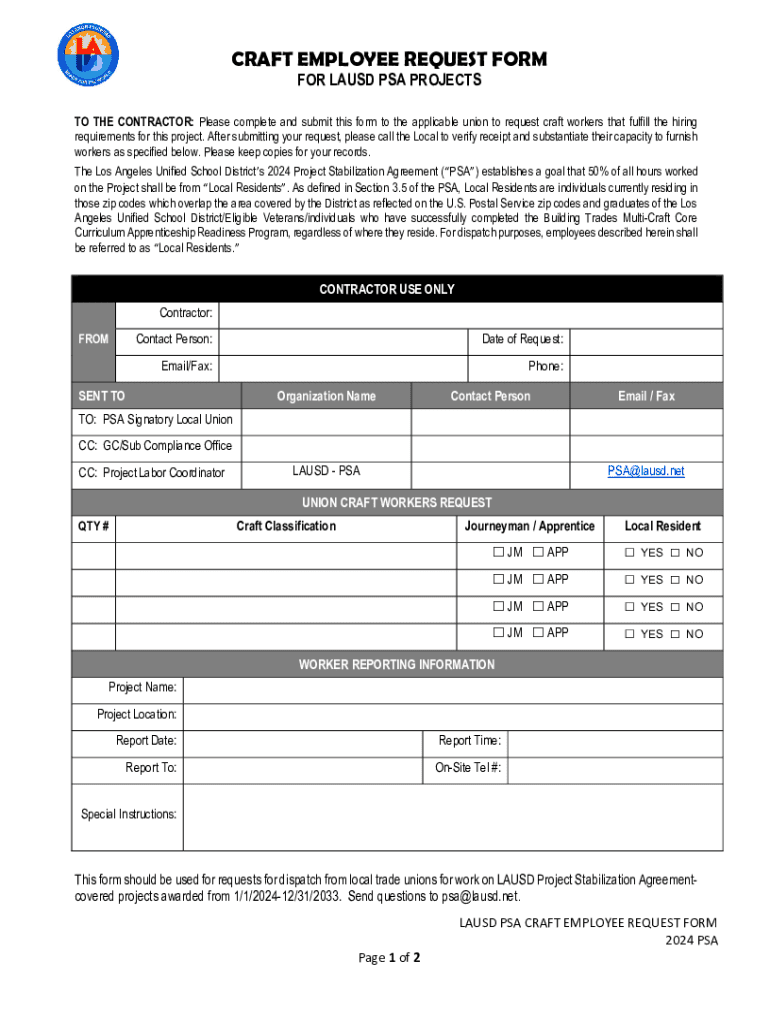
The Craft Employee Request Form is a specialized document utilized within the Los Angeles Unified School District's Project Stabilization Agreement (PSA) projects. It serves as a formal mechanism for contractors to request craft workers for specific projects. The form is crucial for maintaining organized labor assignments and ensuring compliance with the PSA's local hire goals. This document does not only facilitate workforce management but also enforces the strategic objective that 50% of work hours should be contributed by local residents.
How to Use the Craft Employee Request Form
Using the Craft Employee Request Form involves several detailed steps. First, contractors need to fill in their company and project information accurately. This initial section helps identify the requesting entity and the scope of work required. Next, the form must be submitted to the appropriate union offices, ensuring that all requested workers are dispatched according to the Project Stabilization Agreement's criteria. The form also includes sections for union feedback and any necessary amendments to the worker request, providing a clear communication channel between contractors and unions. This process ensures that workforce needs are met efficiently, adhering to district objectives.
Steps to Complete the Craft Employee Request Form
-
Gather Necessary Information: Before beginning, collect all pertinent details, including contractor identification, project specifics, and desired worker qualifications.
-
Fill Out Contractor Details: Enter the contractor's name, address, contact information, and project identification, ensuring all entries are current and accurate.
-
Specify Workforce Requirements: Detail the number and type of craft workers needed. Include information on the required skills and any certifications necessary for the roles.
-
Submit to Union: Forward the filled form to the relevant union, ensuring it includes all requisite signatures and authorization from the contractor’s management.
-
Review and Adjust: Upon feedback from the union, review any dispatched workforce to confirm allocation aligns with the PSA goals. Amend requests if necessary.
-
Documentation: Keep a copy of the submitted form and any correspondence with the union for future reference and compliance audits.
Key Elements of the Craft Employee Request Form
- Contractor Information: Identifies the requesting entity, including name, address, and contact details.
- Project Details: Outlines the specific project requiring craft workers, providing context and location.
- Requested Workers: Specifies the number and type of craft workers needed, including any special qualifications.
- Union Coordination: Includes sections for unions to provide responses, ensuring clarity on worker dispatch and any adjustments.
Legal Use of the Craft Employee Request Form
The Craft Employee Request Form is legally binding within the context of the LAUSD's Project Stabilization Agreement. It ensures compliance with union rules and local hiring mandates. The form helps enforce policies requiring that 50% of project hours be worked by local residents, aligning with regional employment objectives. Contractors must adhere strictly to these guidelines to avoid potential disputes or penalties. The form's legal standing underscores the importance of accuracy and honesty in its completion and submission.
Eligibility Criteria
Contractors wishing to use the Craft Employee Request Form must meet specific eligibility criteria tied to the LAUSD Project Stabilization Agreement. They should be actively engaged in projects covered under the PSA terms and have a demonstrable need for craft labor. Additionally, the company must comply with local hire commitments, aiming to fill 50% of project hours with local residents. These criteria aim to support the district's economic and community objectives.


State-Specific Rules for the Craft Employee Request Form
While the Craft Employee Request Form has a broad application within the LAUSD, adherence to California state labor laws is imperative. The form must comply with regulations concerning fair labor practices, including wage and hour laws, worker safety, and employment eligibility. Contractors should be mindful of California’s stringent work-hour restrictions and pay standards when requesting craft workers.
Important Terms Related to Craft Employee Request Form
- Project Stabilization Agreement (PSA): Refers to the negotiated terms between LAUSD and unions governing project labor practices.
- Local Resident Requirement: The mandate that 50% of workforce hours come from local residents.
- Dispatch: The process of assigning union workers to specific projects based on the request form.
- Contractor Compliance: Adherence to the PSA terms, ensuring legal and fair workforce allocation.
Required Documents
When completing and submitting the Craft Employee Request Form, several documents are typically required. These include proof of contractor qualifications, licensing information, a detailed project description, and any prior agreements or contracts relevant to the PSA. Each document supports the form’s purpose, ensuring clarity and accuracy in the workforce requests. Additionally, union agreements and worker certifications might be necessary to substantiate skills and compliance with project standards.