






Definition & Purpose of the Water Sector Incident Action Checklist
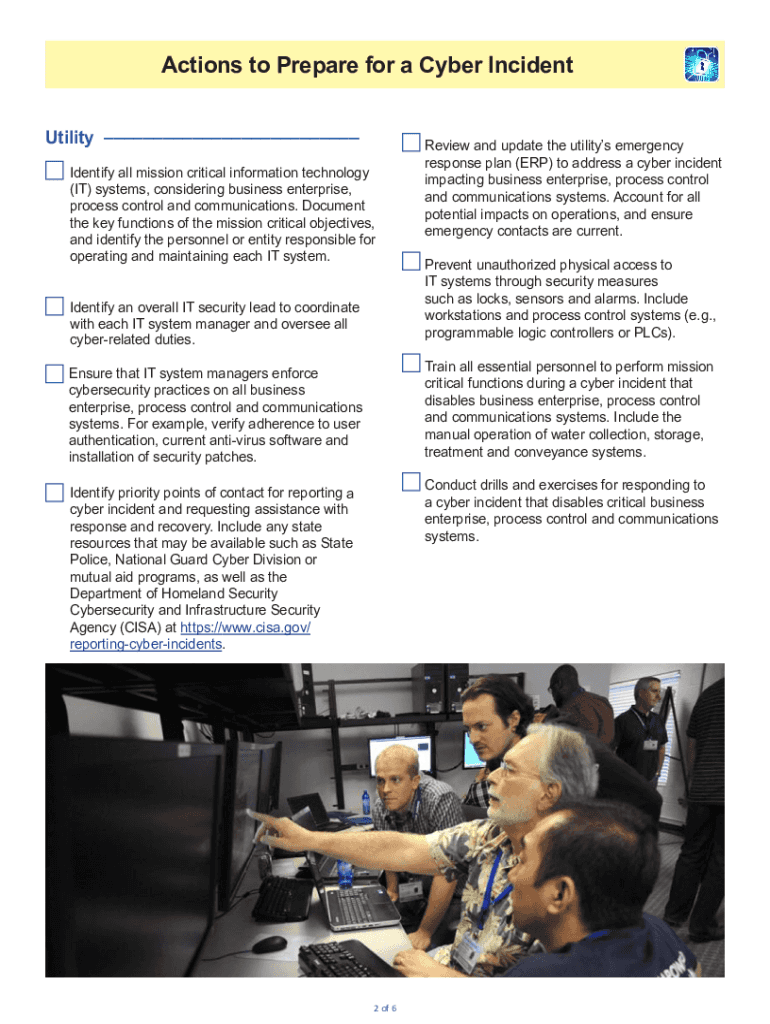
The "Fillable Online Water Sector Incident Action Checklist - DocHub" is a comprehensive tool designed to address the cybersecurity challenges faced by water and wastewater utilities. This checklist assists these utilities in preparing for, responding to, and recovering from cyber incidents. It highlights the specific vulnerabilities in critical IT systems and provides a structured framework to enhance security measures. The document aims to ensure the continuous delivery of safe drinking water and wastewater services by implementing robust cybersecurity protocols.
Key Objectives of the Checklist
- Preparation: Outline strategies for emergency response planning and personnel training.
- Response: Provide actionable steps for incident response to minimize damage.
- Recovery: Detail processes to restore services efficiently after a cyberattack.
How to Use the Checklist Effectively
To maximize the utility of the water sector incident action checklist, utilities should follow a structured approach. This ensures comprehensive coverage of all cybersecurity aspects relevant to the water sector.
Step-by-Step Usage Guide
-
Preparation Phase:
- Conduct risk assessments to identify vulnerabilities.
- Develop and update emergency response plans.
- Train personnel on incident response protocols.
-
Response Phase:
- Implement the checklist's action steps during a cyber incident.
- Coordinate with internal and external stakeholders for efficient handling.
-
Recovery Phase:
- Assess damage and prioritize restoration tasks.
- Review and revise security protocols based on incident learnings.
Obtaining the Water Sector Incident Action Checklist
Accessing the checklist is a straightforward process via the DocHub platform. The platform provides several ways to import and manage documents ensuring ease of use.
Methods of Access
- Online Access: Easily accessible through the DocHub website.
- Cloud Integration: Import directly from cloud storage services like Google Drive or Dropbox.
- Direct Download: The checklist can be downloaded directly to your device for offline use.
Steps to Complete the Checklist
Completing the checklist involves a detailed review and application of its contents to current utility operations.
Completion Process
- Review Each Section: Thoroughly go through every section to understand the required actions.
- Action Implementation: Assign tasks to appropriate team members.
- Verification: Ensure all actions have been completed and signed off by responsible stakeholders.
Important Sections to Focus On
- Emergency response plan verification.
- Cyber incident response drills.
- Communication and reporting protocols.
Who Typically Uses This Checklist
This checklist is specifically tailored for water and wastewater utility professionals who are responsible for cybersecurity.
Typical Users Include
- Utility Managers: Oversee the implementation of cybersecurity measures.
- Security Teams: Execute checklist action items and ensure compliance.
- Emergency Response Coordinators: Coordinate responses to cyber incidents.
Key Elements of the Checklist
The checklist contains several critical elements that focus on enhancing water sector cybersecurity.
Critical Components
- Risk Assessment: Identifies and prioritizes potential cyber threats.
- Incident Response: Details immediate actions to mitigate risks.
- Recovery Strategies: Defines processes for restoring normal operations.
Practical Examples of Checklist Utilization
Real-world case studies provide insight into the checklist’s application in various scenarios.
Example Scenarios
- Ransomware Attack: A utility uses the checklist to respond swiftly, mitigating data loss and operational disruption.
- Data Breach: The checklist guides utilities in communicating the breach and reinforcing IT systems.
Software Compatibility
The checklist is designed to integrate seamlessly with various software platforms that utilities might use.
Compatible Platforms
- DocHub: Direct editing and signing capabilities.
- Google Workspace: Import/export integration for streamlined document management.
- Security Platforms: Compatibility with cybersecurity software for monitoring and response.