Navigator Supplemental Questionnaire w-homebuilder supp 5-04doc 2026

Get Form
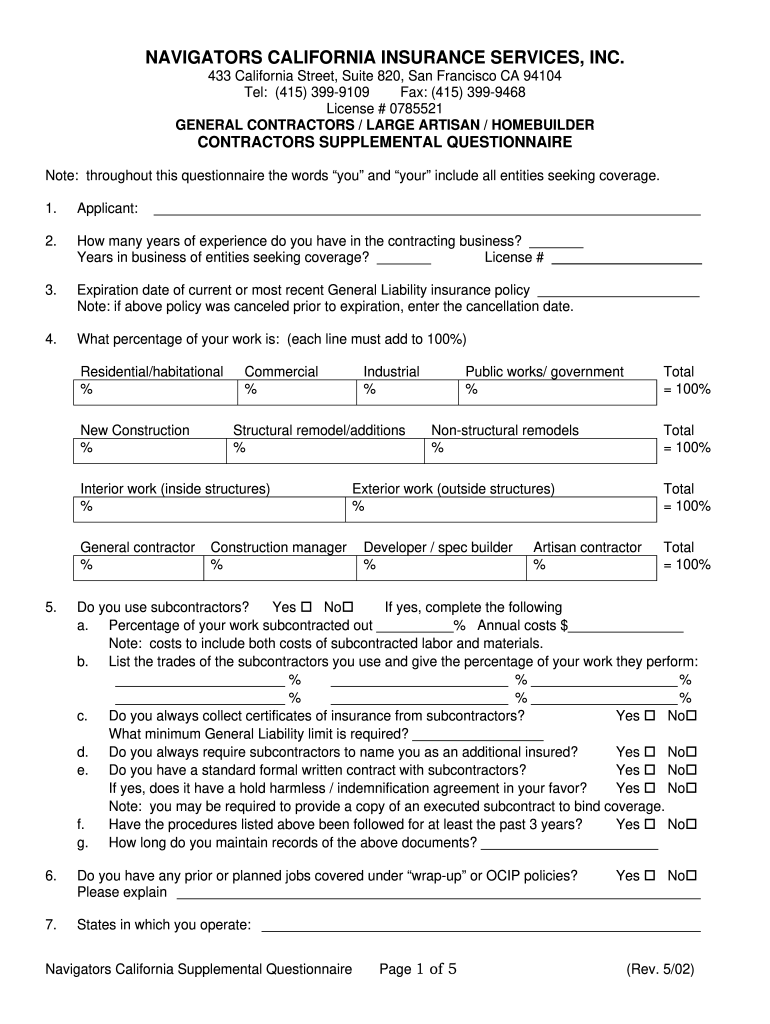
contractors supplemental questionnaire Preview on Page 1

Here's how it works

01. Edit your contractors supplemental questionnaire online
Type text, add images, blackout confidential details, add comments, highlights and more.
02. Sign it in a few clicks
Draw your signature, type it, upload its image, or use your mobile device as a signature pad.
03. Share your form with others
Send it via email, link, or fax. You can also download it, export it or print it out.

How to use or fill out Navigator Supplemental Questionnaire w-homebuilder supp 5-04doc with our platform

Form edit decoration
9.5
Ease of Setup
DocHub User Ratings on G2
9.0
Ease of Use
DocHub User Ratings on G2
  1. Click ‘Get Form’ to open the Navigator Supplemental Questionnaire in the editor.
  2. Begin by filling in your name and contact information in the 'Applicant' section. Ensure accuracy as this information is crucial for processing.
  3. Provide details about your experience in contracting, including years in business and license number. This establishes your qualifications.
  4. Complete the insurance policy expiration date and cancellation details if applicable. This helps assess your coverage history.
  5. Fill out the percentage of work breakdown across various categories such as residential, commercial, and public works. Ensure all percentages total 100% for each section.
  6. Answer questions regarding subcontractors, including their usage and insurance requirements. Be thorough to avoid issues later.
  7. Continue through the form, providing financial data and project descriptions as requested. Use our platform's features to easily navigate between sections.
  8. Review all entries for accuracy before signing at the end of the document. Your signature confirms that all provided information is truthful.

Start using our platform today to complete your Navigator Supplemental Questionnaire efficiently and for free!

See more Navigator Supplemental Questionnaire w-homebuilder supp 5-04doc versions

We've got more versions of the Navigator Supplemental Questionnaire w-homebuilder supp 5-04doc form. Select the right Navigator Supplemental Questionnaire w-homebuilder supp 5-04doc version from the list and start editing it straight away!
Versions Form popularity Fillable & printable
2002 4.4 Satisfied (54 Votes)
be ready to get more

Complete this form in 5 minutes or less

Get form

Got questions?

We have answers to the most popular questions from our customers. If you can't find an answer to your question, please contact us.
Contact us
The number of supplemental essays you will need to write depends on where youre applying. Some colleges may require you to write a response to every prompt they give, while others allow you to choose from a handful of options. The prompts given to you will depend on where youre applying.
Supplemental forms means the additional forms all LTSS applicants are required to complete.
During the process of developing narrative supplemental questions, identify a positions important tasks and competencies. Write questions that get at key information about the tasks, experience, and competencies. Determine what constitutes an effective response to a question.
The most recent data is from 2023 and the BOARS report states about a 50% admit rate for applicants that submitted their supplemental. Previous years has been in the high 30-low 40% admit rate.
A supplemental questionnaire consists of questions related to the experience, education, training, knowledge, skills, and abilities needed to perform the job.

Security and compliance

At DocHub, your data security is our priority. We follow HIPAA, SOC2, GDPR, and other standards, so you can work on your documents with confidence.

Learn more
ccpa2
pci-dss
gdpr-compliance
hipaa
soc-compliance
be ready to get more

Complete this form in 5 minutes or less

Get form