Indiana form 51923 2026

Get Form
state form 51923 Preview on Page 1

Here's how it works

01. Edit your state form 51923 online
Type text, add images, blackout confidential details, add comments, highlights and more.

02. Sign it in a few clicks
Draw your signature, type it, upload its image, or use your mobile device as a signature pad.

03. Share your form with others
Send accept checks via email, link, or fax. You can also download it, export it or print it out.

How to use or fill out Indiana Form 51923 with DocHub

Form edit decoration
9.5
Ease of Setup
DocHub User Ratings on G2
9.0
Ease of Use
DocHub User Ratings on G2
  1. Click ‘Get Form’ to open it in the editor.
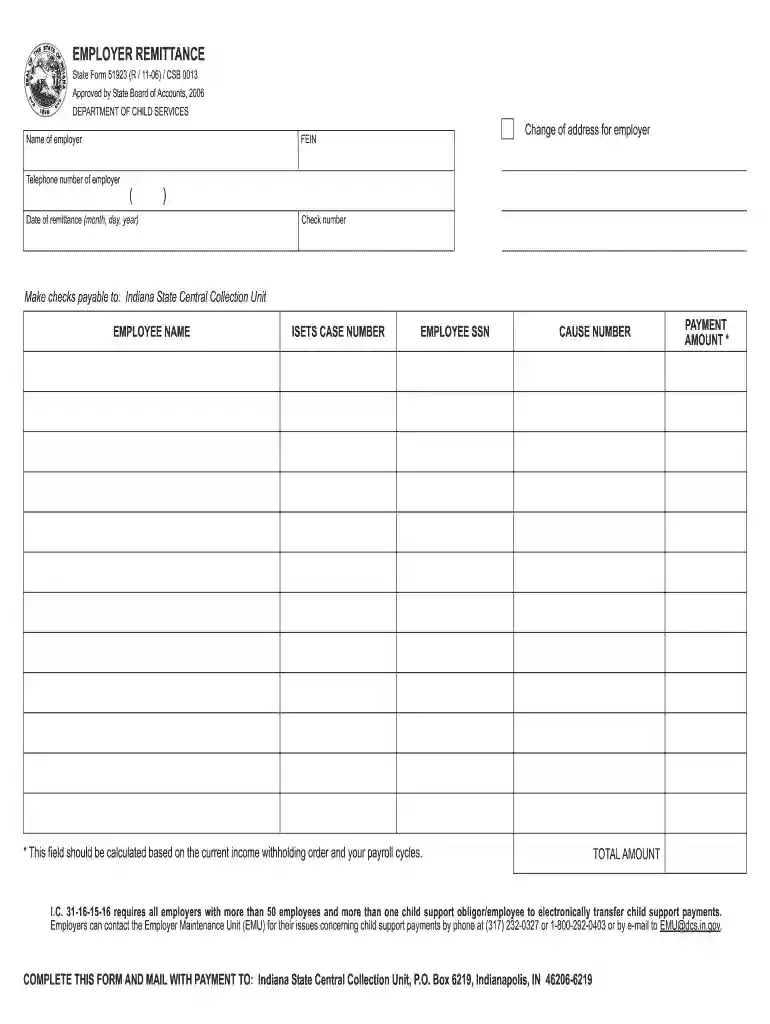
  2. Begin by entering the employer's name and address. If there is a change of address, ensure to update this section accurately.
  3. Input the Federal Employer Identification Number (FEIN) and the telephone number of the employer. This information is crucial for identification purposes.
  4. Fill in the date of remittance using the format month, day, year. This helps track when payments are made.
  5. Enter the check number if applicable, ensuring that all payment details are correct.
  6. For each employee, provide their name, ISETS case number, Social Security Number (SSN), and cause number as required.
  7. Calculate and enter the payment amount based on current income withholding orders and payroll cycles. Ensure accuracy for compliance.
  8. Finally, review all entries for completeness before saving your document. Once satisfied, you can print or share it directly from our platform.

Start filling out Indiana Form 51923 today for free using our platform!

See more indiana form 51923 versions

We've got more versions of the indiana form 51923 form. Select the right indiana form 51923 version from the list and start editing it straight away!
Versions Form popularity Fillable & printable
2006 4.9 Satisfied (516 Votes)
be ready to get more

Complete this form in 5 minutes or less

Get form

Got questions?

We have answers to the most popular questions from our customers. If you can't find an answer to your question, please contact us.
Contact us

Upload your form 51923 to DocHub (after you’ve set up an account for this). If you need to complete fields in it, use appropriate tools from the top pane. For example, add Signature Fields, assign each to specific party, and click on Sign → Request signatures from others. Personalize your message for your recipients and click Send Request. You can also send your paperwork by fax or as a Signing link instead of using email (you’ll locate these options by navigating to the Menu → Send)

When you edit your indiana form 51923 with DocHub, you will not need to look for other software or solutions to sign it. An electronic signature is a component of DocHub’s comprehensive editing toolset, which enables you to apply changes in your form without switching between platforms. Simply complete your form, double-check the correctness of the data and put your electronic signature at the end to make it submission-ready within minutes.

Indiana is an at-will employment state. Essentially, state law does not prevent either a worker or an employer from terminating a work relationship at any point. A worker can quit without notice, an employer can fire them for a host of reasons or no specific reason at all.
No Inheritance tax returns for Indiana residents or nonresidents should be prepared or filed after Oct. 5, 2023 (IC 34-11-1-2). This means that there is no Inheritance tax owed in Indiana. The forms are no longer needed and were retired by DOR.
Indiana is a fault state (as opposed to a no-fault state), which means that you have to prove fault to recover damages and the driver who caused the accident is responsible for paying the damages.

Security and compliance

At DocHub, your data security is our priority. We follow HIPAA, SOC2, GDPR, and other standards, so you can work on your documents with confidence.

Learn more
ccpa2
pci-dss
gdpr-compliance
hipaa
soc-compliance
be ready to get more

Complete this form in 5 minutes or less

Get form

People also ask

Zero Tolerance Law Encompasses Drugged Driving Indiana zero tolerance law policy also encompasses illegal drug use. If you are caught with a controlled substance, such as marijuana, , , nonprescription opioids, or , you will be charged with a crime.
Indiana is among six states whose plans to replace No Child Left Behind were approved by the U.S. Department of Education Friday. Signed into law by President Barack Obama in 2015, the Every Student Succeeds Act replaced 2002s No Child Left Behind Act and allows states to create specialized plans for growth.

Related links