Cit 0049-2026

Get Form
cit 0049 Preview on Page 1

Here's how it works

01. Edit your cit 0049 online
Type text, add images, blackout confidential details, add comments, highlights and more.

02. Sign it in a few clicks
Draw your signature, type it, upload its image, or use your mobile device as a signature pad.

03. Share your form with others
Send oath or affirmation of citizenship form pdf download via email, link, or fax. You can also download it, export it or print it out.

How to use or fill out cit 0049 with our platform

Form edit decoration
9.5
Ease of Setup
DocHub User Ratings on G2
9.0
Ease of Use
DocHub User Ratings on G2
  1. Click ‘Get Form’ to open it in the editor.
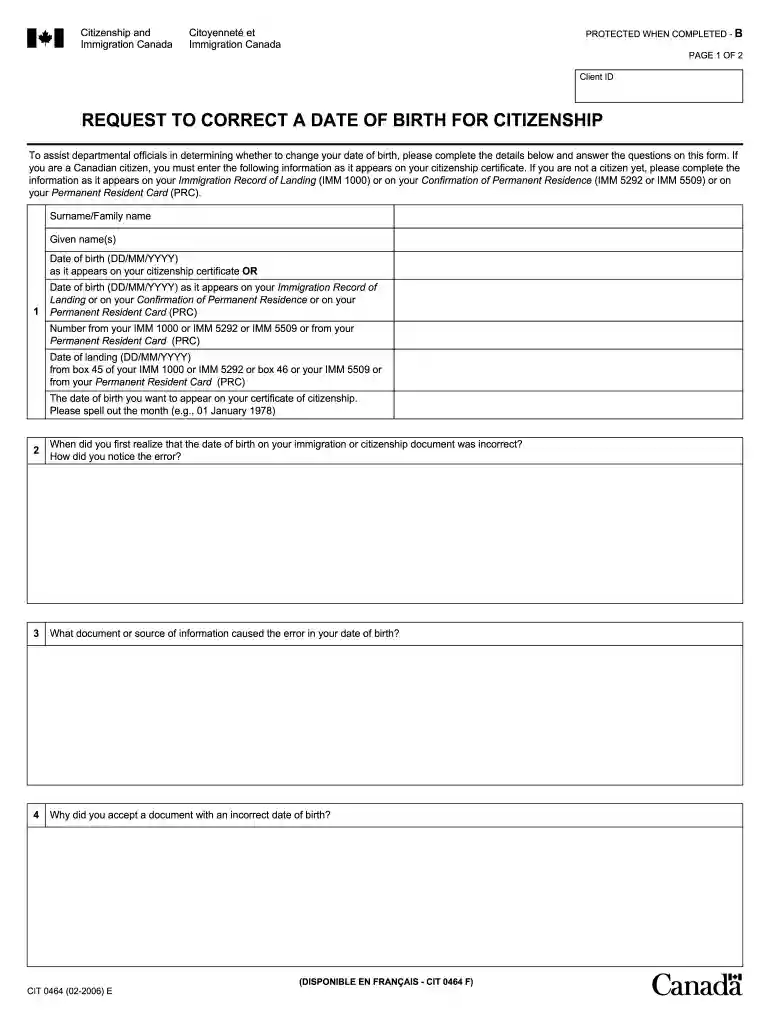
  2. Begin by entering your surname and given names as they appear on your citizenship certificate or immigration documents.
  3. Fill in your date of birth in the format DD/MM/YYYY, ensuring it matches the information on your official documents.
  4. Provide the number from your Immigration Record of Landing or Permanent Resident Card, along with the date of landing.
  5. Clearly state the desired date of birth for your citizenship certificate, spelling out the month (e.g., 01 January 1978).
  6. Answer questions regarding when you noticed the error and what document caused it. This helps clarify your situation.
  7. Complete any additional questions about previous attempts to correct this information and provide a signature with the date.

Start using our platform today to easily fill out cit 0049 for free!

See more cit 0049 versions

We've got more versions of the cit 0049 form. Select the right cit 0049 version from the list and start editing it straight away!
Versions Form popularity Fillable & printable
2018 4.8 Satisfied (61 Votes)
2006 4 Satisfied (33 Votes)
be ready to get more

Complete this form in 5 minutes or less

Get form

Got questions?

We have answers to the most popular questions from our customers. If you can't find an answer to your question, please contact us.
Contact us
Once you have signed the Oath or Affirmation of Citizenship form (on paper or electronically), you must e-mail it to IRCC immediately (within 2 days). If you printed and signed the form, you will need to scan the signed copy and email it in.
I hereby declare, on oath, that I absolutely and entirely renounce and abjure all allegiance and fidelity to any foreign prince, potentate, state, or sovereignty, of whom or which I have heretofore been a subject or citizen; that I will support and defend the Constitution and laws of the United States of America
Tips for Administering an Oath The affirmant must physically appear before you. When administering the oath or affirmation, make sure the person swears or affirms the truthfulness of their statement. Speak clearly and take the notarial act seriously. Record the notarization in your journal.
Application for Canadian Citizenship Adults [CIT 0002] (PDF, 2.1 MB) Last updated: March 2025.
The Oath-Taking Ceremony It usually starts with welcoming remarks from USCIS officials or local dignitaries. Then, all participants stand to recite the Oath of Allegiance together. This moment officially transforms you into a U.S. citizen. The oath-taking portion of the ceremony typically lasts about 10-15 minutes.

Security and compliance

At DocHub, your data security is our priority. We follow HIPAA, SOC2, GDPR, and other standards, so you can work on your documents with confidence.

Learn more
ccpa2
pci-dss
gdpr-compliance
hipaa
soc-compliance
be ready to get more

Complete this form in 5 minutes or less

Get form

People also ask

After the Ceremony Once you have signed the Oath or Affirmation of Citizenship form (on paper or electronically), you must e-mail it to IRCC immediately (within 2 days). If you printed and signed the form, you will need to scan the signed copy and email it in.
To apply for a Certificate of Citizenship, you will need to submit Form N-600 (officially called Application for Certificate of Citizenship) and a number of required documents, including the following: The petitioners birth certificate. The birth certificate of the U.S. parent. Two passport-style photos.

cit 0024