




Here's how it works



How to use or fill out fillable catering form with our platform

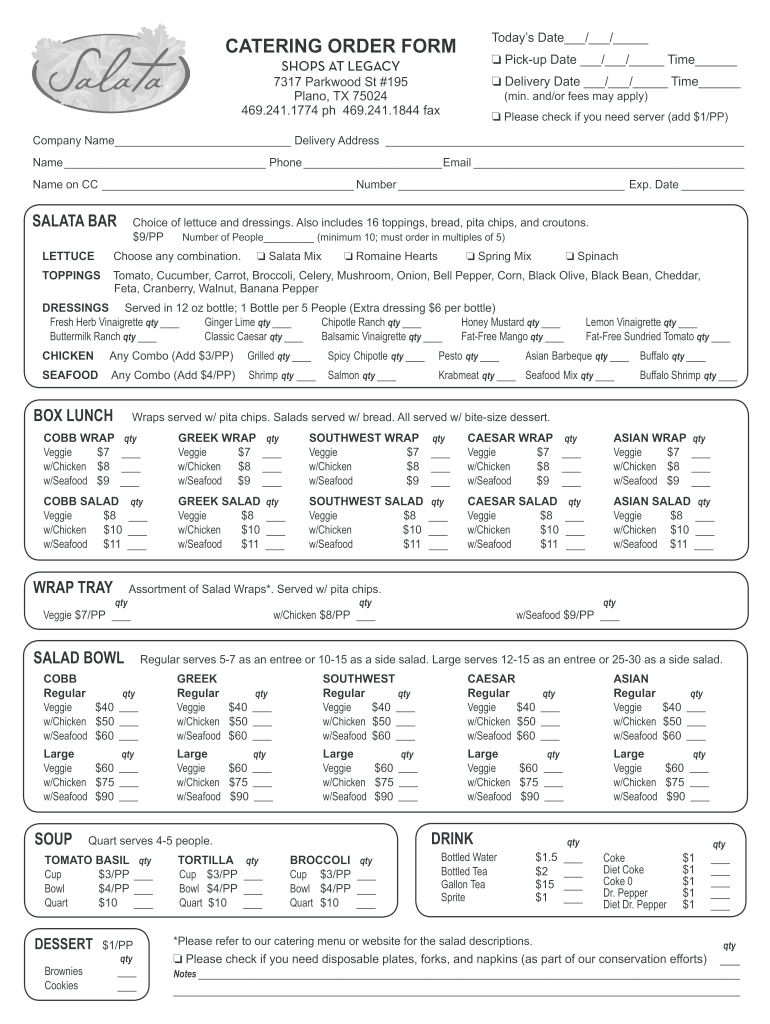
- Click ‘Get Form’ to open the fillable catering order form in the editor.
- Begin by entering today’s date at the top of the form. This helps track your order.
- Fill in the pick-up or delivery date and time as required. Ensure these details are accurate for timely service.
- Provide your company name, delivery address, contact name, phone number, and email. This information is crucial for communication.
- If you require a server, check the box and note the additional cost per person.
- Select your catering options from the Salata Bar section, including lettuce choices and toppings. Specify quantities as needed.
- Continue filling out sections for chicken, seafood, wraps, salads, drinks, and desserts by indicating quantities next to each item.
- Lastly, add any notes or special requests in the designated area before submitting your completed form.
Start using our platform today to streamline your catering orders effortlessly!
It's free
See more fillable catering form versions
| Versions | Form popularity | Fillable & printable |
|---|---|---|
| 2013 | 4.3 Satisfied (30 Votes) |
Got questions?
Is it safe to sign my fillable catering form electronically?
You need to use only trustworthy software solutions with strong security compliance to sign your documents electronically. DocHub is just the type of service you need! It stores data on Amazon Web Servers and complies with all essential security standards and eSignature regulations, so it’s a trusted way to electronically sign your fillable catering form or other paperwork using this tool.
How do you get fillable catering form for my state?
If you are searching for a state-specific fillable catering form sample, you will find it in our DocHub Forms & Templates catalog. Use the search field, key in your form’s name, and search through the results for your state. You may also filter out irrelevant results while browsing our catalog by groups.
Security and compliance
At DocHub, your data security is our priority. We follow HIPAA, SOC2, GDPR, and other standards, so you can work on your documents with confidence.
Learn more




