Type text, add images, blackout confidential details, add comments, highlights and more.
02. Sign it in a few clicks
Draw your signature, type it, upload its image, or use your mobile device as a signature pad.
03. Share your form with others
Send it via email, link, or fax. You can also download it, export it or print it out.
How to use or fill out Pdf fillable form cms 672 1998 with DocHub
Ease of Setup
DocHub User Ratings on G2
Ease of Use
DocHub User Ratings on G2
Click ‘Get Form’ to open it in the editor.
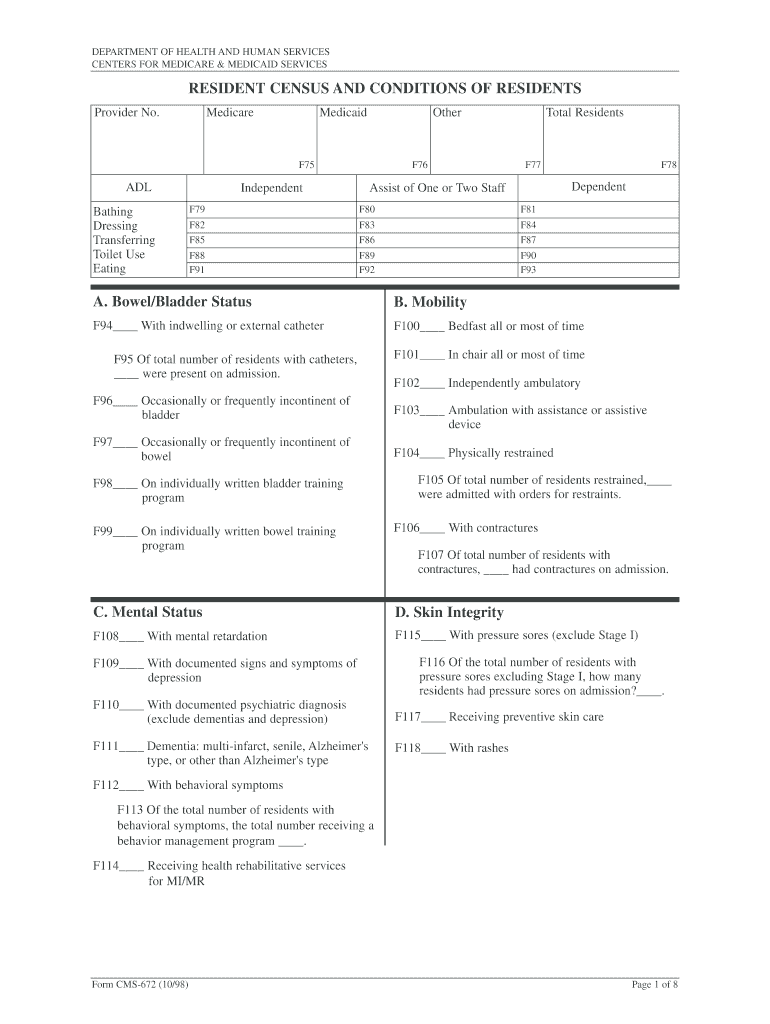
Begin by entering the Provider Number at the top of the form. This is essential for identifying your facility.
In Block F75, F76, and F77, input the number of residents under Medicare, Medicaid, and other payers respectively. Ensure accuracy as these figures represent your current resident census.
Proceed to the Activities of Daily Living (ADLs) section (F79-F93). For each activity like bathing, dressing, and transferring, indicate how many residents require assistance versus those who are independent.
Complete sections A through G by specifying the number of residents in each category based on their conditions and care needs. Use clear definitions provided in the form to guide your entries.
Finally, certify the information by signing at the bottom of the form. Make sure to include your title and date for validation.
Start using our platform today to fill out your CMS 672 form easily and efficiently!
Fill out Pdf fillable form cms 672 1998 online It's free
We've got more versions of the Pdf fillable form cms 672 1998 form. Select the right Pdf fillable form cms 672 1998 version from the list and start editing it straight away!
Pdf fillable form cms 672 1998 pdf downloadPdf fillable form cms 672 1998 downloadPdf fillable form cms 672 1998 free downloadPdf fillable form cms 672 1998 freePdf fillable form cms 672 1998 2021CMS 671 formCMS-671 instructionsCMS 671 pdf
Security and compliance
At DocHub, your data security is our priority. We follow HIPAA, SOC2, GDPR, and other standards, so you can work on your documents with confidence.
Jul 12, 2006 1.1 New and Updated Features. Nicknamed the developer build, CMS 8.0 makes it easier to implement custom solutions on the platform.Read more
Both the system manual and the Easy Book are available as electronic (PDF) manuals. The electronic manuals can be downloaded from the customer support webRead more
Cookie consent notice
This site uses cookies to enhance site navigation and personalize your experience.
By using this site you agree to our use of cookies as described in our Privacy Notice.
You can modify your selections by visiting our Cookie and Advertising Notice.