PA Provider Registry App 03 13 19 2026

Get Form
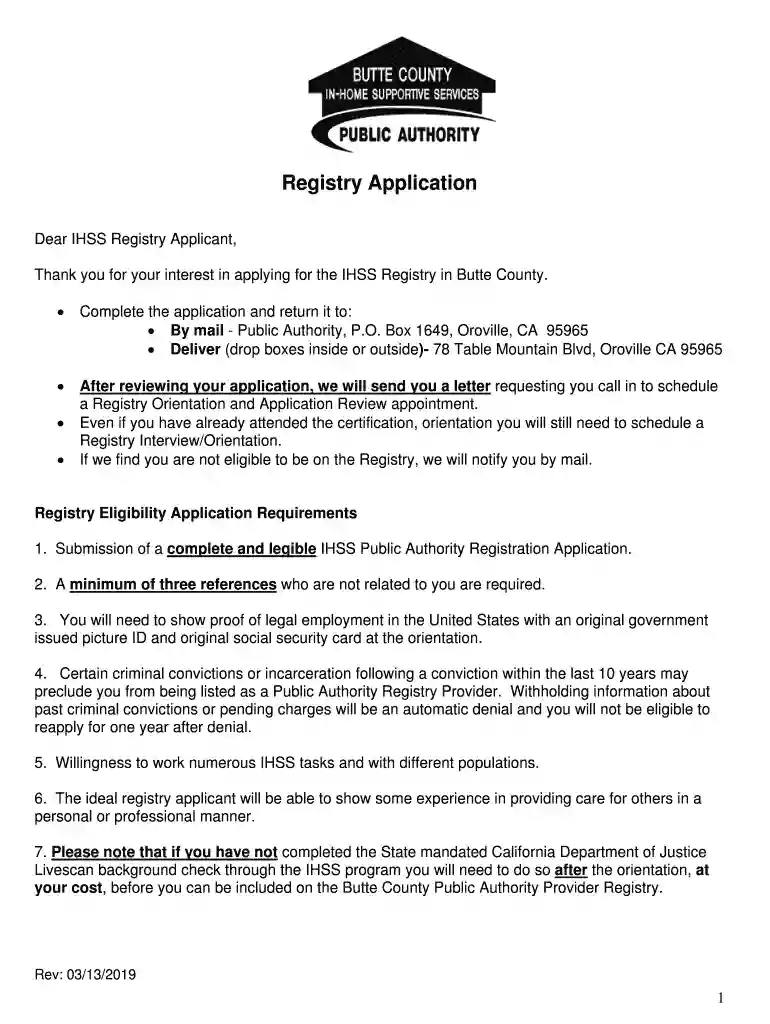
PA Provider Registry App 03 13 19 Preview on Page 1

Here's how it works

01. Edit your form online
Type text, add images, blackout confidential details, add comments, highlights and more.

02. Sign it in a few clicks
Draw your signature, type it, upload its image, or use your mobile device as a signature pad.

03. Share your form with others
Send it via email, link, or fax. You can also download it, export it or print it out.

Definition and Purpose of the PA Provider Registry App 03 13 19

The PA Provider Registry App 03 13 19 is a specialized form used by individuals in the United States seeking to join the In-Home Supportive Services (IHSS) Registry. This application is pivotal for those interested in registry positions, as it helps the governing body manage and verify eligibility requirements effectively. The application process centers around documenting the applicant's qualifications, legal work status, and suitability for in-home service roles.

Key Areas the Form Covers

  • Eligibility Verification: Ensures applicants meet all prerequisites, including legal employment status and clear background checks.
  • Documentation Submission: Guides applicants on the necessary paperwork, such as references and identification proofs.
  • Responsibility Outline: Lists potential tasks and responsibilities applicants may undertake once approved.

Steps to Complete the PA Provider Registry App 03 13 19

Filling out the PA Provider Registry App 03 13 19 requires precision and attention to detail to avoid errors that could delay processing.

  1. Gather Required Documents: Collect all supporting documents like proof of employment eligibility, personal identification, and references.
  2. Fill Out Personal Information: Enter your details such as name, address, and contact information accurately.
  3. Complete Work History Section: Detail your previous experience relevant to in-home services, including any similar roles or responsibilities you've held.
  4. Understand the Task Sheet: Review the range of services you may need to perform, ensuring you are comfortable with the potential job scope.
  5. Review and Sign: Double-check the application for accuracy, then sign it to confirm that all information provided is truthful and complete.

Required Documents for the Application

To ensure the PA Provider Registry App is processed smoothly, gather and submit the following key documents:

  • Proof of Identity: Provide a government-issued ID such as a driver's license or passport.
  • Legal Work Authorization: Include documents like a social security card or work visa.
  • Professional References: Submit at least two references from previous employers or supervisors related to in-home care.
  • Background Check Approval: Be prepared to undergo a background check to verify your eligibility for in-home services.

Application Process and Approval Time

Applying for the PA Provider Registry involves several steps, each designed to ensure that only qualified individuals are approved.

  • Initial Submission: Once all forms and documents are complete, submit the application to the designated registry office.
  • Background Check: A standard check is conducted to ensure no disqualifying factors.
  • Review Period: The complete review process can take several weeks, as every application is carefully vetted.
  • Notification of Status: Successful applicants will receive approval notifications and can begin choosing assignments.

Importance of Using the PA Provider Registry App 03 13 19

The PA Provider Registry App 03 13 19 is essential for individuals seeking employment in the IHSS program. It facilitates a structured pathway to becoming a recognized provider, offering several benefits:

  • Professional Recognition: Join an official registry that enhances employability and credibility.
  • Streamlined Process: Ensures all legal and professional requirements are met systematically.
  • Service Opportunities: Opens access to clients in need of in-home health and domestic services.

Key Elements and Sections of the Form

Understanding the composition of the PA Provider Registry App 03 13 19 is crucial for its correct completion.

  • Personal Details: Basic information section that includes physical and mailing addresses.
  • Eligibility Confirmation: Requires proof of ability to legally work in the U.S.
  • Employment History: Detailed section focusing on past relevant experience.
  • Acknowledgement and Signature: Final section for applicant's declaration of truthfulness in provided information.

Legal Compliance and Use

The completion and submission of the PA Provider Registry App 03 13 19 implicate certain legal responsibilities:

  • Truthful Representation: Mandatory to provide honest and accurate information to prevent disqualification.
  • Data Protection: All information is handled under strict U.S. privacy laws to protect applicants' personal data.

Practical Examples and Use Cases

Several real-world examples depict the widespread use and necessity of the PA Provider Registry App:

  • Case Study: An applicant with a background in elderly care successfully joined the registry, highlighting the importance of including relevant work history.
  • Success Stories: Individuals looking to transition from uncertified caregiving roles utilized the app to formalize their capacities and gain certification.

State-Specific Rules for the Application

While the core of the PA Provider Registry App remains consistent, each state may have slight variations in the rules and protocols:

  • California Requirements: More stringent checks and additional state-specific certifications may be needed.
  • Florida Adaptations: May introduce specific regional training prerequisites for successful application handling.

By following the detailed requirements and guidelines in this comprehensive exploration, potential applicants can approach the PA Provider Registry App 03 13 19 strategically, maximizing their chances of a successful application.

be ready to get more

Complete this form in 5 minutes or less

Get form

Got questions?

We have answers to the most popular questions from our customers. If you can't find an answer to your question, please contact us.
Contact us
If you need to edit your profile, email registry@pakeys.org to request your profile to be unlocked.
The PD Registry is a technology system that functions as a workforce registry. A workforce registry increases the number of high quality early childhood education (ECE) programs by helping to develop and track a knowledgeable and skilled early childhood workforce.
I will not share private or sensitive information in the PD Registry with anyone other than those that are employed by Department of Human Services, Office of Child Development and Early Learning, or the Pennsylvania Key.

Security and compliance

At DocHub, your data security is our priority. We follow HIPAA, SOC2, GDPR, and other standards, so you can work on your documents with confidence.
Learn more
ccpa2
pci-dss
gdpr-compliance
hipaa
soc-compliance
be ready to get more

Complete this form in 5 minutes or less

Get form