C01: record removal form 2026

Get Form
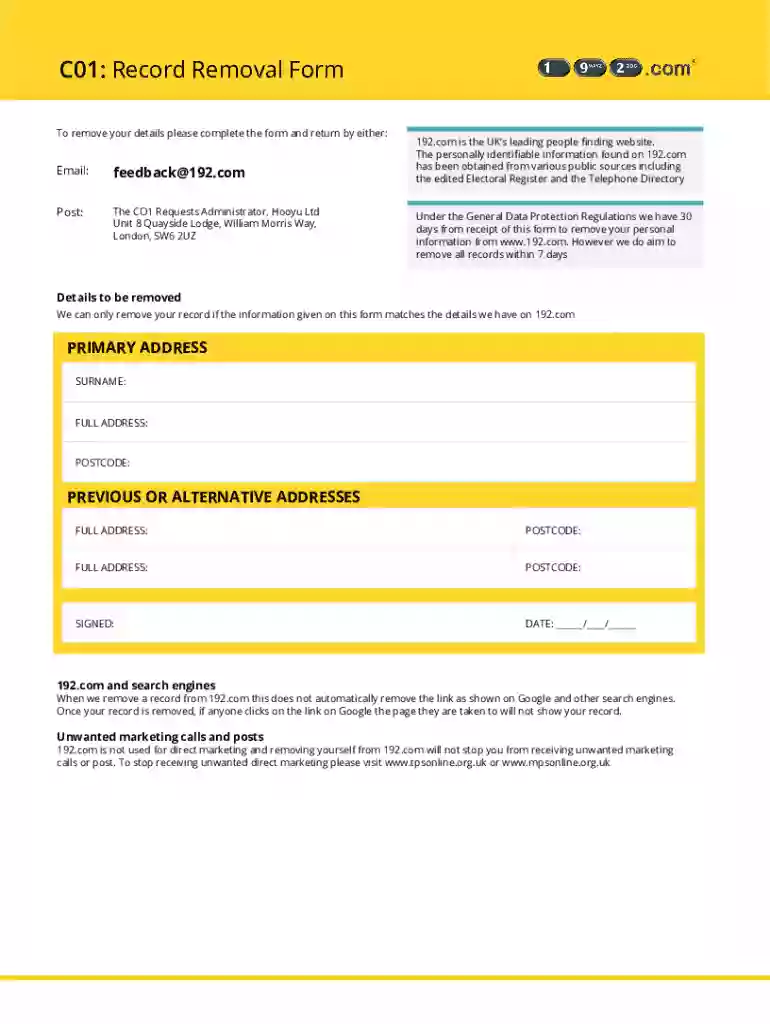
c01: record removal form Preview on Page 1

Here's how it works

01. Edit your form online
Type text, add images, blackout confidential details, add comments, highlights and more.

02. Sign it in a few clicks
Draw your signature, type it, upload its image, or use your mobile device as a signature pad.

03. Share your form with others
Send it via email, link, or fax. You can also download it, export it or print it out.

Definition and Purpose of the c01: Record Removal Form

The c01: Record Removal Form is utilized to request the deletion of personal information from specific databases or listings. This form is commonly employed when individuals desire increased privacy or need to ensure their personal data is not publicly accessible. The primary goal is to secure personal information against unwanted exposure, marketing, or identity misuse. It’s crucial for maintaining compliance with data protection regulations, particularly in contexts involving sensitive information.

Importance of Data Privacy

  • Protects against identity theft and fraud
  • Enhances personal privacy and security
  • Ensures compliance with legal data protection regulations

Regulatory Compliance

The form aids in adhering to data privacy laws such as the General Data Protection Regulation (GDPR) in Europe or relevant U.S. regulations, ensuring individuals' rights to control personal data storage and sharing.

How to Use the c01: Record Removal Form

Using the c01: Record Removal Form involves a thorough understanding of your data rights and the specific information you wish to have removed. The procedure begins with accurately filling out the form to clearly communicate your request to the concerned entity.

  1. Identify Information to be Removed: List all relevant personal details for removal.
  2. Complete the Form Accurately: Provide precise information to avoid processing delays.
  3. Submit to the Correct Department: Ensure the form reaches the designated personal data handling team within the organization.

Instructions and Best Practices

  • Ensure all sections of the form are completed to facilitate a prompt response.
  • Use clear language to describe the records in question.
  • Verify submission methods, whether via email, post, or in-person.

How to Obtain the c01: Record Removal Form

The c01: Record Removal Form can typically be accessed through the organization's website or by contacting their customer service. Understanding the requisite steps to obtain the form is crucial.

Steps to Access the Form

  1. Visit the Official Website: Navigate to the relevant section dedicated to privacy and data management.
  2. Contact Customer Support: Request the form directly if it’s not available online.
  3. Download or Request a Physical Copy: Choose your preferred method of form acquisition.

Alternative Sources

Some third-party websites and legal advisory services may provide templates or guidance on accessing the form, although it's essential to ensure these are authorized and accurate.

Steps to Complete the c01: Record Removal Form

Accurate completion of the c01 form is essential to ensure the processing of your request without delay. Each section of the form requires detailed attention.

  1. Personal Information: Enter your full name, address, and any relevant identification numbers.
  2. Record Details: Specify the exact records you wish to have removed.
  3. Reason for Request: Provide a concise explanation for the record removal request.

Tips for Completion

  • Review for accuracy before submission.
  • Consider consulting with a legal advisor if you are unsure about any sections.
  • Retain a copy of the completed form for personal records.

Key Elements of the c01: Record Removal Form

Understanding the individual components of the c01 form allows for better preparation and accurate information provision.

Core Sections

  • Personal Identification Details: Proves identity and ownership of the data.
  • Record Identification: Clearly identifies which records are to be removed.
  • Declaration and Signature: Certifies the truthfulness and intent of the request.

Common Pitfalls

  • Incomplete forms or missing signatures can lead to processing delays.
  • Incorrect details may result in rejection of the request, necessitating re-submission.

Legal Use of the c01: Record Removal Form

Submitting a c01: Record Removal Form is a legal request under data protection laws. This use underscores the mandate of organizations to comply with personal data erasure requests in specific legal jurisdictions.

Legal Framework

  • Ensures organizations comply with data protection laws like GDPR.
  • Provides individuals with a tool to control their personal data.

Limitations and Exceptions

While generally applicable, certain situations, such as ongoing legal investigations or contractual obligations, may limit the removal scope.

Important Terms Related to the c01: Record Removal Form

Understanding the terminologies linked to the c01 form enhances comprehension and facilitates correct application.

Key Terms

  • GDPR: General Data Protection Regulation—Privacy regulation applicable in Europe.
  • Personally Identifiable Information (PII): Information that can identify an individual.

Usage Context

These terms guide the proper comprehension and execution of data removal laws and form processing.

State-Specific Rules for the c01: Record Removal Form

Given the legal nuances involved in data removal, some requirements may vary across different states or regions.

Regional Variations

  1. Privacy Laws: Varying state laws may affect processing times or requirements.
  2. Submission Methods: Some states may have specific regulations regarding electronic submissions or notarization.

Best Practices

  • Consult local regulations to ensure compliance.
  • Verify any additional documents required for your specific region or jurisdiction.
be ready to get more

Complete this form in 5 minutes or less

Get form

Got questions?

We have answers to the most popular questions from our customers. If you can't find an answer to your question, please contact us.
Contact us
It is free to register on 192.com but in order to search Premium Data you will need to buy credits. How many credits do I need to search? VAT is non-refundable on overseas orders. 6 credit packages are valid for one month.
If your personal data is published on 192.com, and you would like us to remove it permanently, please complete the form. You may only complete the form on behalf of yourself or members of your immediate family. Requests to remove any other people will not be carried out.
192.coms other records come from Companies House Director Reports, the Land Registry, and Births Deaths and Marriages Data for England and Wales.
It sends them a report every time their name, and/or address is searched on the site. The report tells them who you are, even if you dont have a 192.com account yourself. So if you want to search for someone secretly, use a pseudonym.

Security and compliance

At DocHub, your data security is our priority. We follow HIPAA, SOC2, GDPR, and other standards, so you can work on your documents with confidence.

Learn more
ccpa2
pci-dss
gdpr-compliance
hipaa
soc-compliance