Information blank sheet 2026

Get Form
child dependent income Preview on Page 1

Here's how it works

01. Edit your child dependent income online
Type text, add images, blackout confidential details, add comments, highlights and more.

02. Sign it in a few clicks
Draw your signature, type it, upload its image, or use your mobile device as a signature pad.

03. Share your form with others
Send dependent income via email, link, or fax. You can also download it, export it or print it out.

How to use or fill out the information blank sheet

Form edit decoration
9.5
Ease of Setup
DocHub User Ratings on G2
9.0
Ease of Use
DocHub User Ratings on G2
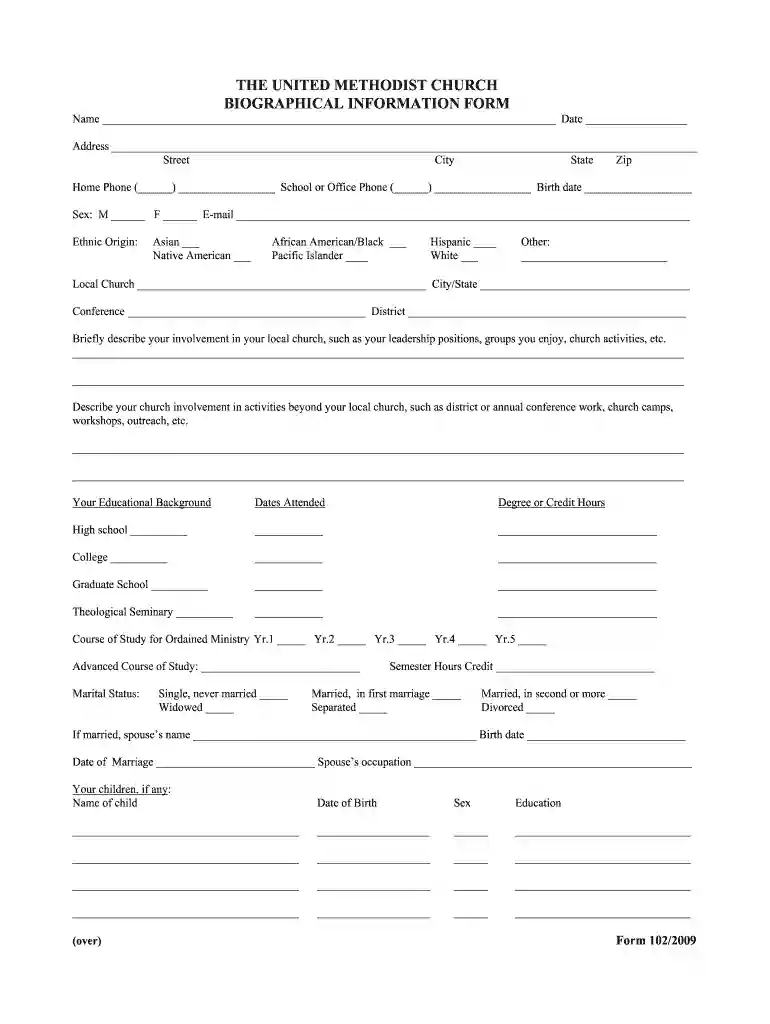
  1. Click ‘Get Form’ to open it in the editor.
  2. Begin by entering your name and date at the top of the form. Ensure accuracy as this information is essential for identification.
  3. Fill in your address details, including street, city, state, and zip code. This section helps establish your location.
  4. Provide your home and school or office phone numbers along with your birth date. This information is crucial for contact purposes.
  5. Indicate your sex and email address. These fields are important for demographic data collection.
  6. Select your ethnic origin from the provided options. If applicable, specify any other ethnicity in the space provided.
  7. Detail your local church involvement, including leadership roles and activities you participate in. This gives insight into your community engagement.
  8. Describe any broader church activities beyond your local church to highlight additional contributions.
  9. Complete the educational background section by listing schools attended along with degrees earned or credit hours completed.
  10. Fill out marital status and spouse details if applicable, ensuring all fields are completed accurately.
  11. List any children or dependents along with their relevant details such as date of birth and education.
  12. Finally, provide a summary of work experience and any clergy relationships with The United Methodist Church if relevant.

Start filling out your information blank sheet today using our platform for free!

be ready to get more

Complete this form in 5 minutes or less

Get form

Got questions?

We have answers to the most popular questions from our customers. If you can't find an answer to your question, please contact us.
Contact us
Suggestions for presenting content in a fact sheet: Keep text brief. Write in active voice. Define key words or concepts. Simplify complex ideas. Give examples to clarify a concept. Create graphics to reinforce information. Provide easy-to-follow steps to describe a process. Keep graphics simple and easy-to-understand.
What is an information sheet? The purpose of an information sheet is to provide potential participants with the information they need in order to make an informed choice about taking part in your research. The information offered should be clear, concise, and understandable.
Questions to include on your personal data sheet form Full Name. Date of Birth (MM/DD/YYYY) Gender (Male, Female, Other) Home Address. Email Address. Phone Number. Nationality.
Creating an Effective Fact Sheet: Steps Step 1: Define Your Purpose. Defining the purpose of your fact sheet is crucial. Step 2: Identify Your Audience. Step 3: Gather Pertinent Data. Step 4: Format Your Fact Sheet. Step 5: Design for Readability. Step 6: Review and Edit. Step 7: Disseminate Your Fact Sheet.
Easy to read: As weve mentioned before, fact sheets comprise lots of white spaces, bullet points, and bold headings. On top of that, they are usually very visual in nature,e with key information presented using tables, graphs, and charts that are easy to read and grasp.

Security and compliance

At DocHub, your data security is our priority. We follow HIPAA, SOC2, GDPR, and other standards, so you can work on your documents with confidence.

Learn more
ccpa2
pci-dss
gdpr-compliance
hipaa
soc-compliance
be ready to get more

Complete this form in 5 minutes or less

Get form