Type text, add images, blackout confidential details, add comments, highlights and more.
02. Sign it in a few clicks
Draw your signature, type it, upload its image, or use your mobile device as a signature pad.
03. Share your form with others
Send va beneficiary form via email, link, or fax. You can also download it, export it or print it out.
How to use or fill out VA Form 29-336 with Our Platform
Ease of Setup
DocHub User Ratings on G2
Ease of Use
DocHub User Ratings on G2
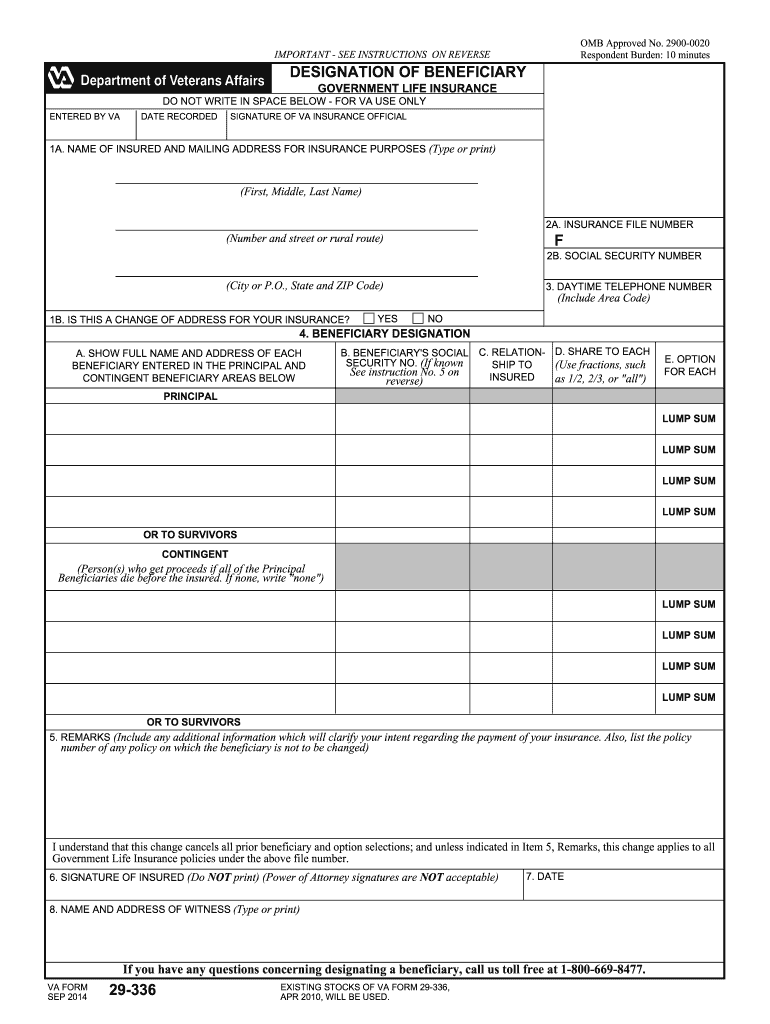
Click ‘Get Form’ to open VA Form 29-336 in the editor.
Begin by entering your name and mailing address in Section 1A. Ensure you type or print clearly for accuracy.
In Section 2A, input your insurance file number and your Social Security number in Section 2B. If this is a change of address, indicate it in Section 1B.
Provide your daytime telephone number in Section 3, including the area code.
In Section 4, list each beneficiary's full name and address. Include their Social Security number if known, relationship to you, share percentage, and option for each beneficiary.
Use Section 5 for any remarks that clarify your intent regarding the payment of insurance or to list policies not included in this designation.
Sign and date the form in Sections 6 and 7. A witness must also provide their name and address in Section 8.
Start using our platform today to easily complete VA Form 29-336 online for free!
VA Form 29 336aVA form 29-336 Designation of BeneficiaryVA Form 29 4125 pdf downloadVA Form 29 4125 onlineVA Form 29 888VA form 29-1546VA claim Form 29 4125eVA Form 29-4125 e Claim for One Sum Payment
Security and compliance
At DocHub, your data security is our priority. We follow HIPAA, SOC2, GDPR, and other standards, so you can work on your documents with confidence.
A Quantitative Decision Framework for Assessing Navy
Jun 30, 2015 Respondents should be aware that notwithstanding any other provision of law, no person shall be subject to any penalty for failing to complyRead more
Update Your Insurance Beneficiary - Life Insurance
If the Veteran is competent and is able to sign his name, he should complete and sign form 29-336, Designation of Beneficiary and Optional Settlement; OR; IfRead more
Cookie consent notice
This site uses cookies to enhance site navigation and personalize your experience.
By using this site you agree to our use of cookies as described in our Privacy Notice.
You can modify your selections by visiting our Cookie and Advertising Notice.