Definition & Meaning
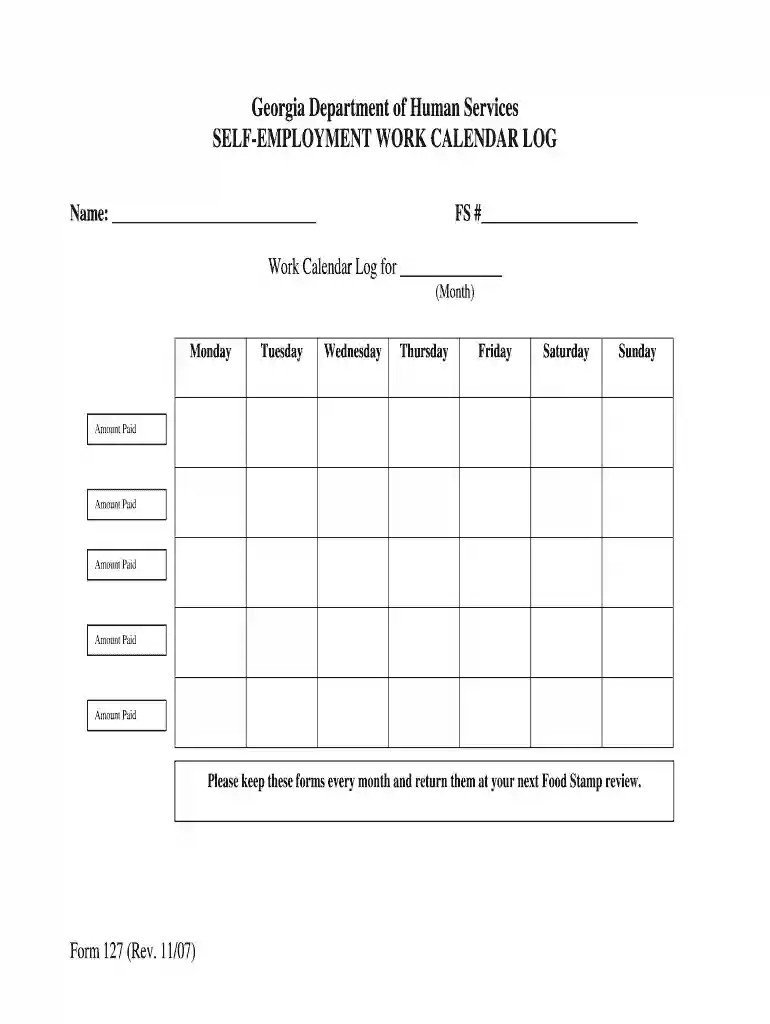
The "Self-Employment Work Calendar Log" is a crucial form designed to help self-employed individuals record their work activities and payments systematically. This form facilitates accurate tracking of income and work hours, which is essential for financial management and tax reporting. It serves as an organized ledger of one's business operations, ensuring all essential details are documented for legal and personal reference. Typically, such logs aid individuals in maintaining a comprehensive record for periodic reviews, such as during a Food Stamp review process conducted by the Georgia Department of Human Services.
Key Components
- Work Hours: Records the daily hours worked, capturing both start and end times.
- Payments Received: Documents the income received from various clients or projects.
- Client Details: Includes information about clients or companies for whom services were rendered.
- Project/Service Description: Provides a brief overview of the tasks or projects completed.
How to Use the Self-Employment Work Calendar Log
Using the Self-Employment Work Calendar Log ensures that individuals adhere to organized work tracking practices. Here are the essential steps:
- Record Daily Activities: At the end of each workday, fill out the hours worked, tasks completed, and income earned. Consistency in daily entries ensures accuracy.
- Weekly Review: At week's end, review the completed entries to verify that all activities are accurately captured.
- Monthly Summary: Compile the weekly logs into a monthly overview. This helps in identifying income patterns and tracking business growth.
Best Practices
- Detailing Tasks: Clearly describe tasks to avoid ambiguity, which assists during audits or reviews.
- Accuracy in Entries: Regularly update entries to reduce errors and omissions.
Steps to Complete the Self-Employment Work Calendar Log
Completing this log involves several straightforward steps:
- Gather Necessary Information: Before starting, collect all required details, such as client contacts, project details, and payment histories.
- Organize by Day: Allocate a specific section for each day's activities to maintain clarity and simplicity.
- Input Data: Use accurate time entries for all projects or tasks completed daily.
Step-by-Step Breakdown
- Start Day Entry: Begin by recording the date and day.
- Record Work Hours: Note start and finish times for each task.
- List Income Sources: Specify payment type (cash, check, bank transfer) and denote any pending payments.
Key Elements of the Self-Employment Work Calendar Log
Several critical components are necessary for the effective use of this log:
- Date and Duration: Clearly label each entry with specific dates and times.
- Task Specification: List all tasks in detail to foster clear and comprehensive understanding.
- Payment Received/Expected: Clearly annotate all revenue streams, whether received or pending.
Critical Fields
- Client/Project Names: Ensures clarity on which project or client the work was for.
- Payment Terms: Transparency on payment deadlines and any discrepancies.
Legal Use of the Self-Employment Work Calendar Log
This form has significant legal implications, especially concerning taxation and benefit eligibility:
- Income Verification: The entries serve as proof of income for tax audits or when applying for benefits.
- Contractual Compliance: Ensures adherence to contractual obligations with clients, reinforcing professional integrity.
Compliance Considerations
- Accuracy: Misstated entries can lead to legal penalties or loss of benefits.
- Record Retention: Ensure all logs are securely stored for future reference or legal verification.
Examples of Using the Self-Employment Work Calendar Log
Several real-world scenarios illustrate the utility of this log:
- Freelancers: A freelance graphic designer might use the log to document each project worked on and the corresponding hours, ensuring proper billing and income reporting.
- Small Business Owners: Entrepreneurs running a small consultancy can track team activities and client billings, enhancing operational transparency.
Case Study
- Consultant: By maintaining a daily log, a business consultant can provide detailed reports to clients, ensuring transparency about work done and facilitating timely payments.
State-Specific Rules for the Self-Employment Work Calendar Log
While the log primarily addresses federal requirements, certain states might have specific conditions:
- Georgia-Specific Requirements: In Georgia, this form might be crucial for periodic state-mandated reviews like Food Stamp eligibility checks.
- Compliance Variation: Some states require additional documentation within the log, particularly if government assistance is involved.
Typical User Profiles
- Independent Consultants: Those who need an accurate reflection of their client interactions and service delivery.
- Seasonal Workers: Individuals with fluctuating income cycles, requiring precise documentation to understand cash flows.
Important Terms Related to the Self-Employment Work Calendar Log
Understanding specific terminology assists in the accurate use of this log:
- Gross Income: Total earnings before deductions; crucial for tax calculations.
- Net Income: Earnings after all expenses; used for personal financial management.
- Billable Hours: Time charged to clients, supporting invoice creation and payment tracking.
Clarifications
- Pending Payments: Income expected but not yet received, influencing cash flow management.
- Expense Tracking: Although not part of this form, relevant for understanding complete business health.
All sections above have been tailored to provide in-depth insights, utilization strategies, and legal context for the "Self-Employment Work Calendar Log," fulfilling both practical and compliance needs.