




01. Edit your form online
Type text, add images, blackout confidential details, add comments, highlights and more.

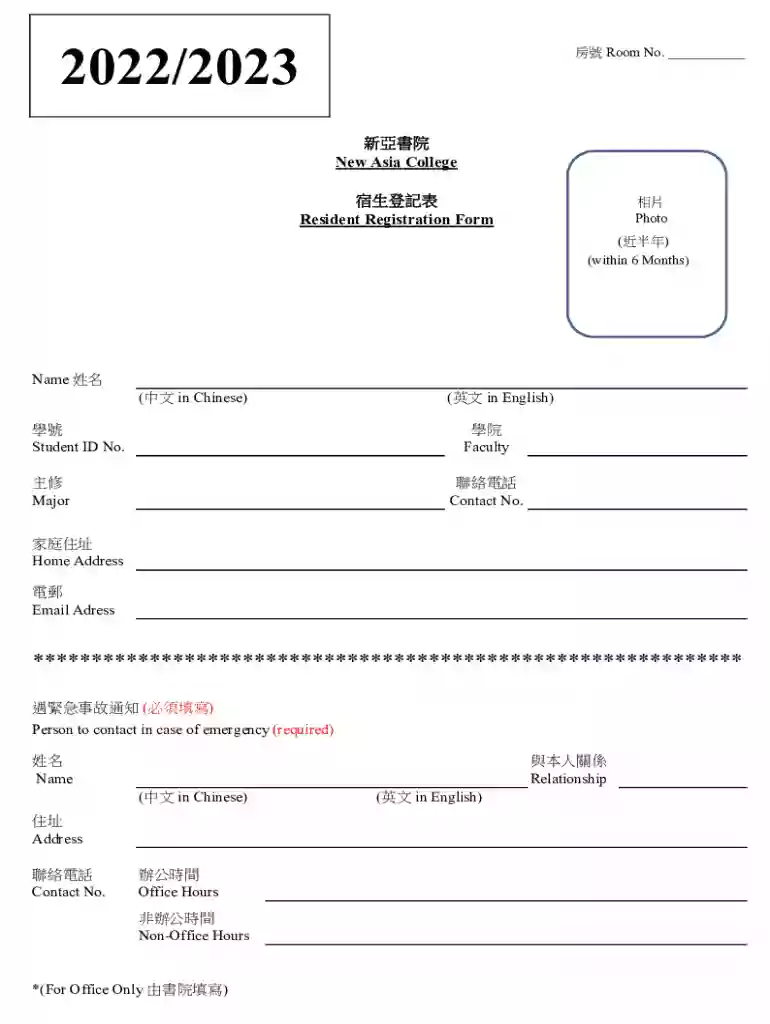
Type text, add images, blackout confidential details, add comments, highlights and more.

Draw your signature, type it, upload its image, or use your mobile device as a signature pad.

Send it via email, link, or fax. You can also download it, export it or print it out.
The "Resident Registration Form xlsx" is a comprehensive document used primarily by educational institutions, such as New Asia College, to collect vital personal information from students. This form is essential for maintaining accurate student records and facilitating communication between students and administrative bodies. It requires entries in both English and Chinese, catering to a diverse student body.
The form includes several sections where students provide their name, student ID, faculty, major, contact details, and emergency contact information. This information helps in various administrative processes, including enrollment, housing requests, and student services. The structure of the form in an Excel spreadsheet, indicated by the "xlsx" format, allows for easy data organization and analysis.
The Resident Registration Form xlsx is designed to streamline the collection of student information. Here are the steps to effectively use this form:
Download and Open: Start by downloading the xlsx file onto your device. Ensure you have the necessary software to open Excel files, such as Microsoft Excel or Google Sheets.
Enter Personal Information: Fill out the fields with your personal data. The form typically includes sections for your name, contact number, email address, and emergency contact information. Ensure accuracy as this data will be used for official purposes.
Complete Academic Details: Enter your student ID, faculty, and major. This information is crucial for your academic records and future interactions with college departments.
Review and Save: Carefully review all the details before saving the document. Confirm that you have entered information in both English and Chinese, as required.
Submit as Required: Depending on the institution’s process, you may need to submit the form digitally via email or through a dedicated online portal.
Completing the Resident Registration Form xlsx involves several detailed steps to ensure all required information is captured accurately. Follow these steps to complete the form efficiently:
Prepare Necessary Information: Before you begin, gather all the relevant information including your student ID, academic history, and emergency contact details.
Open the Form: Use a compatible application to open the xlsx file. Confirm that all sections are visible and no elements appear distorted.
Input Details Systematically: Work through the form field by field. Begin with personal information, followed by academic details, and then emergency contacts. Use the tab key for seamless navigation between fields.
Ensure Dual-Language Entries: Fill in both English and Chinese sections where applicable. This dual-language requirement is often mandatory in bilingual institutions.
Check for Completion: Verify that you have filled in all mandatory sections. Use any built-in validation features to ensure no fields are left blank.
Finalize and Save: Once complete, save the form to prevent data loss. Use a descriptive file name for easy reference.
Submission: Follow the specified submission process—either upload to a portal, send via email, or submit a physical copy if necessary.
The Resident Registration Form xlsx plays a crucial role for students and the institution alike:
The form includes several critical components, each serving distinct purposes:
Educational institutions might adapt the Resident Registration Form xlsx to comply with state-specific regulations. While the form's core components remain consistent, certain aspects might vary:
The primary users of the Resident Registration Form xlsx are:


The xlsx format of the Resident Registration Form ensures broad compatibility across various platforms:
We've got more versions of the Resident Registration Form xlsx form. Select the right Resident Registration Form xlsx version from the list and start editing it straight away!
At DocHub, your data security is our priority. We follow HIPAA, SOC2, GDPR, and other standards, so you can work on your documents with confidence.



please fill out the form here! Members can scan the code to quickly create a form in the Autodesk Forma mobile app. Resident Engineer / Construction Manager
Download the blank Visitors Worksheet MS Excel template. Attach the MS Excel file (.xlsx) of your completed spreadsheet. For visitors who reside in the United
Individual Registration Form If you moved from one Stow address to another, complete this form so we can update your account with your new residence.Read more


