




01. Edit your form online
Type text, add images, blackout confidential details, add comments, highlights and more.

Type text, add images, blackout confidential details, add comments, highlights and more.

Draw your signature, type it, upload its image, or use your mobile device as a signature pad.

Send it via email, link, or fax. You can also download it, export it or print it out.
The "Please use this Renewal Application if your certificate expires after August 31, 2017" refers to a specific renewal form associated with the X-Ray Technician Limited Permit managed by the California Department of Public Health's Radiologic Health Branch. This application is essential for professionals whose certifications require renewal after the mentioned date, ensuring they meet the standards and regulations set for radiologic practices in California. This renewal process helps maintain safety standards and ensures that technicians are up-to-date with their professional knowledge.
To effectively use this renewal application, you must first ensure that your certification is indeed due for renewal after August 31, 2017. The form can be downloaded from the official California Department of Public Health website or obtained through the Radiologic Health Branch. Once you have the form, fill in the necessary personal and certification details accurately. This includes providing information about your current certification and the completion of any required continuing education credits.
Gather Required Information: Before starting, collect all relevant personal and certification data, including your current certification number and evidence of completed continuing education.
Fill in the Form Accurately: Complete the sections dealing with your personal details and professional credentials without leaving any required fields blank.
Attach Supporting Documents: Include evidence of your completed continuing education credits and any other supporting documentation as specified.
Submission: Review the completed form for accuracy, and then submit it through the specified methods—either online, through mail, or in person.
Completing the renewal application involves several key steps to ensure accurate and timely processing.
Review Form Requirements: Begin by reading all instructions provided with the form to understand what information is required.
Verify Continuing Education Credits: You must have completed 24 continuing education credits within the past two years. Gather certificates or proof to attach to your application.
Payment of Fees: Determine if there are any fees associated with renewing your certification and prepare to submit payment as required.
Double-Check Information: Ensure all details supplied on the form are correct to avoid processing delays.
Submit the Application: Send your completed application along with the required documents and payment via the form submission method of your choice.
For example, a certified X-Ray Technician nearing their certification expiration date would gather their continuing education certificates, fill out the renewal form, and submit it with payment via mail ahead of the due date. Double-checking for completeness ensures their application is processed without hitches.
To complete the renewal application, several documents are mandatory.
Ensuring these documents are attached helps in a smooth renewal process.
Eligibility for using this renewal application hinges on specific professional and educational standards.


These criteria ensure that only qualified individuals continue to practice legally within California.
Understanding the legal implications and requirements for using the application ensures compliance with state regulations.
By staying informed of these legal aspects, applicants protect their careers and ensure continued compliance.
Several methods are available for submitting the renewal application, providing flexibility for different preferences.
Each method offers distinct advantages, catering to the individual preferences and needs of applicants.
We've got more versions of the Please use this Renewal Application if your certificate expires after August 31, 2017 form. Select the right Please use this Renewal Application if your certificate expires after August 31, 2017 version from the list and start editing it straight away!
At DocHub, your data security is our priority. We follow HIPAA, SOC2, GDPR, and other standards, so you can work on your documents with confidence.

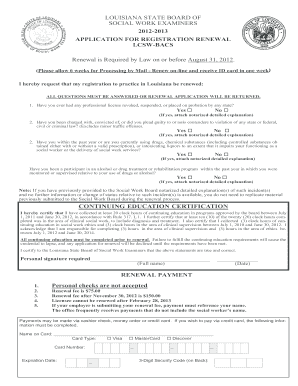

If not renewed on time, the certificate becomes inactive but may still be renewed with the required CPE. You will not be required to retake exams.
You have until August 31, 2023 to reDocHub, and should then reDocHub every three years thereafter. My concealed carry permit was issued in September 2020.Read more


