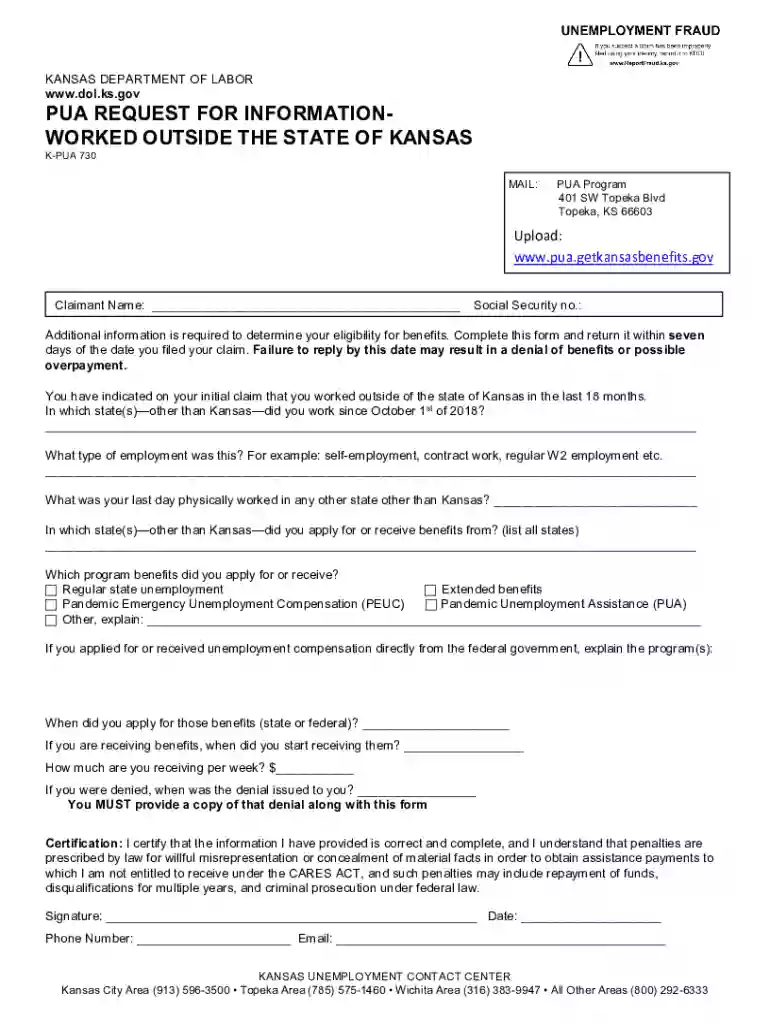
K pua 735 form 2026

Get Form
kdol login Preview on Page 1

Here's how it works

01. Edit your kdol login online
Type text, add images, blackout confidential details, add comments, highlights and more.

02. Sign it in a few clicks
Draw your signature, type it, upload its image, or use your mobile device as a signature pad.

03. Share your form with others
Send kansas pua redetermination notice via email, link, or fax. You can also download it, export it or print it out.

How to use or fill out k pua 735 form with our platform

Form edit decoration
9.5
Ease of Setup
DocHub User Ratings on G2
9.0
Ease of Use
DocHub User Ratings on G2
  1. Click ‘Get Form’ to open the k pua 735 form in the editor.
  2. Begin by entering your Claimant Name and Social Security number in the designated fields. Ensure that this information is accurate as it is crucial for your eligibility assessment.
  3. In the section asking about employment outside of Kansas, list all states where you worked since October 1st, 2018. Be specific to avoid any delays in processing your claim.
  4. Indicate the type of employment you had, such as self-employment or W2 employment, in the provided field.
  5. Fill in the date of your last day physically worked outside Kansas and provide details on any benefits applied for or received from other states.
  6. Complete the certification section by signing and dating the form. Make sure to include your phone number and email for further communication.

Start filling out your k pua 735 form online for free today using our platform!

See more k pua 735 form versions

We've got more versions of the k pua 735 form form. Select the right k pua 735 form version from the list and start editing it straight away!
Versions Form popularity Fillable & printable
2020 4.9 Satisfied (41 Votes)
be ready to get more

Complete this form in 5 minutes or less

Get form

Got questions?

We have answers to the most popular questions from our customers. If you can't find an answer to your question, please contact us.
Contact us

Microsoft Word doesn’t have signing tools to generate legitimate eSignatures and enforceable paperwork. Fortunately, DocHub is an online eSignature-compliant editor that works with various document formats, such as .doc files. Sign in to your account and upload the Word edition of your kdol pua login from your device and cloud, or URL - our editor will automatically turn it into an editable PDF. Make all necessary alterations in your form and click Sign to generate your own legally-binding electronic signature. You will find four signing methods from which to choose.

As a comprehensive document editing platform, DocHub is accessible on mobile devices. Open DocHub in your choice of mobile browser and employ our intelligent mobile-friendly toolset to fill out your ks pua.

If you are eligible for regular unemployment benefits, weekly benefit amounts for claims effective before July 1, 2021 will be between $125 and $503 per week. For claims filed on or after July 1, 2021, weekly benefit amounts will be between $135 and $540 per week.
If your e-mail address changes for any reason, notify us right away. If you have questions for the division's Application Unit, contact (785) 296-4000 or kdol.wchearingnoticessent@ks.gov.
Complaint forms can be obtained at the Kansas Human Rights Commission's website at www.khrc.net or by calling our complaint intake unit at 1-888-793-6874 or (785) 296-3206.

Security and compliance

At DocHub, your data security is our priority. We follow HIPAA, SOC2, GDPR, and other standards, so you can work on your documents with confidence.

Learn more
ccpa2
pci-dss
gdpr-compliance
hipaa
soc-compliance
be ready to get more

Complete this form in 5 minutes or less

Get form

People also ask

If you need help with an unemployment application or claim, please call one of the numbers listed below. *This number is used for outbound calls to claimants and does not accept inbound calls....Business Hours. AgencyPhoneWC Mediation(785) 296-4000 option 2KDOL.WC@ks.gov20 more rows
Those who are eligible should receive payments Thursday or Friday via direct deposit. Claimants who selected to receive their benefits on a debit card that they did not previously have they should receive it within seven to 10 days.
The Pandemic Unemployment Assistance (PUA) provided up to 79 weeks of unemployment benefits to individuals not eligible for regular unemployment compensation or extended benefits due to COVID-19. PUA benefits ceased on September 4, 2021.
You can check the status of your claim, including the payment issue date, in your online Get Kansas Benefits account. If your online account indicates that payment has been issued, but you have not received the funds, please contact your financial institution.
Under the Continued Assistance Act, PUA is available from January 2, 2021 until March 13, 2021. Under the new American Rescue Plan Act of 2021 (ARP), PUA expired September 4, 2021.

pua redetermination letter