Pa dmv 2026

Get Form
pa dmv Preview on Page 1

Here's how it works

01. Edit your pa dmv online
Type text, add images, blackout confidential details, add comments, highlights and more.
02. Sign it in a few clicks
Draw your signature, type it, upload its image, or use your mobile device as a signature pad.
03. Share your form with others
Send pa permit physical form via email, link, or fax. You can also download it, export it or print it out.

How to use or fill out pa dmv with our platform

Form edit decoration
9.5
Ease of Setup
DocHub User Ratings on G2
9.0
Ease of Use
DocHub User Ratings on G2
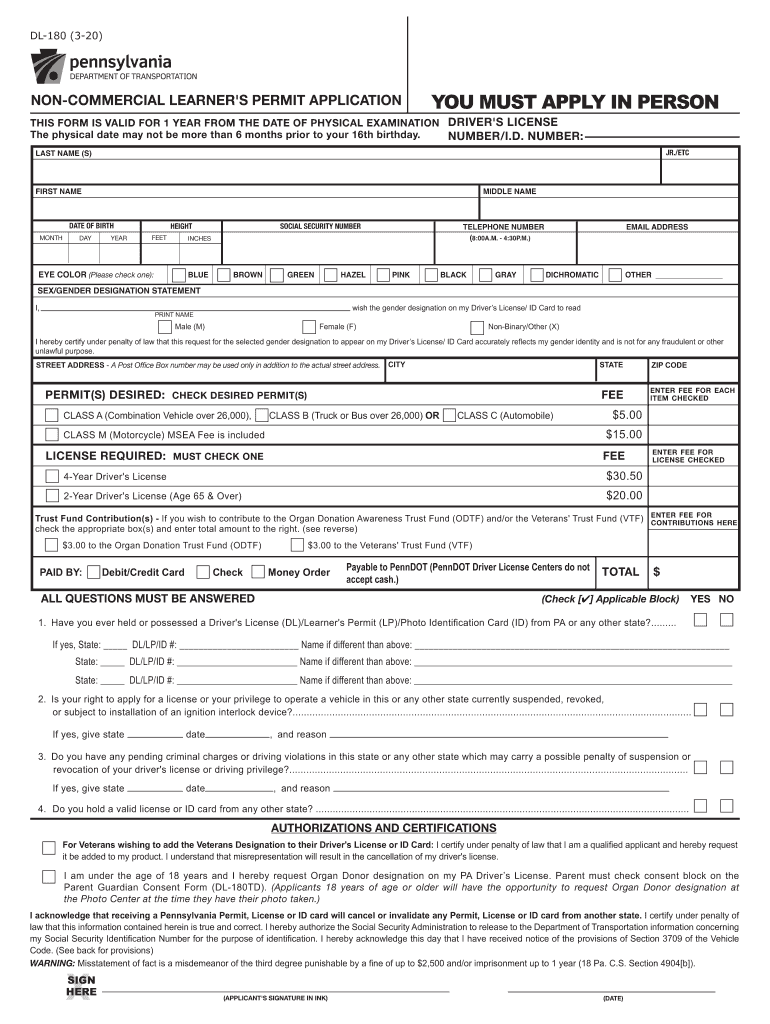
  1. Click ‘Get Form’ to open the DL-180 application in the editor.
  2. Begin by entering your personal information, including your last name, first name, middle name, and date of birth. Ensure accuracy as this information is crucial for your application.
  3. Fill in your height, eye color, and social security number. For eye color, select from the provided options.
  4. Provide your street address and contact details. Remember that a P.O. Box can only be used alongside your actual street address.
  5. Select the type of permit desired by checking the appropriate box and enter any applicable fees next to each selection.
  6. Answer all questions regarding previous licenses or permits held and any current suspensions or violations. This section is mandatory.
  7. Review the authorizations and certifications section carefully before signing. Ensure you understand all statements made.

Start filling out your pa dmv application today for free using our platform!

See more pa dmv versions

We've got more versions of the pa dmv form. Select the right pa dmv version from the list and start editing it straight away!
Versions Form popularity Fillable & printable
2020 4.8 Satisfied (106 Votes)
2018 4 Satisfied (63 Votes)
2018 4.3 Satisfied (63 Votes)
2017 4 Satisfied (63 Votes)
2016 4.4 Satisfied (56 Votes)
2014 4 Satisfied (39 Votes)
2010 4.1 Satisfied (51 Votes)
2008 4 Satisfied (56 Votes)
be ready to get more

Complete this form in 5 minutes or less

Get form

Got questions?

We have answers to the most popular questions from our customers. If you can't find an answer to your question, please contact us.
Contact us

With DocHub, it’s pretty simple. The editor offers users an add-on called DocHub for Gmail, which you can find in the Google Workspace Marketplace without being charged. Set it up and give it access to your Google account. Open your email with your penndot medical form for permit attached and click on the add-on button in the right-side panel. Log in to your DocHub account, and import the file to our editor, where you can complete it and sign.

If you edit your permit application with DocHub, you merely need a steady web connection and virtually any browser installed on your device. No need to set up any third-party applications or study guides. Just open a tab with DocHub, drag and drop your file, and modify it on the spot.

Proof of your Pennsylvania Residency Current, unexpired PA driver's license or photo ID card. PA vehicle registration card. Auto insurance card. A computer-generated utility bill showing your name and address.
What documents are acceptable as proof of residence Utility bill, e.g. municipal water and lights account or property managing agent statement. Bank statement from another bank on an official bank document or form. Municipal councillor's letter. Tax certificate. Recent active lease or rental agreement.
6 Points of ID At least one Primary Document. At least one Secondary Document. A verifiable Social Security Number (SSN), or Individual Tax Identification Number (ITIN), or a letter of ineligibility for an SSN from the Social Security Administration (SSA) ... Proof of address.
be ready to get more

Complete this form in 5 minutes or less

Get form

People also ask

The following are not eligible to renew via the Internet: Any Commercial Driver's License. Any license that is not currently valid (expired 6 months or more) Any license where the information on file is not current.
If you want to make a PA DMV appointment, you may be able to go online if you qualify to schedule an appointment. However, not everyone qualifies for scheduling an online appointment.
Pennsylvania does not have a grace period for an expired driver's license. If you are caught driving with an expired license, you face fines and potential jail time. During Covid-19, any expired Pennsylvania driver's license will be valid until August 1, 2021.
Where can I check the status of my license, and other driver information including points, address change, license plate, and vehicle registration? For license and vehicle information, please contact the Driver and Vehicle Services department at 1-717-412-5300.
You can schedule your appointment online using our Online Driver's Test Scheduling Service or by calling the Call Center at 1-717-412-5300.

penndot physical form