Matacare grant 2026

Get Form
matacare grant Preview on Page 1

Here's how it works

01. Edit your matacare grant online
Type text, add images, blackout confidential details, add comments, highlights and more.

02. Sign it in a few clicks
Draw your signature, type it, upload its image, or use your mobile device as a signature pad.

03. Share your form with others
Send csun emergency grant via email, link, or fax. You can also download it, export it or print it out.

How to use or fill out matacare grant with our platform

Form edit decoration
9.5
Ease of Setup
DocHub User Ratings on G2
9.0
Ease of Use
DocHub User Ratings on G2
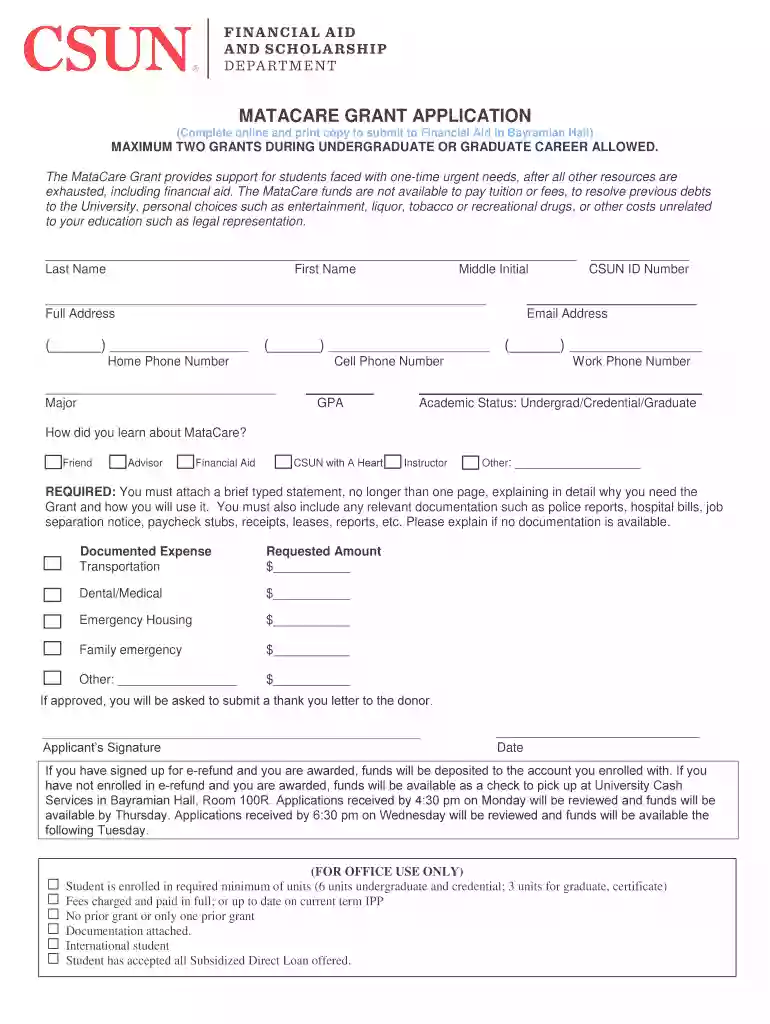
  1. Click ‘Get Form’ to open the MataCare Grant application in the editor.
  2. Begin by filling in your personal information, including your last name, first name, middle initial, and CSUN ID number. Ensure accuracy as this information is crucial for processing your application.
  3. Next, provide your full address and email address. This will be used for communication regarding your application status.
  4. Fill in your contact numbers: home phone, cell phone, and work phone if applicable. Also, indicate your major and GPA to give context to your application.
  5. Select your academic status (Undergrad/Credential/Graduate) and specify how you learned about the MataCare Grant from the provided options.
  6. Prepare a brief typed statement explaining why you need the grant and how you will use it. Attach any relevant documentation such as bills or reports directly within the editor.
  7. Complete the section detailing documented expenses by specifying amounts for transportation, dental/medical needs, emergency housing, family emergencies, or other costs.
  8. Finally, sign and date the application before submitting it through our platform for review.

Start filling out your MataCare Grant application today using our platform for free!

See more matacare grant versions

We've got more versions of the matacare grant form. Select the right matacare grant version from the list and start editing it straight away!
Versions Form popularity Fillable & printable
2022 4.8 Satisfied (179 Votes)
2019 4.4 Satisfied (37 Votes)
be ready to get more

Complete this form in 5 minutes or less

Get form

Got questions?

We have answers to the most popular questions from our customers. If you can't find an answer to your question, please contact us.
Contact us
Our grants are one of many ways that Meta gives back to communities where we have an operational data center. These grants support projects that address critical community needs by: Putting technology to use for community benefit. Enabling people to build strong, sustainable communities.
The Secretsos Small Business Grant offers $2,500 to help entrepreneurs overcome challenges and accelerate growth. To apply, business owners must be 21 or older and operate in eligible US states, excluding Alaska, Florida, Hawaii, New York, and Rhode Island.
The Meta Fund is a collective of successful entrepreneurs and seasoned operators that leverages world-class deal flow to co-invest in early-stage startups; we back approximately one startup every month over the course of a year.
You must be an active duty, veteran, reserve, or National Guard military personnel serving in the U.S. Armed Services, and their immediate family members* to be eligible for this grant.
You can apply for the SASSA R350 grant through any of the following methods: Online via the Official SASSA SRD Website. The most convenient and widely used method: Via WhatsApp. An easy mobile option for users with limited internet access: Via Moya App. A data-free application method available on smartphones:

Security and compliance

At DocHub, your data security is our priority. We follow HIPAA, SOC2, GDPR, and other standards, so you can work on your documents with confidence.

Learn more
ccpa2
pci-dss
gdpr-compliance
hipaa
soc-compliance
be ready to get more

Complete this form in 5 minutes or less

Get form