




Here's how it works



How to use or fill out brotherhood auto aid with our platform

- Click ‘Get Form’ to open the brotherhood auto aid application in the editor.
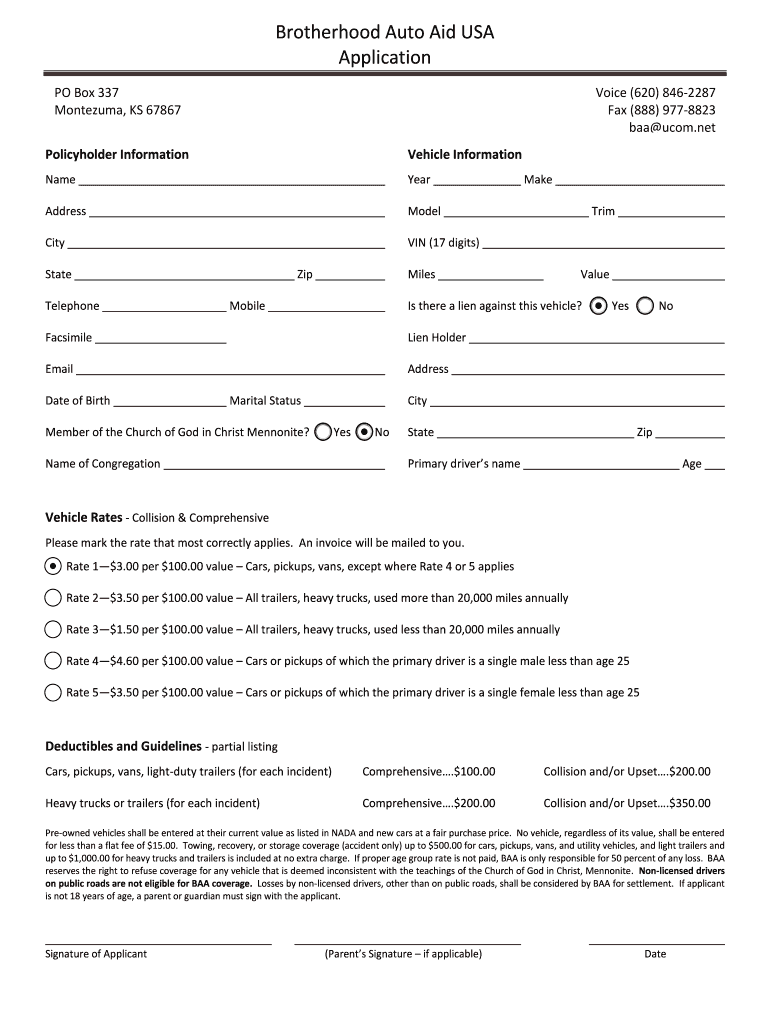
- Begin by filling out the Policyholder Information section. Enter your name, address, city, state, zip code, telephone number, mobile number, email address, and date of birth.
- Next, provide Vehicle Information. Input details such as the vehicle's year, make, model, VIN (17 digits), trim, miles driven annually, and its current value.
- Indicate if there is a lien against the vehicle by selecting 'Yes' or 'No'. If applicable, enter the lien holder's name and address.
- Complete the Vehicle Rates section by marking the rate that applies to your vehicle type based on its usage and driver demographics.
- Review the Deductibles and Guidelines for coverage details. Ensure you understand the implications of your selections.
- Finally, sign the application. If you are under 18 years old, ensure a parent or guardian signs as well before submitting.
Start using our platform today to fill out your brotherhood auto aid application easily and for free!
It's free
See more brotherhood auto aid versions
| Versions | Form popularity | Fillable & printable |
|---|---|---|
| 2018 | 4.9 Satisfied (39 Votes) |
Got questions?
What is the best way to send my aid plans baa for eSignature?
Upload your aid plans baa to DocHub (after you’ve created an account for this). If you need to complete fields in it, use appropriate tools from the upper pane. For example, add Signature Fields, assign each to specific party, and click on Sign → Request signatures from others. Personalize your message for your recipients and click Send Request. You can also send your paperwork by fax or as a Signing link instead of using email (you’ll find these options by navigating to the Menu → Send)
How do you edit brotherhood auto aid phone number online?
With DocHub, you have several convenient methods to edit your brotherhood auto aid phone number online. You can drag and drop the form and modify it straight at the DocHub site or use our browser extension to fill out your form right away. Additionally, you can modify your PDF on your smartphone, as DocHub is compatible with all the available mobile platforms.
Security and compliance
At DocHub, your data security is our priority. We follow HIPAA, SOC2, GDPR, and other standards, so you can work on your documents with confidence.
Learn more




