Ca control inventory 2026

Get Form
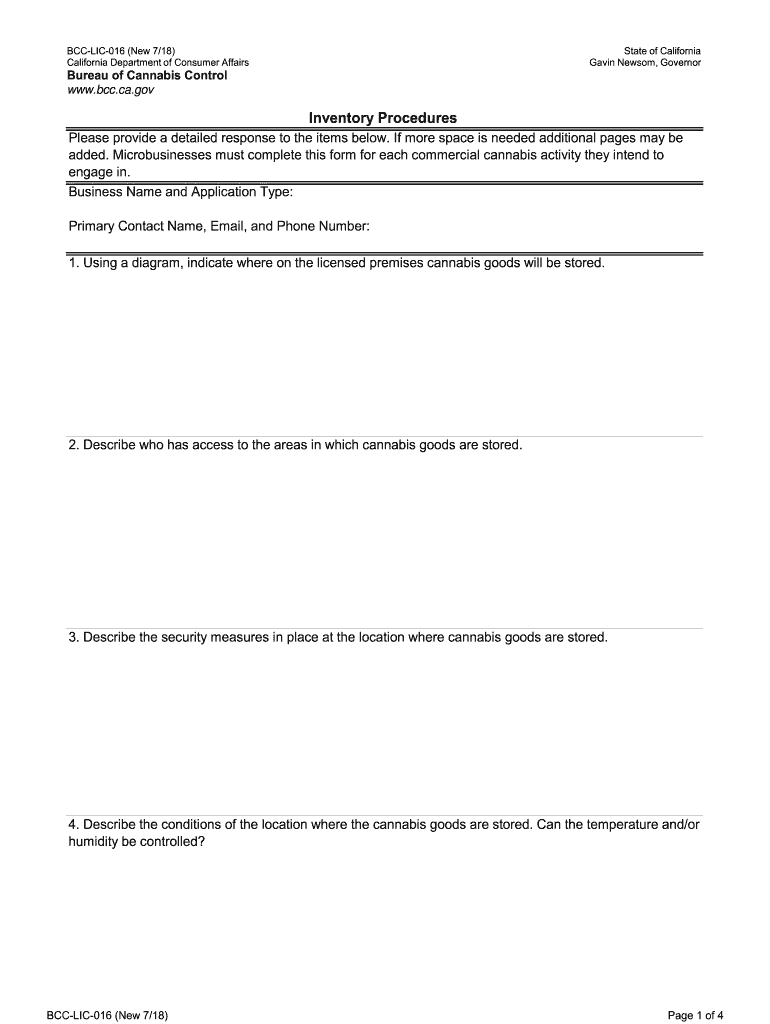
ca control inventory Preview on Page 1

Here's how it works

01. Edit your form online
Type text, add images, blackout confidential details, add comments, highlights and more.
02. Sign it in a few clicks
Draw your signature, type it, upload its image, or use your mobile device as a signature pad.
03. Share your form with others
Send it via email, link, or fax. You can also download it, export it or print it out.

How to use or fill out ca control inventory with our platform

Form edit decoration
9.5
Ease of Setup
DocHub User Ratings on G2
9.0
Ease of Use
DocHub User Ratings on G2
  1. Click ‘Get Form’ to open the ca control inventory in the editor.
  2. Begin by entering your Business Name and Application Type at the top of the form. This information is crucial for identifying your application.
  3. Fill in the Primary Contact Name, Email, and Phone Number. Ensure this contact is accessible for any follow-up inquiries.
  4. For section one, use a diagram to indicate where cannabis goods will be stored on your licensed premises. This visual representation helps clarify storage locations.
  5. In section two, describe who has access to these storage areas. Be specific about roles and responsibilities.
  6. Detail the security measures in place for cannabis goods storage in section three. Highlight any surveillance systems or protocols.
  7. Continue filling out sections four through ten, providing comprehensive descriptions of conditions, employee training, receiving processes, inventory records, and reconciliation methods as required.
  8. Finally, ensure you sign and date the form at the end before submitting it through our platform.

Start using our platform today to streamline your ca control inventory process for free!

See more ca control inventory versions

We've got more versions of the ca control inventory form. Select the right ca control inventory version from the list and start editing it straight away!
Versions Form popularity Fillable & printable
2018 4.8 Satisfied (85 Votes)
be ready to get more

Complete this form in 5 minutes or less

Get form

Got questions?

We have answers to the most popular questions from our customers. If you can't find an answer to your question, please contact us.
Contact us

With DocHub, you can rapidly sign your ca control inventory or any other document on iOS, even without setting up additional applications. You can access your DocHub account from any internet-connected browser and complete and sign your document in any preferred method with just a couple of clicks.

Having a swift editing platform like DocHub, you do not need anything but a browser and internet connection to edit your ca control inventory online quickly. Upload your document or get the appropriate form in DocHub’s catalog, open our editor with a single click, and complete it digitally. To revise your forms at any time, register a free account with DocHub.

Security and compliance

At DocHub, your data security is our priority. We follow HIPAA, SOC2, GDPR, and other standards, so you can work on your documents with confidence.

Learn more
ccpa2
pci-dss
gdpr-compliance
hipaa
soc-compliance
be ready to get more

Complete this form in 5 minutes or less

Get form