Type text, add images, blackout confidential details, add comments, highlights and more.
02. Sign it in a few clicks
Draw your signature, type it, upload its image, or use your mobile device as a signature pad.
03. Share your form with others
Send it via email, link, or fax. You can also download it, export it or print it out.
How to use or fill out mv2162 with our platform
Ease of Setup
DocHub User Ratings on G2
Ease of Use
DocHub User Ratings on G2
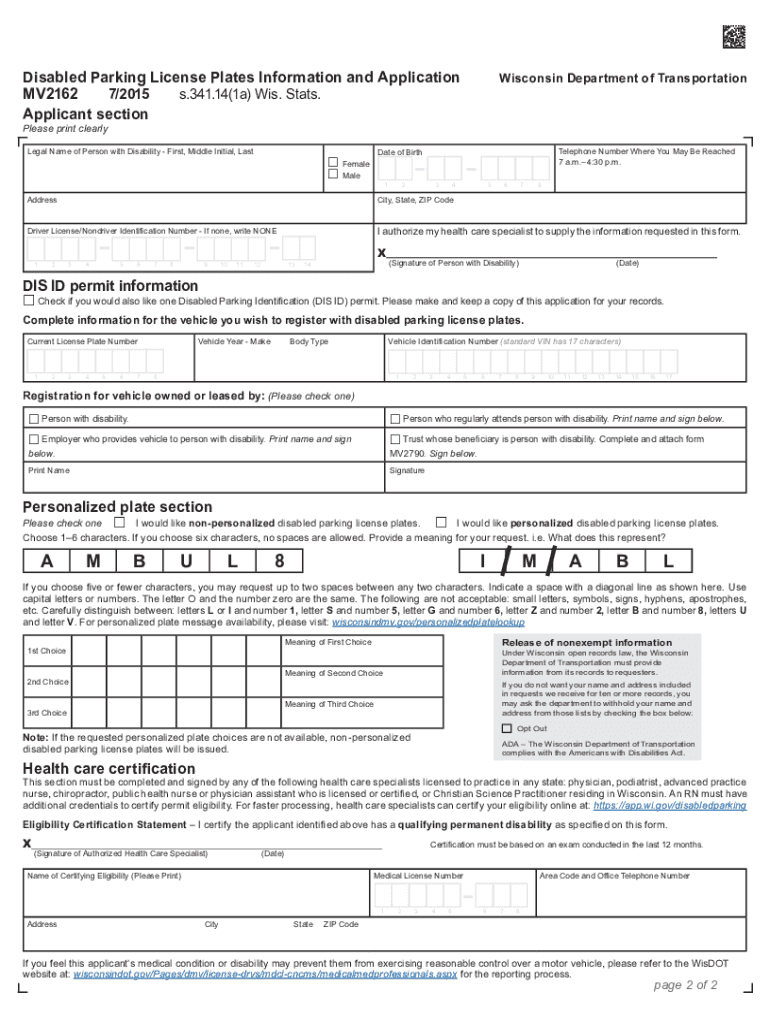
Click ‘Get Form’ to open the mv2162 application in the editor.
Begin by completing the Applicant section. Fill in your legal name, telephone number, date of birth, and address clearly.
Have a health care specialist complete the Health Care Certification section. Ensure they sign and provide their medical license number.
If you are requesting a Disabled Parking Identification (DIS ID) permit, check the appropriate box and keep a copy of this application for your records.
Complete the vehicle information section by providing details such as current license plate number, vehicle year, make, and VIN.
Decide if you want personalized plates by checking the corresponding box and providing your desired characters. Remember to follow the character guidelines provided.
Review all sections for accuracy before submitting your application to ensure smooth processing.
Start using our platform today to fill out your mv2162 form easily and for free!
MV2162 Disabled Parking License PLates Information and
Are you eligible? Any person certified by an authorized health care specialist as having a permanent disability is eligible for the disabled parking licenseRead more
Wis. Admin. Code Department of Transportation Trans 130.11
MV2162, Disabled Parking License Plates Application; MV2172, U.S. Veteran Disabled Parking License Plates Application; MV 2752, Important Information forRead more
Cookie consent notice
This site uses cookies to enhance site navigation and personalize your experience.
By using this site you agree to our use of cookies as described in our Privacy Notice.
You can modify your selections by visiting our Cookie and Advertising Notice.