Michigan vehicle registration request 2026

Get Form
michigan title application Preview on Page 1

Here's how it works

01. Edit your michigan title application online
Type text, add images, blackout confidential details, add comments, highlights and more.

02. Sign it in a few clicks
Draw your signature, type it, upload its image, or use your mobile device as a signature pad.

03. Share your form with others
Send michigan department of state application for title and registration via email, link, or fax. You can also download it, export it or print it out.

How to use or fill out Michigan Vehicle Registration Request with DocHub

Form edit decoration
9.5
Ease of Setup
DocHub User Ratings on G2
9.0
Ease of Use
DocHub User Ratings on G2
  1. Click ‘Get Form’ to open the Michigan Vehicle Registration Request in our editor.
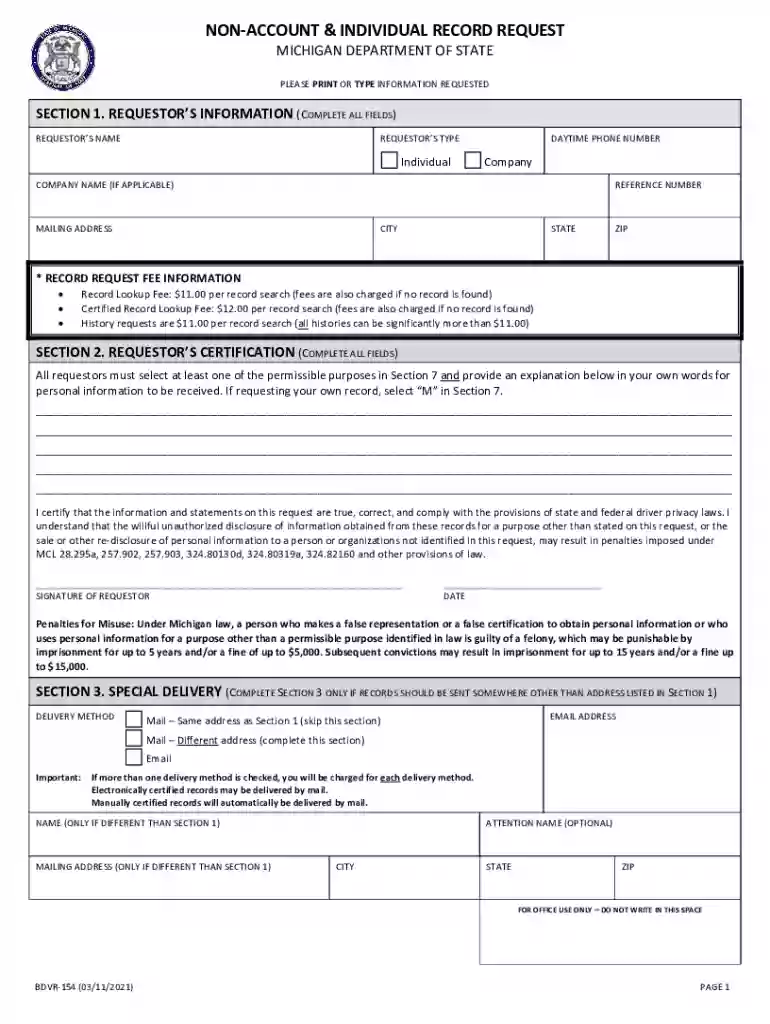
  2. Begin with Section 1, where you will enter your information. Fill in your name, daytime phone number, and specify if you are an individual or a company. If applicable, include your company name and reference number.
  3. In Section 2, certify your request by selecting a permissible purpose from Section 7 and providing an explanation for your request. Ensure all fields are completed accurately.
  4. If necessary, complete Section 3 for special delivery instructions. Specify whether records should be sent to a different address or via email.
  5. Proceed to Sections 4 and 5 if requesting driver’s records or vehicle registration information. Provide detailed information such as VIN, make, year, and any other relevant details.
  6. Finally, complete Section 8 by indicating your payment method and ensure all required sections are filled out before submitting the form.

Start using our platform today to streamline your document editing and form completion for free!

See more michigan vehicle registration request versions

We've got more versions of the michigan vehicle registration request form. Select the right michigan vehicle registration request version from the list and start editing it straight away!
Versions Form popularity Fillable & printable
2022 4.3 Satisfied (35 Votes)
2021 4.8 Satisfied (236 Votes)
2013 4.3 Satisfied (48 Votes)
2010 4.1 Satisfied (40 Votes)
2003 4 Satisfied (66 Votes)
be ready to get more

Complete this form in 5 minutes or less

Get form

Got questions?

We have answers to the most popular questions from our customers. If you can't find an answer to your question, please contact us.
Contact us

Of course, electronically drawing your signature is appropriate, but only if you utilize a tool that complies with industry regulations and policies. Consider DocHub, which ensures eSignature validity under ESIGN and UETA requirements. All you need to eSign your michigan title application pdf is an account with DocHub and an internet connection. When you open your paperwork in our editor, click Sign and choose the Draw option.

With DocHub, there are several convenient methods to edit your car registration pdf online. You can drag and drop the form and edit it straight at the DocHub site or use our browser extension to fill out your form right away. Additionally, you can edit your PDF on your phone, as DocHub is compatible with all the available mobile platforms.

Process of Vehicle Registration through SMS in Punjab Using your mobile phone, open the SMS window. Enter your vehicle's registration number and send it to 8785.
3-3.1 Authority. Section 217 of the Michigan Vehicle Code (MCL 257.217) requires a dealer to apply for title and registration on the retail purchaser's behalf within 15 days of vehicle delivery.
An individual can also call the records unit of the Minnesota Driver and Vehicle Services (DVS) on (651) 296-2940 or (651) 282-6555 (TTY) to make inquiries on how to check the owner of a license plate in Minnesota.

Security and compliance

At DocHub, your data security is our priority. We follow HIPAA, SOC2, GDPR, and other standards, so you can work on your documents with confidence.

Learn more
ccpa2
pci-dss
gdpr-compliance
hipaa
soc-compliance

People also ask

This online system allows you to print your vehicle/vessel registration record. Online records are not official documents; if you need an official record, complete and mail an INF1125 form to the address on the form.
The RD-108 form is a combined tax collection, vehicle title and registration application, and statement of vehicle sale. Each RD-108 must be typed and completed in full, with the exception of the Temporary Registration number. The department will not accept handwritten RD-108 documents.
The kiosks can print auto and motorcycle tabs. Watercraft tabs are mailed to customers. The new machines will add numerous driver-related transactions once the Michigan Department of State completes the second portion of its computer system upgrade in March 2021.
Under the Michigan Vehicle Code, if a required vehicle registration tax is not received on or before the expiration date of the registration plate, the Secretary of State is required to collect a late fee of $10.
Early: You can renew your registration, tab and license plate up to six months in advance of their expiration. Expiration date: In most cases, your tab and license plate will expire on your birthday.

car registration template