







Definition & Meaning
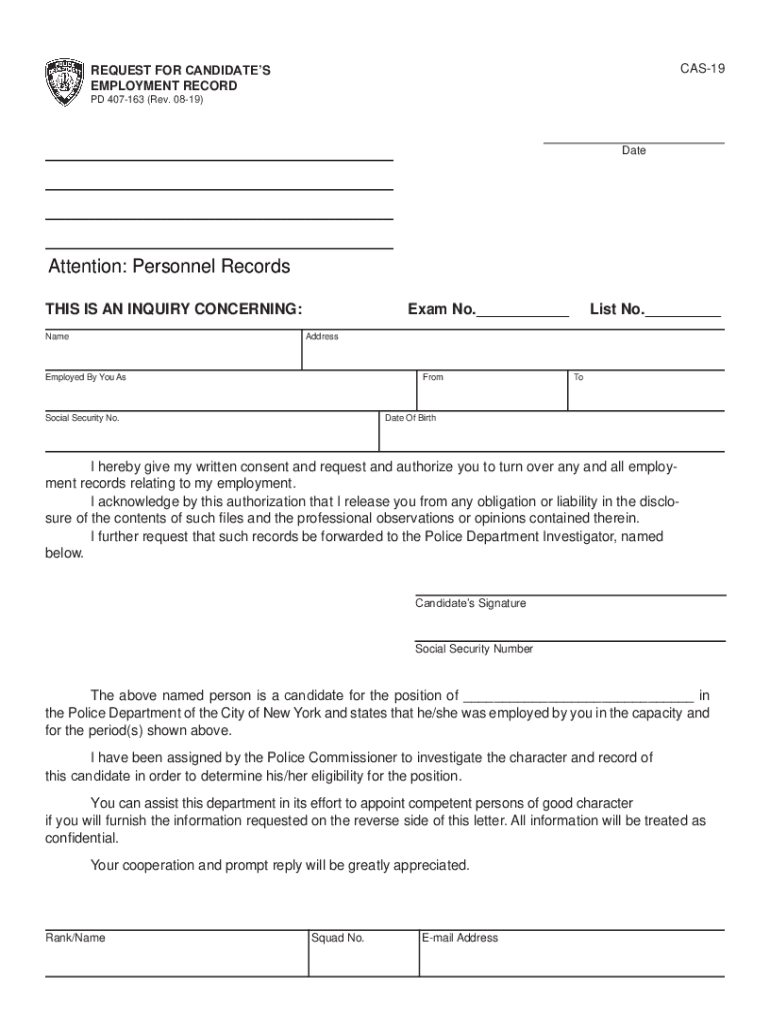
The CAS-19 Request for Candidates form is designed to facilitate the evaluation process for candidates applying for positions within the Police Department of the City of New York. This form functions as a request for access to a candidate’s employment records, allowing for a comprehensive review of their professional history and character traits. The detailed contents of this form help ensure that all necessary data is collected to assess the candidate’s suitability for the position they have applied for.
Key Elements of the Free Fillable CAS-19
The CAS-19 form comprises several critical sections that collect pertinent information. Key elements include:
- Personal Information: Covers essential details about the candidate, such as their full name, contact information, and identification particulars.
- Consent for Disclosure: This section requires candidates to authorize the release of their employment records to the Police Department. The consent must be explicitly granted for compliance.
- Employment History: Inquiries into the candidate’s previous employers, job roles, tenure, and performance evaluations. It may also solicit feedback on character traits relevant to law enforcement roles.
- Character References: Aimed at gathering insights from professional and personal references to gauge the candidate's suitability for the role.
Steps to Complete the Free Fillable CAS-19
Filling out the CAS-19 form involves a sequential process to ensure completeness and accuracy:
- Gather Required Information: Collect all personal and employment-related data necessary to complete the form.
- Fill Personal Information: Enter the candidate's name, address, and other identification details in the relevant sections.
- Provide Employment History: Detail previous employment, including names of employers, job titles, and employment durations.
- Complete Consent Section: The candidate must clearly sign and date the consent for disclosure, which is a crucial element of the form.
- Submit Character References: List individuals who can provide substantive references regarding the candidate's personal and professional attributes.
Who Typically Uses the CAS-19 Form
This form is primarily utilized by:
- Police Departments: Specifically, it is used by the New York City Police Department to evaluate potential recruits.
- Human Resources Personnel: HR staff involved in law enforcement recruitment find this form indispensable for verifying a candidate’s background.
- Candidates: Individuals seeking positions within the department must fill out and submit this form as part of their application.


How to Obtain the Free Fillable CAS-19
To access the CAS-19 form, individuals can:
- Download From Official Websites: Forms are often available on the Police Department or city government websites.
- Request in Person: Visit relevant department offices to obtain a hard copy of the form.
- Utilize Document Management Platforms: Platforms like DocHub offer editable and fillable versions of the CAS-19 to streamline the process.
Legal Use of the CAS-19
The CAS-19 form must be completed in compliance with legal standards to ensure:
- Data Protection Compliance: Personal data collected through the form is protected under data privacy laws.
- Valid Consent Requirements: The candidate's consent for record disclosure must be obtained in a legally binding manner.
- Proper Use of Information: Employment records acquired through the form are utilized solely for evaluating the candidate's eligibility for police recruitment.
Why Should You Use the CAS-19 Form
Utilizing the CAS-19 form offers several advantages:
- Thorough Candidate Assessment: It provides a comprehensive collection of a candidate's employment history and character assessments.
- Streamlined Recruitment Process: The form standardizes the information required, promoting efficiency in the background check process.
- Enhanced Decision-Making: With detailed insights into a candidate’s past performance and character, recruitment decisions become more informed and effective.
Software Compatibility for the CAS-19
To facilitate digital completion and submission, the CAS-19 can be compatible with:
- DocHub: This platform allows for easy editing, signing, and sharing of fillable forms.
- Adobe Acrobat: Useful for editing PDFs and ensuring form integrity.
- Other PDF Editors: Software like Foxit Reader or PDF-XChange offer similar functionality, enabling seamless online form handling.
Versions or Alternatives to the Free Fillable CAS-19
While the CAS-19 form is specific to law enforcement recruitment in New York City, alternative forms might be employed, such as:
- Other Jurisdictional Request Forms: Different cities or states may have their versions if they participate in similar recruitment processes.
- Digital Alternatives: Some departments may offer proprietary digital submission methods to avoid paper-based processes.




