Type text, add images, blackout confidential details, add comments, highlights and more.
02. Sign it in a few clicks
Draw your signature, type it, upload its image, or use your mobile device as a signature pad.
03. Share your form with others
Send georgia irp schedule via email, link, or fax. You can also download it, export it or print it out.
How to use or fill out t 239 with our platform
Ease of Setup
DocHub User Ratings on G2
Ease of Use
DocHub User Ratings on G2
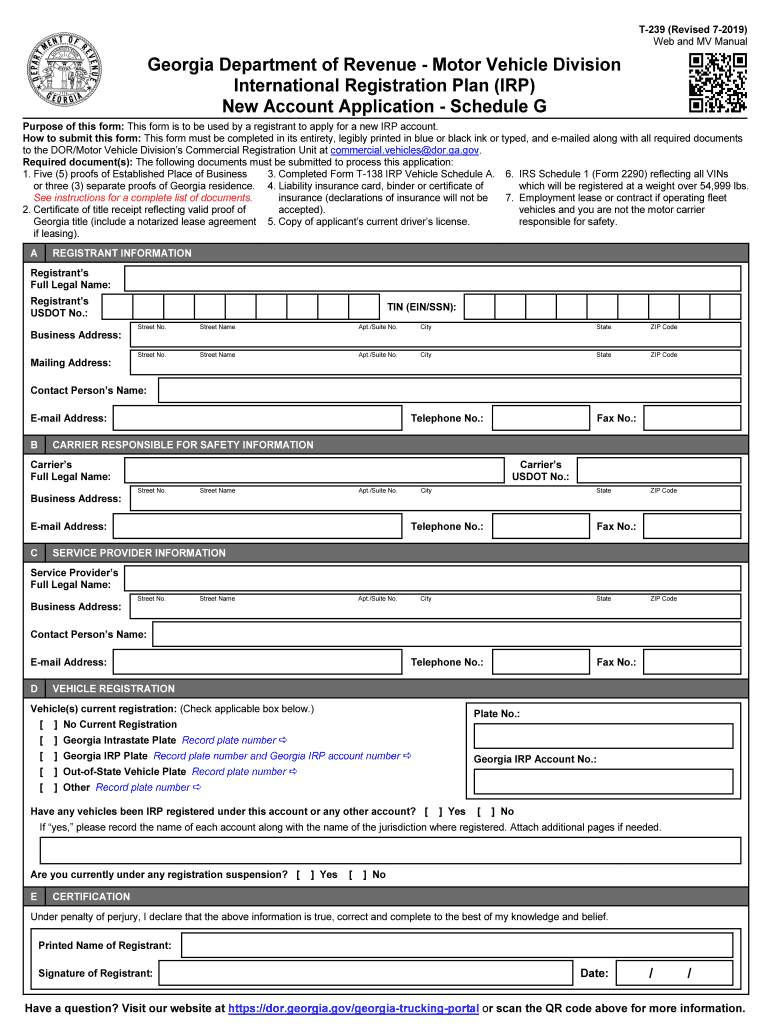
Click ‘Get Form’ to open the T-239 in the editor.
In Section A, enter the registrant’s full legal name, USDOT number, TIN, business address, mailing address, contact person’s name, e-mail address, telephone number, and fax number.
For Section B, if applicable, provide the carrier responsible for safety's full legal name and contact details.
In Section C, include information about any service providers that assisted in preparing the application.
Section D requires you to indicate your current registration status. Check the appropriate box and provide any necessary plate numbers or account details.
Finally, in Section E, certify that all provided information is true by signing and dating the form.
Start filling out your T-239 form online for free today!
T-239, Westinghouse type[le-2?] relay contraption | National
A collection primarily of 19th and early 20th century lantern slides relating mostly to engineering, agriculture, railroads, mining, and extractive industries
Kirkland, Rose Hill, Totem Lake, Brickyard PR, Bothell Single Route Reroute Stop Closure Stop Closure Sunday: To Kirkland Transit Center Route Map.Read more
Cookie consent notice
This site uses cookies to enhance site navigation and personalize your experience.
By using this site you agree to our use of cookies as described in our Privacy Notice.
You can modify your selections by visiting our Cookie and Advertising Notice.