Com Providers Colorado AnswersAnthem 2026

Get Form
anthem claim action request Preview on Page 1

Here's how it works

01. Edit your anthem claim action request online
Type text, add images, blackout confidential details, add comments, highlights and more.

02. Sign it in a few clicks
Draw your signature, type it, upload its image, or use your mobile device as a signature pad.

03. Share your form with others
Send it via email, link, or fax. You can also download it, export it or print it out.

Definition & Meaning

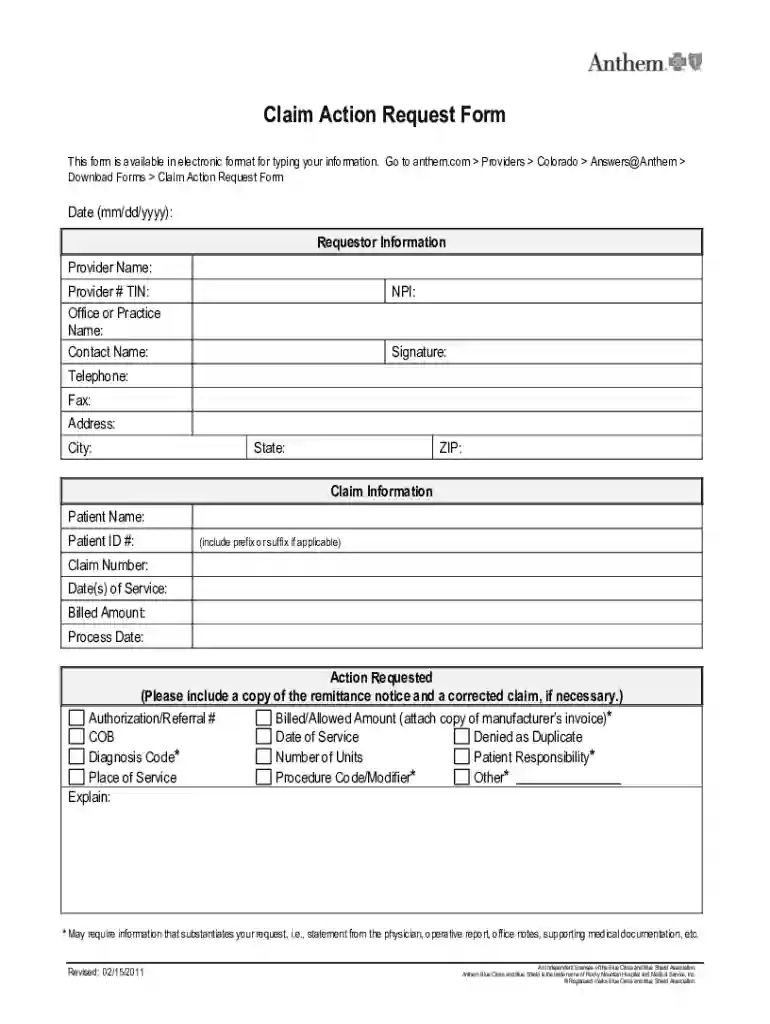
The "com Providers Colorado AnswersAnthem" form is a specific document designed for healthcare providers operating within Colorado who need to submit requests or claims related to Anthem insurance. This form serves as a medium through which providers can manage their claims processing efficiently, ensuring that services rendered are accurately billed and tracked. This form encompasses sections capturing essential provider and patient information, along with specific details concerning the claim and the resultant action desired by the submitting provider.

How to Use the com Providers Colorado AnswersAnthem

To utilize the "com Providers Colorado AnswersAnthem" form effectively, providers must first gather all relevant documentation and information related to the claim. This includes provider identification details, patient information, claims history, and any supporting documentation necessary for processing. Once assembled, providers can fill out the electronic form, ensuring all required fields are completed carefully. The completed form should then be submitted through the appropriate channel designated by Anthem, ensuring compliance with any submission guidelines provided by the insurer.

Steps to Complete the com Providers Colorado AnswersAnthem

  1. Gather Necessary Information: Before starting, ensure you have all required information, including provider details, patient information, and claim specifics.
  2. Fill Out the Form: Enter each section of the form with the required data, ensuring accuracy and completeness.
  3. Attach Supporting Documents: Include any additional documents that substantiate the claim or request you're submitting.
  4. Review and Verify: Double-check all entered information for accuracy and completeness to avoid processing delays.
  5. Submit the Form: Following the guidelines provided, submit the form through the designated Anthem channel, be it online or via mail.
  6. Follow Up: Monitor the status of your submission and be prepared to provide additional information if requested.

Key Elements of the com Providers Colorado AnswersAnthem

  • Provider Information: Includes details such as provider ID, name, and contact details.
  • Patient Information: Collects patient identification data critical for claim linkage.
  • Claim Details: Encompasses specifics like claim numbers, dates of service, and billed amounts.
  • Requested Action: Defines what action the provider is seeking, such as claim adjustments or appeals.
  • Supporting Documentation: Additional documents that lend weight to the request and ensure proper processing.

Legal Use of the com Providers Colorado AnswersAnthem

Using the "com Providers Colorado AnswersAnthem" form comes with legal responsibilities. Providers must ensure that all information submitted is truthful and accurate, reflecting the services rendered to the patient. Misrepresentation or fraudulent claims can result in severe penalties, including fines and disqualification from participating in Anthem insurance programs. Adhering to the guidelines ensures compliance with both state and federal regulations governing healthcare claims.

Form Submission Methods for the com Providers Colorado AnswersAnthem

  • Online Submission: The preferable method for many due to efficiency and speed. Anthem often provides a secure portal for form submission that requires login credentials for access.
  • Mail Submission: For those preferring physical copies, forms can be sent through the mail to the address provided by Anthem. This method requires ensuring all documents are correctly filled and signed.
  • In-Person Submission: Some providers may choose to deliver forms directly, though this option is less common and typically reserved for particular cases or institutions.

Penalties for Non-Compliance

Failure to comply with the regulations when submitting the "com Providers Colorado AnswersAnthem" form can lead to significant penalties. These may include:

  • Financial Penalties: Fines imposed by regulatory bodies for incorrect or fraudulent claims.
  • Provider Suspension: Temporary or permanent suspension from submitting future claims to Anthem.
  • Legal Action: In severe cases, legal proceedings may be initiated for fraudulent activities. Providers must ensure all submissions adhere to the specified guidelines to avoid these repercussions.

Important Terms Related to com Providers Colorado AnswersAnthem

  • Claim Adjustment: The process of modifying a claim based on new or corrected information.
  • Appeal: A formal request to review and reconsider a decision regarding a claim.
  • Provider ID: A unique identification number assigned to healthcare providers within Anthem’s database.
  • EOB (Explanation of Benefits): A statement from the insurance provider detailing what medical services were paid for on a claim.

Software Compatibility

"com Providers Colorado AnswersAnthem" forms may be compatible with various document management and tax preparation software, including:

  • TurboTax: Often used by individuals who need a streamlined method to manage forms and submissions.
  • QuickBooks: Ideal for handling a range of business-related financial documentation, including healthcare claims. Understanding software compatibility can streamline the process of managing and submitting these forms efficiently.

This comprehensive guide ensures that providers using the "com Providers Colorado AnswersAnthem" form are well-prepared to handle the form accurately and in compliance with all relevant guidelines.

be ready to get more

Complete this form in 5 minutes or less

Get form

Got questions?

We have answers to the most popular questions from our customers. If you can't find an answer to your question, please contact us.
Contact us
You must be at least 18 years old, have a high school diploma or equivalent, and pass background and reference checks. Additionally, all adults living in your home must clear these checks. Training in first aid, CPR, and other required courses is provided to ensure youre prepared.
New to Connecting Colorado? Visit ConnectingColorado.gov. Click Register as a Job Seeker on the login page. Follow the prompts to create your account.
Uploading a Resume or Documents Click the resume tab. Click Browse. (It will take you to the storage on the computer or you can access your flash drive.) Select the location of the document. Then select the document. Name the document. Click Attach. Now click Attach. Repeat steps 1-6 to add additional documents.
Connecting Colorado is the official online platform of Colorados public workforce system, designed to connect job seekers with career opportunities and support employers in finding skilled talent.

Security and compliance

At DocHub, your data security is our priority. We follow HIPAA, SOC2, GDPR, and other standards, so you can work on your documents with confidence.

Learn more
ccpa2
pci-dss
gdpr-compliance
hipaa
soc-compliance
be ready to get more

Complete this form in 5 minutes or less

Get form