Fillable Baptist Health release form - Fill io 2026

Get Form
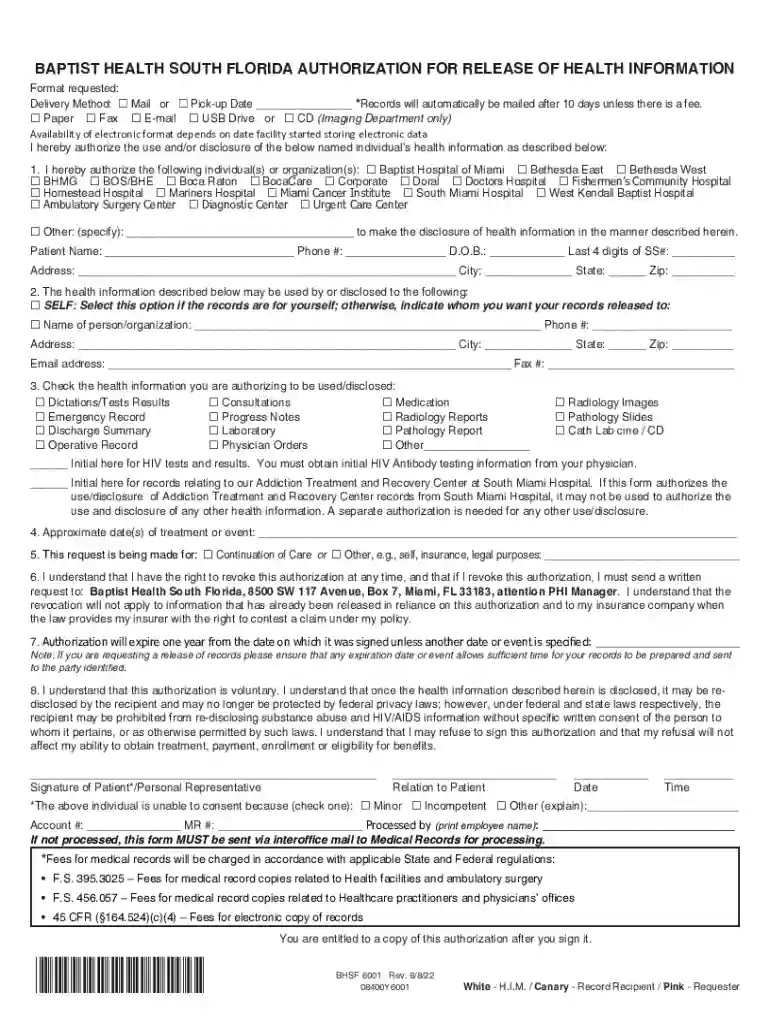
Fillable Baptist Health release form - Fill io Preview on Page 1

Here's how it works

01. Edit your form online
Type text, add images, blackout confidential details, add comments, highlights and more.

02. Sign it in a few clicks
Draw your signature, type it, upload its image, or use your mobile device as a signature pad.

03. Share your form with others
Send it via email, link, or fax. You can also download it, export it or print it out.

Definition & Meaning

The "Fillable Baptist Health release form" is a structured document used to authorize the release of health information held by Baptist Health South Florida. This form is essential for patients who wish to grant permission to medical facilities, insurance providers, or other entities to access their medical records. It includes comprehensive sections that gather information about the patient, specify which health records are to be disclosed, and designate the recipient of this information. Understanding its scope and purpose ensures compliance with privacy laws and seamless sharing of medical data for valid purposes.

Steps to Complete the Fillable Baptist Health Release Form

Completing the Baptist Health release form involves several straightforward steps to ensure accuracy and legitimacy:

  1. Patient Information: Enter your full name, date of birth, and contact information. This identifies you as the requestor and links to your health records.

  2. Specify Health Information: Clearly indicate which medical records or types of information you are authorizing for release. This may include treatment dates, specific test results, or entire medical histories.

  3. Recipient Details: Provide the name and contact information for the person or organization receiving the information. Ensure this aligns with your authorization purpose.

  4. Revocation Rights: Acknowledge the section that explains your right to revoke authorization at any time, ensuring you maintain control over your sensitive information.

  5. Authorization Signatures: Sign the form electronically or with a handwritten signature in the designated space. If applicable, witness signatures might be needed.

  6. Submission: Follow the instructions to submit the form. Available submission methods include digital platforms, mail, or in-person delivery, depending on preference or requirement.

Key Elements of the Fillable Baptist Health Release Form

The form comprises various sections, each critical for its purpose:

  • Patient Identification: Crucial for associating the form with the correct medical records.
  • Disclosure Purpose: Reasons such as medical treatment, insurance claims, or legal proceedings.
  • Authorized Parties: Identifies who can access and receive the disclosed information.
  • Health Information Details: Ensures only the necessary details are released.
  • Authorization Validity: Typically has a validity period after signing, requiring extensions if necessary.

Legal Use of the Fillable Baptist Health Release Form

This form must comply with the Health Insurance Portability and Accountability Act (HIPAA) regulations, which protect patient privacy. Patients must explicitly consent to the release of their health information, understanding that unauthorized disclosure could lead to legal complications. Legal requirements mandate clarity on which information can be shared and with whom, ensuring patient rights are respected.

How to Obtain the Fillable Baptist Health Release Form

The release form can be acquired through various platforms:

  • Online Access: Visit the Baptist Health South Florida website or DocHub.
  • Healthcare Facilities: Obtain a physical or digital copy directly from Baptist Health facilities.
  • Patient Portals: Users of Baptist Health’s patient portals may download and fill out the form digitally, expediting the release process.

State-Specific Rules for the Form

While the form generally falls under federal HIPAA guidelines, variations may occur depending on state privacy laws. In Florida, for instance, additional consent may be needed for sharing information related to mental health, substance abuse treatment, and HIV test results. Patients must verify compliance with both state and federal regulations when completing the form.

Examples of Using the Fillable Baptist Health Release Form

The form is versatile, serving multiple practical scenarios:

  • Care Coordination: Used to share patient records among different healthcare providers.
  • Insurance Claims Processing: Authorizes insurers to access necessary documents for claim evaluations.
  • Legal Proceedings: Facilitates the sharing of medical records with legal representatives or courts when required by case proceedings.

Important Terms Related to Fillable Baptist Health Release Form

Understanding key terms ensures correct form usage:

  • Authorization: Patient consent allowing information release.
  • Revocation: The process of withdrawing permission for data sharing.
  • Protected Health Information (PHI): Any information about health status, provision of health care, or health care payment that can be linked to an individual.
  • Compliance: Adhering to federal and state laws governing medical information release.
be ready to get more

Complete this form in 5 minutes or less

Get form

Got questions?

We have answers to the most popular questions from our customers. If you can't find an answer to your question, please contact us.
Contact us
You will receive an email when you have new information in your MyChart account. If you are not receiving these emails, please verify that we have the correct email address on file and that you have signed up to receive notifications. To do this, log in to MyChart and click My Account Notification on the left menu.
To respect HIPAA compliance rules, a signed HIPAA release form must be obtained from a patient before their protected health information can be shared with other individuals or organizations, except in the case of routine disclosures for treatment, payment or healthcare operations permitted by the HIPAA Privacy Rule.
DALLAS--(BUSINESS WIRE)-- Tenet Healthcare Corporation (NYSE: THC) today announced that it has completed the sale of its 70% majority ownership interest in Brookwood Baptist Health in Birmingham to Orlando Health consistent with previously disclosed terms.
On the MyChart login screen, click the Forgot Username? or Forgot Password? link for help. If you forgot both your username and password, start with the username first. You will be prompted to answer some security questions to verify your identity so you can recover your username or password.
(Baptist Health), located in Florida, has agreed to pay $1.5 million to resolve allegations that it violated the False Claims Act by knowingly causing its subsidiaries to offer discounts to patients to induce them to purchase or refer Baptist Health services reimbursed by federal health care programs.

Security and compliance

At DocHub, your data security is our priority. We follow HIPAA, SOC2, GDPR, and other standards, so you can work on your documents with confidence.

Learn more
ccpa2
pci-dss
gdpr-compliance
hipaa
soc-compliance

People also ask

Need more help? If you require further assistance, contact your My Baptist Chart help desk at 844-622-0622 to help you regain access to your My Baptist Chart account.
MyChart works best on up to date browsers such as Microsoft Edge, Mozilla Firefox, Safari and Google Chrome. You can download several of these browsers for free. For Microsoft Edge, go to Microsoft.com/edge. For Firefox, go to mozilla.org.
If you do not remember any of this information, you will have to contact your MyChart help desk at 800-318-4246 to help you regain access to your MyChart account.

Related links