Type text, add images, blackout confidential details, add comments, highlights and more.
02. Sign it in a few clicks
Draw your signature, type it, upload its image, or use your mobile device as a signature pad.
03. Share your form with others
Send it via email, link, or fax. You can also download it, export it or print it out.
How to use or fill out dla 1 with our platform
Ease of Setup
DocHub User Ratings on G2
Ease of Use
DocHub User Ratings on G2
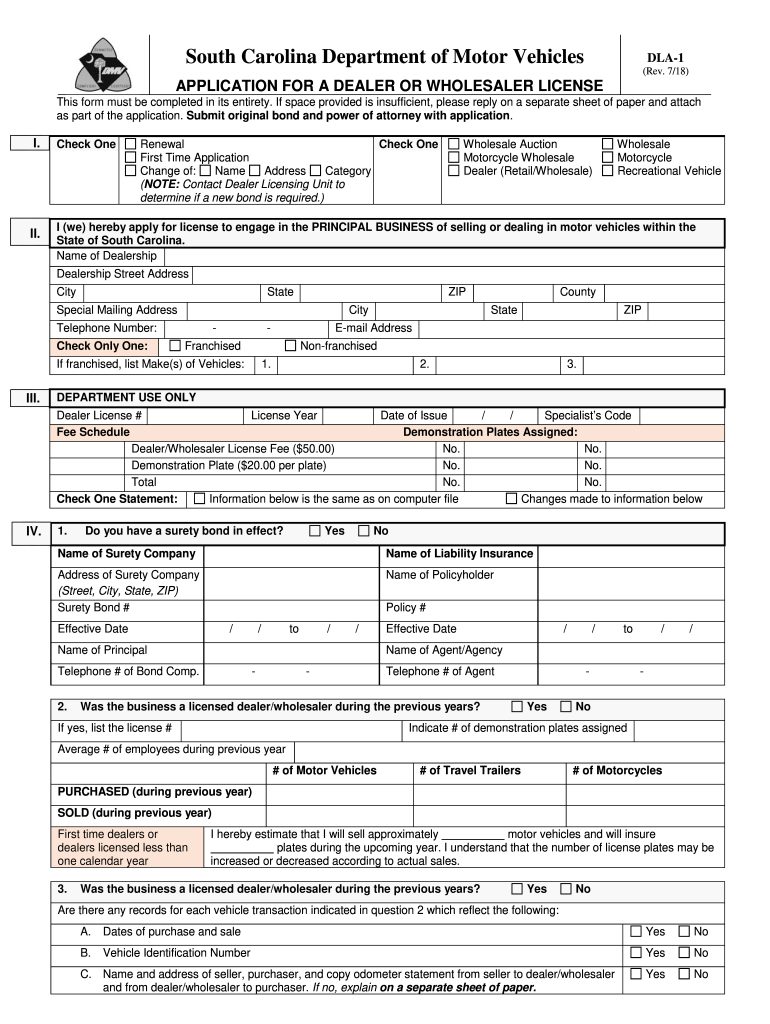
Click ‘Get Form’ to open the DLA-1 application in the editor.
Begin by selecting whether this is a renewal or a first-time application. Check the appropriate box in Section I.
Fill in your dealership's name, address, city, state, and ZIP code in Section II. If you have a special mailing address, include that as well.
Indicate if your dealership is franchised or non-franchised and list the makes of vehicles if applicable.
Proceed to Section IV and answer questions regarding your surety bond, sales tax number, and previous licensing status. Ensure all fields are completed accurately.
In Section V, sign and date the application to affirm that all information provided is true and correct before submitting it through our platform.
Start filling out your DLA-1 form online for free today!
Directed Learning Activities (DLAs) and Interactive Learning Activities (ILAs) are great tools designed to help you strengthen your grammar and writingRead more
HP DLA allows you to use the hp cd-writer drive like a diskette drive by using the drag-and-drop capability. Important: Before using HP DLA to copy filesRead more
DLA-1 - South Carolina Department of Motor Vehicles
DLA-1. (Rev. 12/2024). First time dealers or dealers licensed less than one calendar year. I hereby estimate that I will sell approximately motor vehicles andRead more
Cookie consent notice
This site uses cookies to enhance site navigation and personalize your experience.
By using this site you agree to our use of cookies as described in our Privacy Notice.
You can modify your selections by visiting our Cookie and Advertising Notice.