




01. Edit your form online
Type text, add images, blackout confidential details, add comments, highlights and more.

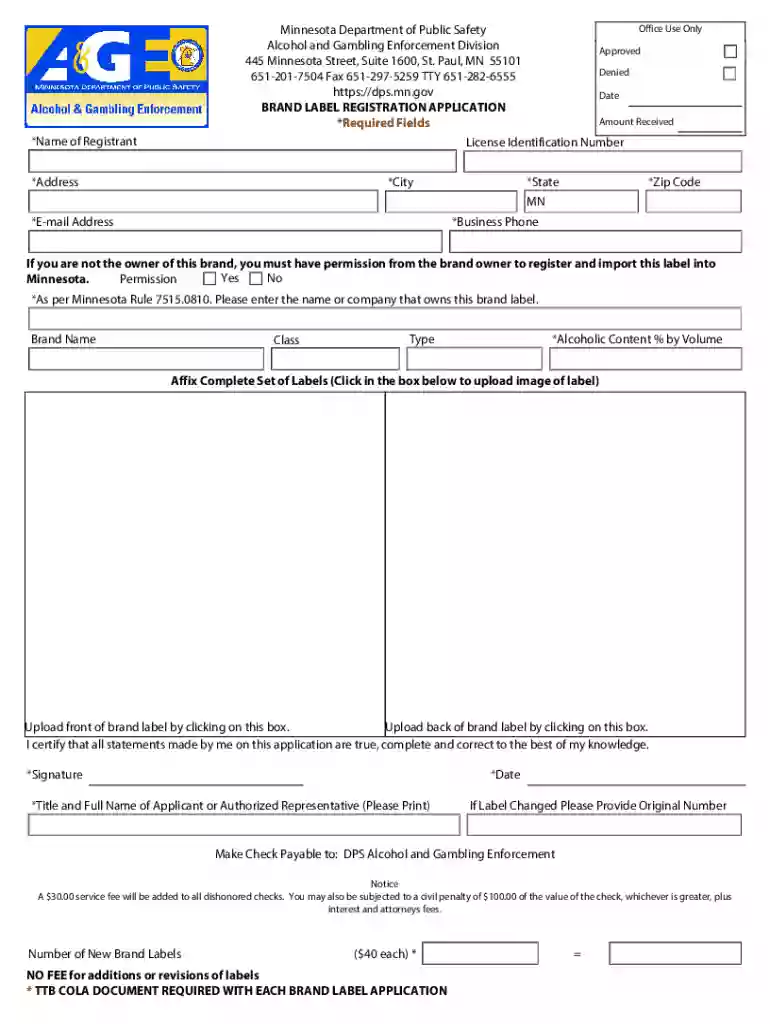
Type text, add images, blackout confidential details, add comments, highlights and more.

Draw your signature, type it, upload its image, or use your mobile device as a signature pad.

Send it via email, link, or fax. You can also download it, export it or print it out.
A "form online" refers to digital documents that can be filled out and submitted through the internet. These forms eliminate the need for physical paperwork, offering users a convenient way to record and share information. Online forms encompass various types, including applications, registrations, surveys, or agreements, and are accessible via web browsers on both computers and mobile devices. They are specifically designed for user interaction, collecting input through fields such as text boxes, dropdown menus, and checkboxes. This technological advancement streamlines processes, making data collection more efficient and secure in the digital age.
To effectively complete an online form, follow these detailed steps:
Accessing the Form: Begin by visiting the website hosting the form. Ensure you have a stable internet connection and the necessary permissions, such as a login or account access if required.
Filling Out Required Fields: Start by entering the requested information in the designated fields. Pay attention to mandatory fields marked with an asterisk (*), as these must be filled to proceed.
Using Validation Checks: Utilize any real-time validation notifications to correct errors promptly, ensuring all data is in the correct format.
Reviewing the Information: Before submission, thoroughly review the provided information to verify accuracy. Check for completeness, and make any necessary corrections or additions.
Submitting the Form: Once the form is completed and reviewed, click the "Submit" button. Ensure you receive a confirmation message indicating successful submission.
Saving a Copy: If the form allows, download or print a confirmation receipt or copy of the submitted form for your records.
By adhering to these steps, you ensure an accurate and thorough completion of the online form, minimizing the chance of rejection or errors.
Online forms cater to a diverse range of users, including:
The widespread use across varied sectors illustrates the adaptability of online forms in meeting specific needs while providing a standardized approach to data collection.


Critical components that constitute an effective online form include:
These elements ensure the form is not only functional but also secure and accessible to all users.
When using online forms, certain legal considerations must be observed:
Understanding and implementing these legal aspects ensures that the use of online forms complies with applicable laws and protects both users and organizations.
Online forms find applications across various scenarios:
These practical examples demonstrate the versatility of online forms in handling routine tasks efficiently and effectively.
While online forms are generally uniform, certain state-specific rules might apply:
Such variations necessitate due diligence to ensure compliance with local regulations.
The choice between digital and paper forms involves several considerations:
For most organizations, digital forms offer significant advantages in terms of efficiency, accessibility, and environmental responsibility.
We've got more versions of the Minnesota Brand Label Registration Application form. Select the right Minnesota Brand Label Registration Application version from the list and start editing it straight away!
At DocHub, your data security is our priority. We follow HIPAA, SOC2, GDPR, and other standards, so you can work on your documents with confidence.
The brand label for an intoxicating malt liquor, 3.2 percent malt liquor, or wine will not be registered unless it is ascertained that the proposed registrant
Application forms are available at Forms and Documents. Initial registration - $40 Renewal - $30 after the third year
Cohesity gives you both data security and data management. Defend against ransomware with immutable backup, AI-based early threat detection, and rapid data


