




01. Edit your form online
Type text, add images, blackout confidential details, add comments, highlights and more.

Type text, add images, blackout confidential details, add comments, highlights and more.

Draw your signature, type it, upload its image, or use your mobile device as a signature pad.

Send it via email, link, or fax. You can also download it, export it or print it out.
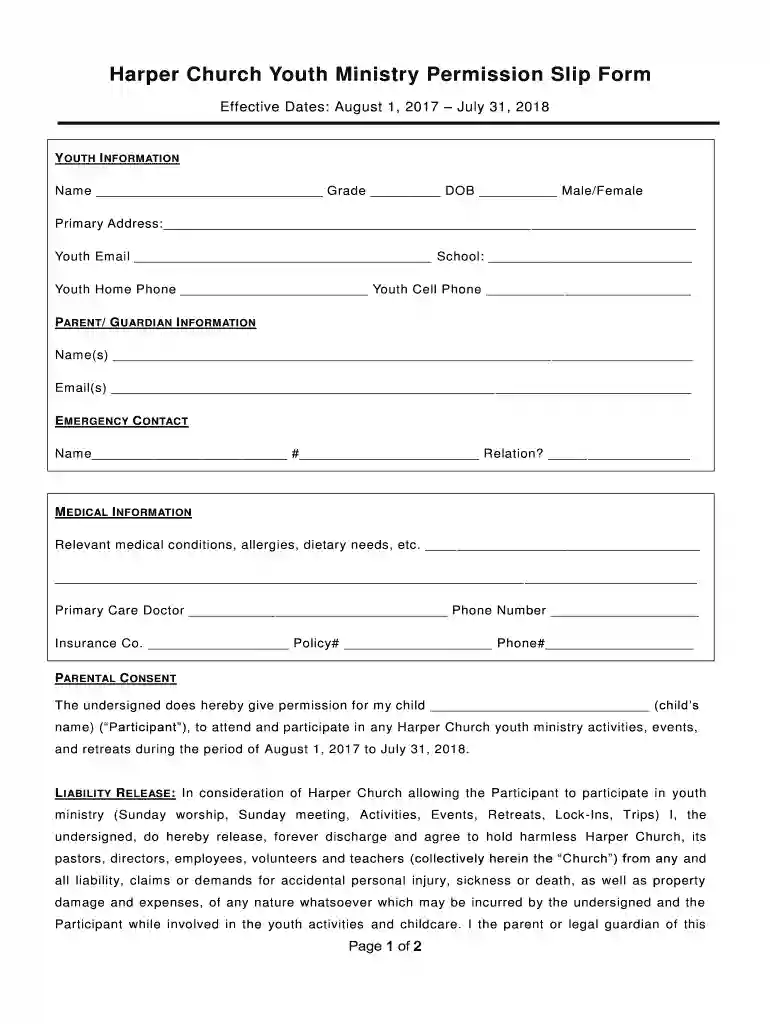
The Harper Church Youth Ministry Permission Slip Form is a document designed to ensure the safety and well-being of youth participants in church-run activities. It serves as a legal authorization from parents or guardians, allowing their children to engage in various church-sponsored events and programs. This form outlines essential details such as emergency contacts, medical information, and parental or guardian consent for participation. The document often includes a liability release clause, transportation permissions, and guidelines for behavior, making it a comprehensive agreement for both the church and the participants’ families.
To effectively use the Harper Church Youth Ministry Permission Slip Form, follow these steps:
Read Thoroughly: Before filling out the form, carefully review all sections to understand what information is required and the obligations you are agreeing to.
Fill Out Personal Information: Enter the participant’s full name, date of birth, and contact information. Ensure accuracy to facilitate communication during events.
Provide Emergency Contacts: List contact numbers for persons who can be reached in case of an emergency. Include at least one alternative contact for added security.
Submit Medical Details: Indicate any medical conditions, allergies, or medications that the participant is currently taking. This ensures that organizers are informed and prepared for any medical needs.
Sign Legal Clauses: Ensure a parent or guardian reads and signs the consent, liability release, and medical treatment authorization sections.
Submit the Form: Return the completed form to the church’s youth ministry coordinator by the specified deadline. Digital submissions via platforms like DocHub can streamline this process.
Start with Personal Information: At the top of the form, enter the participant's name, birthdate, and address. Providing accurate information is crucial for proper documentation and communication.
List Emergency Contacts: Add at least two emergency contacts, including their names, relationships to the participant, and phone numbers. This is vital for allowing quick communication if needed.
Detail Medical Information: Record any known medical conditions, allergies, or prescription medications. It’s important to update this section regularly to reflect the most current information.
Signatures and Approvals: Both the parent or guardian and participant should sign where indicated, acknowledging the agreement to the terms of participation and consent for medical care.
Submission: Submit the completed form to the church office or designated responsible person. For added convenience, electronic submission can be done via document management platforms like DocHub.
Participant Information: Basic details such as name, birthdate, and contact information are necessary for identification and record-keeping.
Parental Consent: A section for parents or guardians to confirm their approval for participation in church activities, accepting the terms outlined in the form.
Medical and Emergency Details: Critical information regarding allergies, medications, and emergency contacts ensure safety and readiness during events.
Liability Release: A clause to release Harper Church from liability, indicating that parents or guardians understand and accept the inherent risks involved in church-sponsored activities.
Transportation Permission: Parental approval for transportation arrangements made by the church, ensuring that legal requirements are met for participant travel.
The Harper Church Youth Ministry Permission Slip Form holds legal significance in protecting both the church and the participants’ families. By signing the form, parents or guardians legally consent to their child’s involvement in activities, agreeing to the terms outlined. This document also serves as a liability waiver, limiting the church’s legal responsibility in case of accidental injuries during events. Furthermore, it grants the church permission to seek medical treatment if required, safeguarding the health and safety of participants. Following proper legal standards ensures that the form is enforceable and effective.
The primary users of the Harper Church Youth Ministry Permission Slip Form are parents or guardians of youth participants in church activities. The form is also utilized by the church’s youth ministry leaders to organize, manage, and conduct events safely and efficiently. Volunteers who help facilitate church programs may reference this form to verify consent and access emergency contact details quickly. Overall, the form is vital for any party involved in the planning, oversight, or participation in youth group events.


The Harper Church Youth Ministry Permission Slip Form is available in both digital and paper formats, offering flexibility for users:
Digital Version:
Paper Version:
The Harper Church Youth Ministry Permission Slip Form can be easily integrated into various software platforms:
By leveraging these tools, both the church and participants can streamline the form's handling, ensuring a smooth process for consent and documentation.
We've got more versions of the Harper Church Youth Ministry Permission Slip Form form. Select the right Harper Church Youth Ministry Permission Slip Form version from the list and start editing it straight away!
At DocHub, your data security is our priority. We follow HIPAA, SOC2, GDPR, and other standards, so you can work on your documents with confidence.


