




01. Edit your form online
Type text, add images, blackout confidential details, add comments, highlights and more.

Type text, add images, blackout confidential details, add comments, highlights and more.

Draw your signature, type it, upload its image, or use your mobile device as a signature pad.

Send it via email, link, or fax. You can also download it, export it or print it out.
Understanding the term “form online” is crucial for anyone engaging with digital document workflows. In the context of documents, "form online" refers to digital forms that are completed and submitted via the internet. These forms can include various types of documents such as applications, surveys, or any paperwork that requires input from the user.
Online forms have revolutionized the way data is collected, making information gathering more efficient and accurate compared to traditional paper forms. This process not only reduces the need for physical storage but also enhances the accessibility of forms by allowing access from any location with an internet connection.
To use a form online effectively, one must understand the platform's interface and navigation tools. When you open the form, ensure your device is connected to stable internet to avoid interruptions during submission. Before filling out, review the entire document to understand what information is required.
Read Instructions Carefully: Each section of the form has specific instructions. Pay close attention to avoid errors.
Complete Required Fields: Online forms often have mandatory fields marked with asterisks. Ensure those are filled out to proceed to the next step.
Save Your Progress: Platforms may offer options to save your progress. Use this feature, especially for lengthy forms, to avoid losing input due to unforeseen issues.
Review and Submit: Always review the completed form to ensure accuracy before final submission.
Successfully completing an online form involves a few systematic steps. Here is a step-by-step guide to help streamline this process:
Access the Form: Locate the form through the organization's website or email link.
Fill Out Basic Information: Begin by entering basic personal or professional details as prompted.
Use the Digital Tools Available: Utilize online tools for signatures, dates, and other input types. Platforms like DocHub enable these functions seamlessly.
Check Error Messages: Many online forms provide instant error alerts. If a mistake is detected, resolve it immediately.
Submit the Form: After a thorough review, press the submit button. Confirmation of submission should be received shortly after.
Familiarity with certain terminology enhances your experience with online forms:
Key elements are essential features and sections that ensure an online form functions effectively:
The legal use of forms online is governed by various laws and regulations ensuring their validity:
Depending on the form type, additional documents may be necessary:
Practical scenarios where online forms are invaluable include:
Each example underscores the efficiency and practicality of using online forms across various situations, promoting streamlined workflows and effective data management.
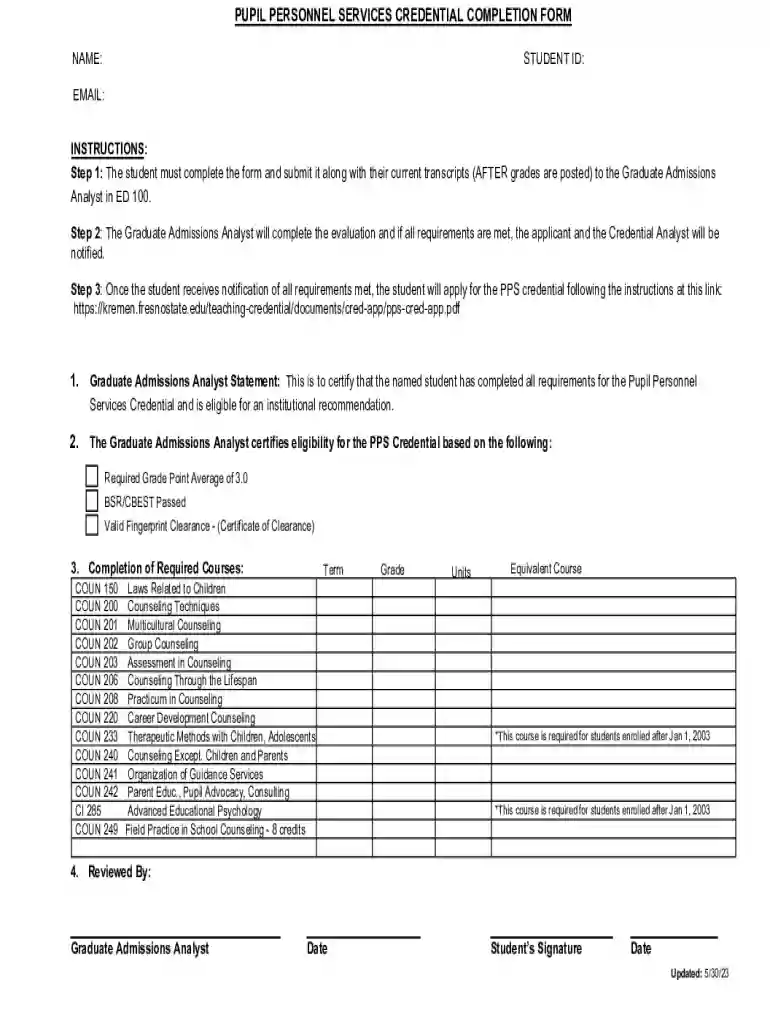
We've got more versions of the Pupil Personnel Services Credential Completion Form form. Select the right Pupil Personnel Services Credential Completion Form version from the list and start editing it straight away!
| Versions | Form popularity | Fillable & printable |
|---|---|---|
| 2023 | 4.4 Satisfied (50 Votes) |
At DocHub, your data security is our priority. We follow HIPAA, SOC2, GDPR, and other standards, so you can work on your documents with confidence.
Requirements and renewal information for the Preliminary credential option can be found in the leaflet below.
The 2021 Form 1040 asks whether at any time during 2021, I received, sold, exchanged, or otherwise disposed of any financial interest in any virtual currency.Read more


