Mcps form 335-45 2026

Get Form
cosa form Preview on Page 1

Here's how it works

01. Edit your cosa form online
Type text, add images, blackout confidential details, add comments, highlights and more.

02. Sign it in a few clicks
Draw your signature, type it, upload its image, or use your mobile device as a signature pad.

03. Share your form with others
Send cosa forms net via email, link, or fax. You can also download it, export it or print it out.

Definition & Purpose of MCPS Form 335-45

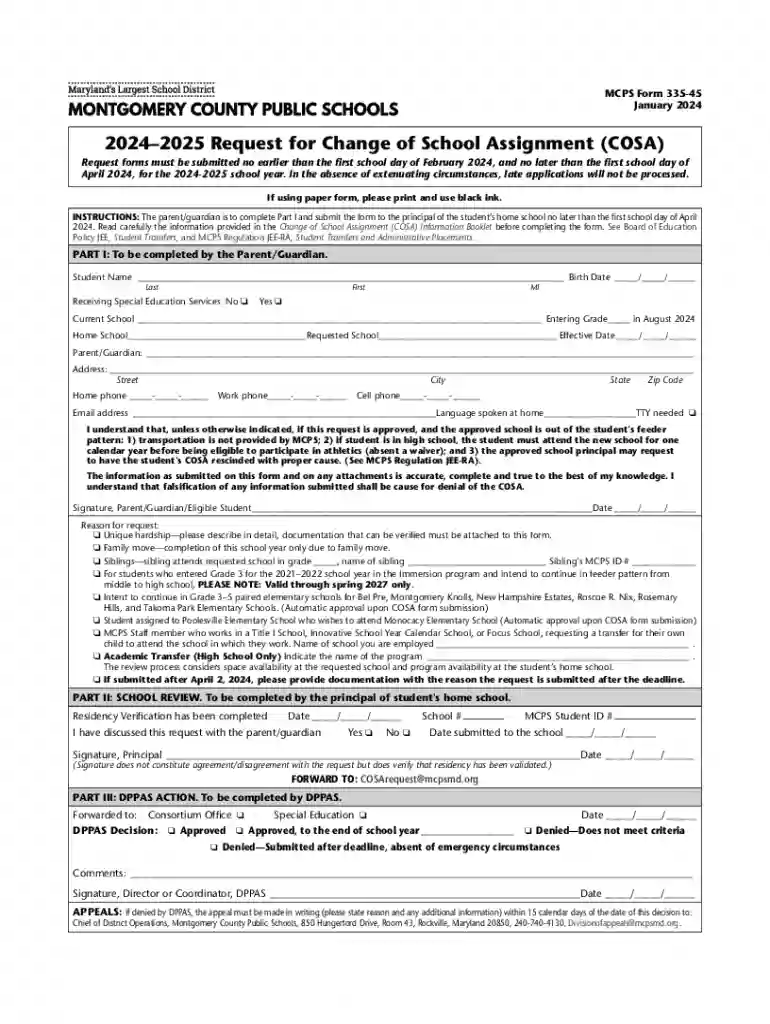
Montgomery County Public Schools (MCPS) Form 335-45 is designed for parents or guardians to request a change of school assignment (COSA) for their child. This form allows families to apply for their child to attend a different school within the district, other than the designated home school. The primary purpose of this form is to provide families with the flexibility to seek alternatives that better suit their child's educational needs or logistical preferences.

How to Obtain the MCPS Form 335-45

The MCPS Form 335-45 can typically be obtained from the local school offices or directly from the official MCPS website. Some schools may also have copies available at their administrative offices for parents who prefer a physical form. When accessing the form online, ensure you download the latest version for the current academic year to avoid any discrepancies or administrative delays.

Steps to Complete the MCPS Form 335-45

  1. Personal Information: Start by filling in the child’s name, current school, and grade level. Include the parent's or guardian’s contact information for correspondence.

  2. Request Details: Specify the school to which you wish to transfer your child and provide valid reasons for the transfer request. Include any supporting documentation if necessary.

  3. Residency Verification: Ensure all residency documentation is up to date and attached to the form. This may include utility bills, lease agreements, or other proof of residence.

  4. Submission Deadline: Complete and submit the form by April 2024 to ensure it is considered for the 2 school year. Late submissions may result in denial of the request.

  5. Signature: The form must be signed by a parent or legal guardian before submission.

Eligibility Criteria and Requirements

To be eligible for a change of school assignment, there are specific criteria that must be met, including:


  • Residency: The student must be a current resident of Montgomery County.
  • Justification for Request: Valid reasons might include academic programs not available at the home school, family relocation within the county, or medical conditions that necessitate a different school environment.
  • Supporting Documents: Any claims made in the request must be supported by relevant documents, such as medical certificates or proof of residence.
decoration image ratings of Dochub

Form Submission Methods

  • Online: Submit the completed form electronically via the MCPS portal, where applicable.
  • Mail: Send the physical form to the principal of the student's current home school.
  • In-Person: Deliver the form to the school office, which can provide a receipt of submission.

Key Elements of the MCPS Form 335-45

  • Student Information Section: Captures all necessary student details and current school assignment.
  • Request for Transfer Section: Allows parents to outline the desired school and reasons for the request.
  • Documentation and Verification Section: Ensures all required verification documents are attached.
  • Signature Section: Validates the form with a parent or guardian's signature.

Legal Use and Compliance

Submitting the MCPS Form 335-45 obligates the parent or guardian to provide truthful and accurate information to avoid legal ramifications. Misrepresentation can result in refusal of the change request or disciplinary measures by the school district. Understanding these legal implications is crucial for compliant form submission.

Important Dates and Deadlines

  • Submission Deadline: All forms must be submitted by April 2024 for the 2 school year consideration.
  • Decision Notification: Parents or guardians generally receive a decision before the start of the new school year to allow adequate transition time.

Examples of Use Cases for the MCPS Form 335-45

  • Academic Considerations: A student wishes to attend a school with a specialized STEM program not offered at their current school.
  • Family Relocation: The family moves to a different part of the county and seeks a school closer to the new home.
  • Medical or Psychological Needs: A student requires a different environment due to specific medical needs, and the new school support these requirements better.

By adhering to these guidelines and paying attention to detail, parents and guardians can effectively use the MCPS Form 335-45 to request a change of school assignment, ensuring the best educational outcomes for their children.

be ready to get more

Complete this form in 5 minutes or less

Get form

Got questions?

We have answers to the most popular questions from our customers. If you can't find an answer to your question, please contact us.
Contact us
Google Forms Pricing Google Forms is free for anyone with a Google account. It is included with all paid G Suite licenses, which start at $6 per user per month for Business plans. Volume discounts are available.
Use eSignature to fill out a PDF form and sign it Flat forms are non-interactive forms that require extra effort and extra steps to be completed. An interactive form contains fields that you can select or fill in, eliminating the need to print the form and complete it by hand.
Google Forms is free online software that allows you to create surveys, quizzes, and more. Google Forms is part of Googles web-based apps suite, which also includes Google Docs, Google Sheets, Google Slides, and more.
Zoho Forms is a powerful, free form builder like Google Forms that offers a wide range of features to help you create and manage forms for any purpose. With 30+ field types, an intuitive form builder, powerful features, and seamless integrations, you can collect actionable data for your business.
Best free online form builder for quickly creating powerful forms Google Forms pros: Google Forms cons: Google Forms price: 100% free. Jotform pros: Jotform cons: Jotform price: Free plan available; paid plans start at $39/month. Feathery pros: Feathery cons:

Security and compliance

At DocHub, your data security is our priority. We follow HIPAA, SOC2, GDPR, and other standards, so you can work on your documents with confidence.

Learn more
ccpa2
pci-dss
gdpr-compliance
hipaa
soc-compliance

People also ask

Is Google Forms free to use? Yes, Google Forms is free for most users.
Google Forms is totally free to use. As long as you have a Google account, you can access Google Forms in its entiretycompletely free.
Its easy to create fillable PDF form in Adobe Acrobat. Open Acrobat. Select a file or scan a document. Add new form fields. To change existing text boxes or images, click Edit in the toolbar. Save your fillable PDF.

mcps cosa form