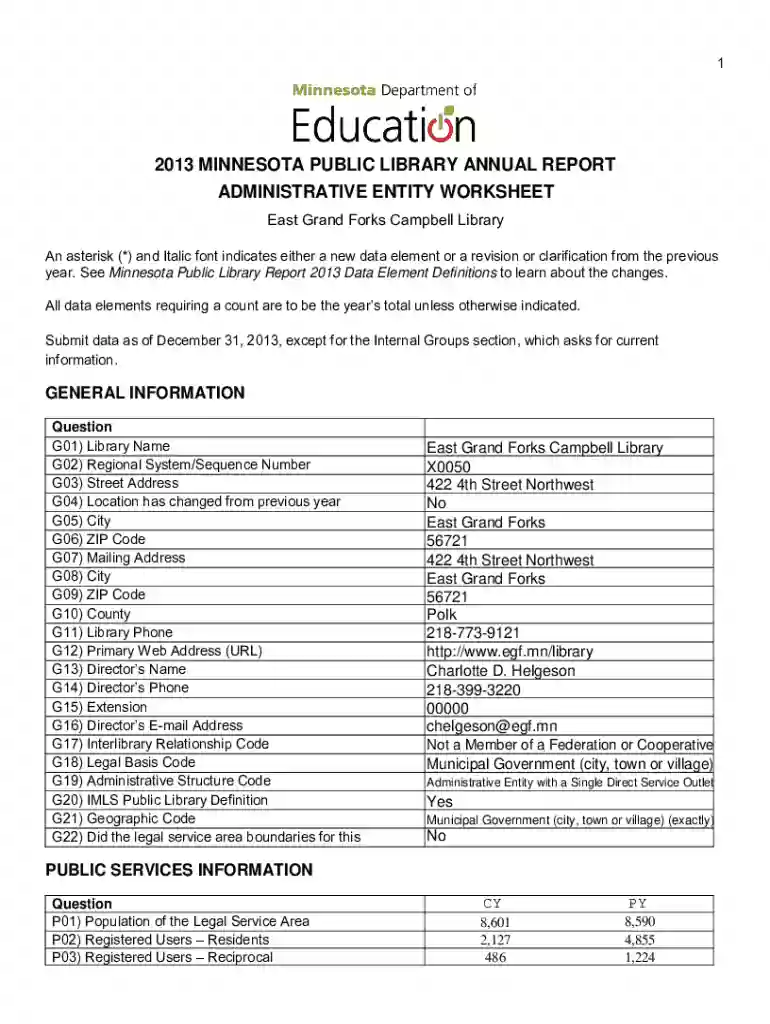
Apa countingopinions docsmn2014 MINNESOTA PUBLIC LIBRARY ANNUAL REPORT WORKSHEET 2026

Get Form
apa countingopinions docsmn2014 MINNESOTA PUBLIC LIBRARY ANNUAL REPORT WORKSHEET Preview on Page 1

Here's how it works

01. Edit your form online
Type text, add images, blackout confidential details, add comments, highlights and more.

02. Sign it in a few clicks
Draw your signature, type it, upload its image, or use your mobile device as a signature pad.

03. Share your form with others
Send it via email, link, or fax. You can also download it, export it or print it out.

Definition & Meaning

The "apa countingopinions docsmn2014 MINNESOTA PUBLIC LIBRARY ANNUAL REPORT WORKSHEET" serves as a standardized tool for collecting vital statistics and operational information specific to public libraries in Minnesota. It acts as an annual report framework that libraries use to compile data on user registration, program attendance, catalog updates, and fiscal management. This worksheet allows libraries to maintain consistent reporting, enabling better comparison and analysis year over year.

How to Use the MINNESOTA PUBLIC LIBRARY ANNUAL REPORT WORKSHEET

Libraries should utilize the worksheet by carefully gathering all necessary data from their annual operations. This includes user statistics, program effectiveness, and financial details. Each section of the worksheet is designed to capture specific types of information:

  • User Registrations: Track the number of new users registered during the year.
  • Program Attendance: Log attendance figures for each program offered by the library.
  • Collection Management: Report changes in the catalog such as new acquisitions, withdrawals, or digitizations.
  • Fiscal Operations: Document income from sources such as fines, fees, and grants, alongside operational expenditures.

Steps to Complete the Worksheet

  1. Collect Data: Gather all necessary data from your library's systems including circulation software, membership databases, and financial records.
  2. Fill Out User Statistics: Enter information related to new registrations, active users, and demographics.
  3. Detail Program Inputs: Include details of every program run, noting attendance numbers and participant feedback.
  4. Input Financial Information: Document all sources of revenue and detailed expenditures.
  5. Review for Accuracy: Cross-check all data entries for accuracy and completeness before final submission.

Key Elements of the Worksheet

The worksheet contains several major components critical for comprehensive data collection:

  • Library Services: Overview of the services provided, including digital and offline resources.
  • User Engagement: Analysis of how users interact with the library and its services.
  • Staffing Information: Details about staff numbers, roles, and hours worked.
  • Outreach Initiatives: Information on any community outreach and collaboration efforts.

Who Typically Uses This Worksheet

This tool is primarily used by library administrators and managers responsible for reporting to state oversight bodies. It is also beneficial for:

  • Policy Makers: For understanding the impact and reach of public libraries.
  • Library Associations: To advocate for funding and support based on documented needs and successes.
  • Researchers and Academics: Interested in studying public library trends over time.

Important Terms Related to the Worksheet

  • Circulation Data: Refers to the borrowing records, including check-ins and checkouts.
  • Program Impact: Measures the success and reach of library-hosted events or courses.
  • Operating Budget: Detailing all income sources and expenditure categories for the year.

Legal Use of the Worksheet

This worksheet functions within the legal framework of state reporting requirements for public libraries. Completing and submitting it ensures compliance with:

  • State Regulations: Depending on Minnesota state library laws and regulations.
  • Public Accountability Standards: Demonstrating transparency in operations and financial management.

State-Specific Rules for Minnesota Libraries

Given the regional focus, certain elements should align specifically with Minnesota state rules:

  • Library Funding Regulations: Adhering to guidelines stated by the Minnesota Department of Education.
  • State-Approved Metrics: Ensuring all metrics and data points meet state-approved criteria for public libraries.

Digital vs. Paper Version

While traditional paper forms have been used, digital versions offer significant advantages such as:

  • Ease of Use: The ability to input, calculate, and revise figures more efficiently.
  • Data Security: Ensures that sensitive information is protected via encryption and secure platforms.
  • Integration: Seamless integration with existing library management software for easier import/export of data.

See more apa countingopinions docsmn2014 MINNESOTA PUBLIC LIBRARY ANNUAL REPORT WORKSHEET versions

We've got more versions of the apa countingopinions docsmn2014 MINNESOTA PUBLIC LIBRARY ANNUAL REPORT WORKSHEET form. Select the right apa countingopinions docsmn2014 MINNESOTA PUBLIC LIBRARY ANNUAL REPORT WORKSHEET version from the list and start editing it straight away!
Versions Form popularity Fillable & printable
2020 4.8 Satisfied (56 Votes)
2014 4.4 Satisfied (57 Votes)
be ready to get more

Complete this form in 5 minutes or less

Get form

Got questions?

We have answers to the most popular questions from our customers. If you can't find an answer to your question, please contact us.
Contact us
Sections of an Annual Report General Corporate Information. Operating and Financial Highlights. Letter to the Shareholderes from the CEO. Narrative Text, Graphics, and Photos. Managements Discussion and Analysis. Financial Statements. Notes to the Financial Statements. Auditors Report.
Log in at file.dos.pa.gov and search for your company name under Business Search. Click on the icon for Annual Report. No PIN access is required to file an Annual Report. Complete the Annual Report form online and pay by credit card.
Create a timeline. Follow up. Be flexible and adapt. Approve for printing. Always think Annual Report. Plan and anticipate. Always look for the news. Be proactive; look for opportunities. Document ideas. Flyers and Brochures. Electronic and hard copies. Photos. Always be ready to take pictures. Content.
The fee for filing the annual report is $7 for business corporations, general LLPs, LPs and LLCs. There is no fee for nonprofit corporations and LPs or LLCs with a not-for-profit purpose. Note: Sole proprietorships and general partnerships are not required to file an annual report.
Your annual report should include four main components: the chairmans letter, a profile of your business, an analysis of your management strategies, and your financial statements. Adding creative elements like graphic design and a narrative can also help your annual report double as a marketing tool.

Security and compliance

At DocHub, your data security is our priority. We follow HIPAA, SOC2, GDPR, and other standards, so you can work on your documents with confidence.

Learn more
ccpa2
pci-dss
gdpr-compliance
hipaa
soc-compliance