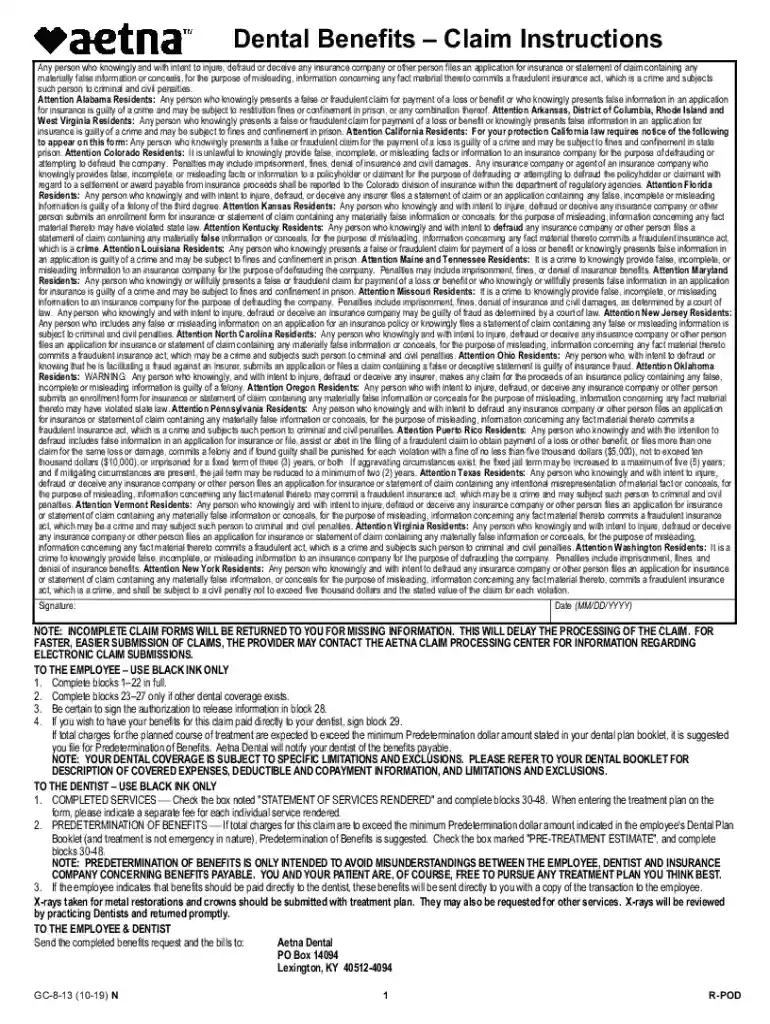
GC-8-1310-19 - Dental BenefitsClaim Instructions Accessible PDF - Dental BenefitsClaim Instructions-2026

Get Form
GC-8-1310-19 - Dental BenefitsClaim Instructions Accessible PDF - Dental BenefitsClaim Instructions Preview on Page 1

Here's how it works

01. Edit your form online
Type text, add images, blackout confidential details, add comments, highlights and more.

02. Sign it in a few clicks
Draw your signature, type it, upload its image, or use your mobile device as a signature pad.

03. Share your form with others
Send it via email, link, or fax. You can also download it, export it or print it out.

Definition & Meaning

The "GC-8-1310-19 - Dental Benefits Claim Instructions Accessible PDF - Dental Benefits Claim Instructions" is a detailed guide specifically for completing dental benefits claims. It is an essential document for individuals or organizations submitting claims for dental services to ensure all necessary information is properly provided. This document includes explicit instructions on how to fill out the dental benefits claim, focusing on accuracy and compliance with legal standards to prevent delays or rejections in processing.

How to Use the GC-8-1310-19 Instructions

  1. Review the Document Thoroughly: Before beginning the claim, familiarize yourself with the entirety of the instructions to understand the required information and process.
  2. Gather Required Information: Ensure that you have all the patient details, treatment information, and necessary documentation ready as specified in the form.
  3. Follow Step-by-Step Instructions: Adhere strictly to the steps outlined, which guide you through filling out each section of the claim form.

Practical Example:

  • If submitting a claim for teeth extraction, ensure to include the specific tooth codes and relevant treatment dates.

Steps to Complete the GC-8-1310-19

  1. Patient Information: Provide accurate patient demographics such as name, date of birth, and insurance policy number.
  2. Service Details: Indicate the type of dental service rendered, including dates and specific procedures.
  3. Provider Information: Enter the dentist's details, including license number and office address.

Subsections:

  • Filing Date: Record the date on which the claim is being filed.
  • Verification Checklist: Double-check all entries against practice records for accuracy.

Who Typically Uses the GC-8-1310-19

The document is primarily used by:

  • Dental Offices and Clinics: For submitting claims to insurers on behalf of patients.
  • Insurance Companies: To process and verify the claims received for dental services.
  • Individual Policyholders: Patients who directly manage their dental claim submissions.
decoration image ratings of Dochub

Legal Use of GC-8-1310-19

The accurate submission of this form ensures compliance with legal requirements for insurance claim processing. False or misleading information can lead to:

  • Fraud Charges: Misrepresentation of services can result in legal proceedings.
  • Claim Denial: Incorrect or incomplete submissions may be returned or denied.

State-Specific Compliance:

  • Certain U.S. states may have additional legal requirements or penalties for fraud specific to dental claims.

Key Elements of the Instructions

  • Mandatory Fields: Fields marked as necessary must be completed for claim processing.
  • Signature Requirements: Both patient and provider signatures are often required to validate the claim.
  • Additional Documentation: Attach relevant documents like treatment authorization or x-rays if specified.

Examples of Using the Instructions

  • Routine Dental Cleaning: A straightforward claim with typical codes; ensure date and service provider are accurately recorded.
  • Emergency Dental Surgery: More complex, requiring detailed notes and pre-authorization where applicable.

Penalties for Non-Compliance

Failing to adhere to the guidelines can result in:

  • Delayed Reimbursement: Incorrect submissions could delay payment.
  • Fines and Legal Issues: For persistent or serious non-compliance, legal action may ensue.

Form Variants

While "GC-8-1310-19" is the current standard, older forms or state-specific alternatives may exist, each catering to varied jurisdictional requirements. Ensure the latest version is used to avoid processing delays.

Importance of Version Control:

  • Using obsolete forms may lead to claim rejection, hence it's critical to verify form version before submission.

Each section should be carefully followed for a comprehensive understanding of how to correctly utilize the "GC-8-1310-19 - Dental Benefits Claim Instructions Accessible PDF - Dental Benefits Claim Instructions" for effective and accurate claim submissions.

See more GC-8-1310-19 - Dental BenefitsClaim Instructions Accessible PDF - Dental BenefitsClaim Instructions versions

We've got more versions of the GC-8-1310-19 - Dental BenefitsClaim Instructions Accessible PDF - Dental BenefitsClaim Instructions form. Select the right GC-8-1310-19 - Dental BenefitsClaim Instructions Accessible PDF - Dental BenefitsClaim Instructions version from the list and start editing it straight away!
Versions Form popularity Fillable & printable
2022 4.9 Satisfied (37 Votes)
2019 4.2 Satisfied (51 Votes)
be ready to get more

Complete this form in 5 minutes or less

Get form

Got questions?

We have answers to the most popular questions from our customers. If you can't find an answer to your question, please contact us.
Contact us
The ADA Dental Claim Form provides a common format for reporting dental services to a patients dental benefit plan. ADA policy promotes use and acceptance of the most current version of the ADA Dental Claim Form by dentists and payers.
The 2024 ADA Dental Claim Form has been structurally revised to incorporate data content changes that enable reporting: a) services delivered by a dentist in locum tenens (i.e., temporary substitute) status; b) date of the patients last scaling and root planing procedure; and c) benefit plan Payer ID codes.
The tooth system on a dental claim form refers to the method used to identify and specify individual teeth when documenting dental procedures.
The JP code refers to the Universal/National Tooth Numbering System, which is a standard method of identifying and labeling individual teeth on dental claim forms. This system is widely used in the United States and is a HIPAA (Health Insurance Portability and Accountability Act) standard for dental claims.
Tooth System: Enter JP to indicate that teeth are being designated using the ADAs. 25. Universal/National Tooth Designation System (1-32 for permanent dentition and A-T for primary. 26. dentition).

Security and compliance

At DocHub, your data security is our priority. We follow HIPAA, SOC2, GDPR, and other standards, so you can work on your documents with confidence.

Learn more
ccpa2
pci-dss
gdpr-compliance
hipaa
soc-compliance

People also ask

Procedure date (Box 24) is the date your practice performed the procedure. General area of oral cavity (Box 25) is arranged by numeric codes rather than abbreviations. Tooth system (Box 26) JP, or the American system, follows the ADAs Universal Tooth Designation System with a combination of letters and numbers.
On the CMS form in Field 24 there is a shaded pink area to report supplemental information. In fields 24A-24G where you may report tooth numbers and other supplemental information such as anesthesia time and narrative descriptions of unspecified codes. A qualifier should be used when reporting any of these services.
Tooth numbering is a notation used by dentists to denote and specify information linked with a particular tooth. Using a tooth numbering system allows for easy identification, communication, and dental record maintenance in an easy and a precise manner.

Related links