




01. Edit your form online
Type text, add images, blackout confidential details, add comments, highlights and more.

Type text, add images, blackout confidential details, add comments, highlights and more.

Draw your signature, type it, upload its image, or use your mobile device as a signature pad.

Send it via email, link, or fax. You can also download it, export it or print it out.
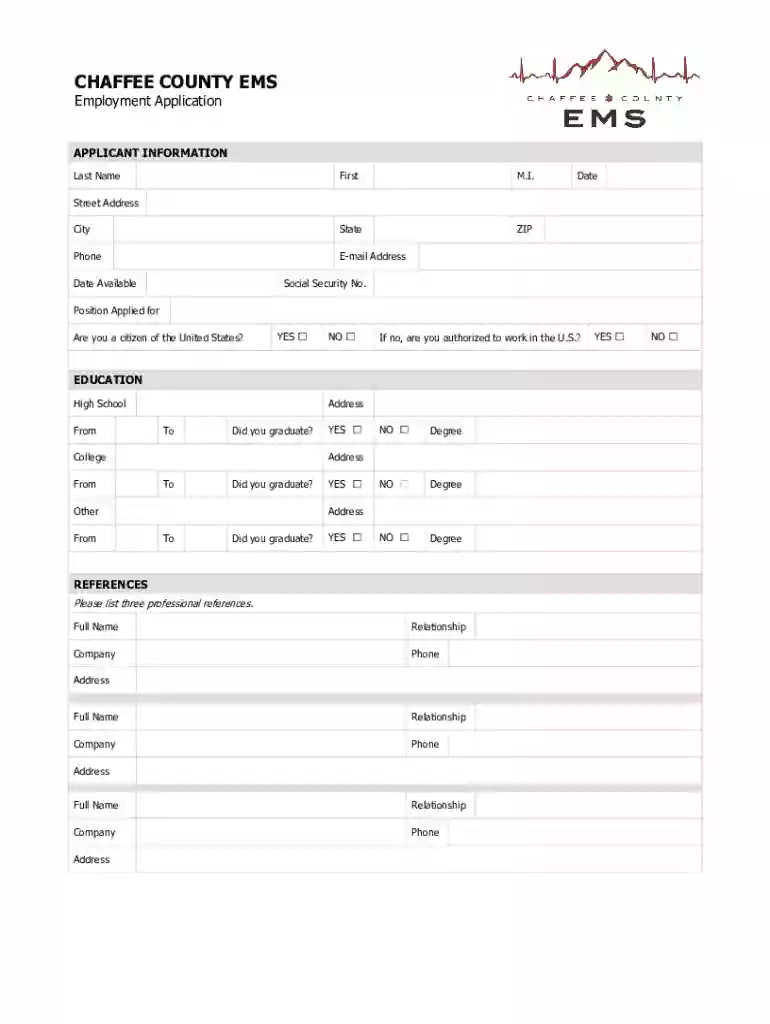
The "Chaffee County EMS - Overview, News and Competitors" form serves as an application for employment within Chaffee County's Emergency Medical Services (EMS). It encompasses various sections designed to capture comprehensive personal and professional information from applicants seeking positions within the EMS. This includes areas such as personal data, education and employment history, references, and relevant certifications. The form is integral for ensuring that candidates meet the necessary qualifications required for different EMS roles.
Engaging with the Chaffee County EMS form involves a systematic approach to detailing one's personal and professional history. Applicants must ensure that they provide accurate and up-to-date information across all sections. This typically begins with personal details, followed by educational background, previous employment, and certifications. Each section is designed to capture data relevant to assess a candidate's fitness for an EMS role. Consideration must be given to the specifics such as the format of employment history which usually requires details like job titles, durations, and responsibilities.
Personal Information: Begin by filling out your full name, contact details, and possibly a government ID number if required.
Education History: List all relevant educational qualifications starting with the most recent. Include the names of institutions, degrees obtained, and dates attended.
Employment History: Detail past job roles. Ensure to include employer names, job titles, responsibilities, and dates of employment.
References: Provide contact information for professional references. These should be individuals who can attest to your work ethic and competencies.
Certifications: List all applicable certifications and licenses, like CPR or EMT certifications, their issuing bodies, and expiration dates.
Sections for Detailed Information: Each section like personal info, education, and employment is structured to extract specific details imperative for EMS assessment.
Structured References: Specific fields for professional references ensure that the hiring body can verify the information provided.
Certifications and Skills: Dedicated sections for certifications ensure that only qualified candidates are considered for positions.
This form is primarily used by individuals aspiring to join the Chaffee County EMS team. This includes a wide range of applicants from recent graduates of medical training programs to seasoned professionals looking for new opportunities in emergency medical services. The form is crucial for HR professionals within the EMS department, who use it to filter and evaluate potential candidates.


Applicants are usually required to submit several supporting documents alongside their completed form. These might include:
Online: Many jurisdictions offer digital versions of the form that can be filled and submitted electronically, often through dedicated portals.
Mail: Applicants can print the form and send it via postal service if online options aren't available or preferred.
In-Person: Some applicants may choose or be required to deliver their form directly to the EMS office to ensure receipt and discuss any potential queries.
The form is legally employed within the hiring processes of Chaffee County, ensuring that all applicants comply with the specific criteria associated with EMS roles. The information collected is used strictly for employment verification and decision-making processes, adhering to privacy regulations to protect applicant data.
Once the form is submitted, applicants can typically expect an acknowledgment from the EMS department. Assessment times may vary, but candidates usually receive feedback or an interview invitation within a few weeks, depending on the volume of applications and the urgency of recruitment.
We've got more versions of the Chaffee County EMS - Overview, News and Competitors form. Select the right Chaffee County EMS - Overview, News and Competitors version from the list and start editing it straight away!
At DocHub, your data security is our priority. We follow HIPAA, SOC2, GDPR, and other standards, so you can work on your documents with confidence.


