




Here's how it works



How to use or fill out Get - sos ga with our platform

- Click ‘Get Form’ to open it in the editor.
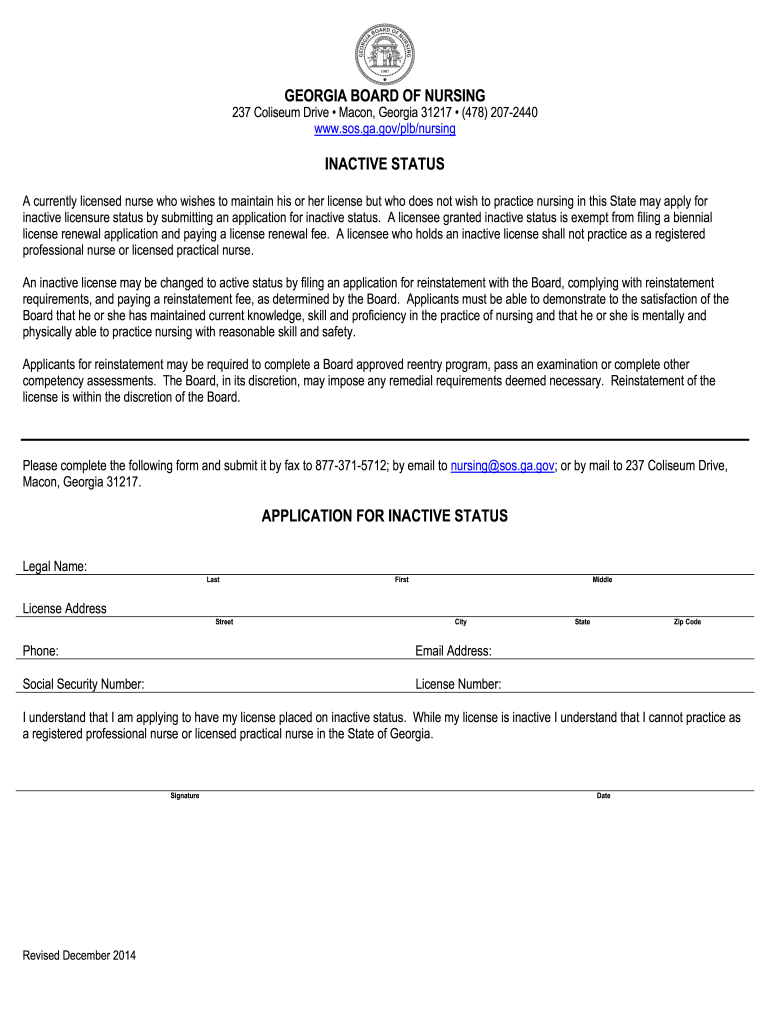
- Begin by entering your legal name in the designated fields: Last, First, and Middle. Ensure accuracy as this information is crucial for your application.
- Fill in your License Address, including Street, City, State, and Zip Code. This helps the Board verify your current residency.
- Provide your Phone number and Email Address for any necessary communication regarding your application.
- Enter your Social Security Number and License Number accurately to avoid processing delays.
- Read the statement regarding inactive status carefully. Confirm your understanding by signing and dating the form at the bottom.
Start using our platform today to complete your Get - sos ga form easily and for free!
It's free
Got questions?
Can I draw my electronic signature to approve my sos ga?
Sure, electronically drawing your signature is acceptable, but only if you utilize a tool that complies with industry laws and regulations. Try DocHub, which ensures eSignature validity under ESIGN and UETA requirements. All you need to eSign your sos ga is an account with DocHub and an internet connection. When you open your file in our editor, click Sign and select the Draw option.
How to fill out sos ga gov login on the internet for free in 2024?
Using a swift editing platform like DocHub, you do not require anything but a web browser and internet connection to edit your sos ga gov login online quickly. Add your document or find the relevant form in DocHub’s catalog, open our editor with a single click, and finish it electronically. To edit your forms anytime, register a free profile with DocHub.
How do I find my LLC?
Does an LLC need a business license in Georgia?
How do I contact the Georgia secretary of state?
Security and compliance
At DocHub, your data security is our priority. We follow HIPAA, SOC2, GDPR, and other standards, so you can work on your documents with confidence.
Learn more


